Keywords: Triggers, Trigger, Triggers FAQ, automation.
Triggers FAQ Overview
This article answers the frequently asked questions about Triggers. Check out the full list of questions below and click through to find the answer.
Contents
General
CRM Specific
InterAction
OnePlace
General
I wanted to use the Publish Page trigger in a container that has the approval workflow activated. Will this trigger still work or does it only work when the approval workflow is off?
Yes it will work and the trigger will publish the page and ignore the workflow. If the page is in a pending approval state when the trigger runs it will publish but it will also remain in a pending approval state if someone was to manually edit the page subsequently.
When a trigger causes an email to be sent, the user that set up the trigger receives a trigger confirmation email. Does the confirmation email get sent to the user that created the trigger or the user that enabled the trigger? (If one set it up and the other enabled.)
When the trigger is initially created by a user, the trigger owner is that user. If a different user logs in, clicks into the trigger and saves it, then that user becomes the owner.
The act of enabling the trigger does not transfer the ownership of the trigger.
The confirmation email will be sent to the user that owns the trigger, with the owner of the campaign being CC'd.
Can the trigger confirmation email be sent to another user or an additional contact in the business, instead of the user who set up or saved the trigger?
No, this is currently not a feature. The confirmation email is sent to the trigger owner with the campaign creator CC'd.
What is the difference between a Form Notification and a Trigger?
Form Notifications are ideal for instantly sending a response to any client who RSVPs yes to an event. However, Triggers have a broader capability and are an advanced form of the basic Notification functionality.
Notifications are sent off an RSVP form only, using RSVP = Yes or No. Triggers work with emails, landing pages, forms and moving contacts in or out of lists.
Notifications only work instantly once a form is submitted. Triggers can be dated ahead, or timed, to have a delay built in. They can be set as recurring, e.g. running a daily sweep of a list.
Notifications can only send one pre-defined email. Triggers can send a broadcast email, remove the client from a list, add the client to a list, send an email to “matches" (person who submits the form) or redirect a person to a new site.
What is the difference between Send Later and a Triggered send?
When you choose to Send Later, Vx does all the processing immediately when you click Send – filtering the list, processing any suppressions and de-duplicating. It then holds the result and puts it in a queue to be actually delivered at the chosen send time.
If you want everything to run at a specific time in the future then using a trigger will let you do that. Create a triggered send at a specified time in the future and all the processing happens at that time. This means you can set up a send now, for several weeks in the future, and as more people accept over time, the list you eventually send to will reflect the additional people.
For more information, click here.
What happens if a trigger is enabled, disabled, then enabled again?
It depends on the actions that are setup with the trigger, but if it is enabled, the actions begin. If it is disabled midway through a sequence of actions, those will stop.
For example, you set a 'Date' trigger to send out an event invitation on 3/20/2021. You disable it on 3/18/2021, but then enable it again on 3/19/2021. The invitation will still be sent on 3/20/2021 because the date wasn't met yet.
When setting up a trigger which has a date and time, what happens if you don’t pick a time? Is there a default time set by Vuture?
Yes the default time is 00.00.00 or midnight.
If you do pick a time, note that triggers are programmed in the time zone of the user setting them up.
Is there a way to see who was sent what trigger and when?
The triggered sends will appear in the monthly sent folder in your email campaign, with the exception of the 'Form Submitted' trigger for Blank forms. It functions like a regular email.
When sending an email using a trigger, do you still get the Email Send Confirmation from Vuture? This is the automated email which shows you how many emails were sent and to whom.
A triggered email send to a whole list would send you the usual Email Send Confirmation from Vuture.
With a 'Recurring' trigger, which could be set to every hour, it can create many Email Send Confirmation to be sent to you. However, you have a choice when setting up the 'Recurring' trigger to set the frequency of the Email Send Confirmations. Learn more about this setting here.
What happens if you delete a user account in Vuture who has active triggers associated with their account?
Please refer to this Help Desk Article for full details.
If you use a 'Recurring' trigger to send an email, how does Vuture cope with the fact that on the first date the email was in the Compose Email folder but then it moves down to the Sent folder (i.e. March 2020)? For example, I may use a 'Recurring' trigger to sweep a list every day and send an email to new people coming onto the list. Do I need multiple copies of that email available?
No, you do not need multiple copies of the email.
Vuture uses the Send More functionality to send a copy of the original email automatically to new people coming onto your list. Vuture uses the email ID, not its location in the Compose Email folder, to identify the correct email to send and to prevent anybody getting the same email twice. So, if you have a trigger set to send a particular email, it doesn’t matter if that email moves from Compose Email Folder to the Sent Email Folder – Vuture will still send it, based on the email’s ID.
With a Date Trigger, why can’t I send the same email (as a reminder) that I used in the original send?
The Date Trigger, like all emails in Vuture, will not send the same email to the same person twice. If you want to edit a trigger to send another copy reminder you must first select the Sent email folder, find the email you already sent out and click Resend. This will create a new copy in the Compose folder, with a new ID. You can then edit the trigger with the new Date and the new Email which is now in the Compose Folder.
CRM Specific
InterAction
Does anything get written back to InterAction when an email is sent by trigger?
It depends on the trigger, but you should see an email sent/opened activity, with the exception of the 'Form Submitted' trigger for Blank forms. It functions like a regular email.
I want to send an Event Confirmation email to those who RSVP'd to an event (both through the RSVP Prefilled and Blank Forms), but wish to see all send stats (e.g. Opens, Clicks, etc.). Which trigger is the best one to use?
You'll want to use a 'Recurring' trigger, about every 30 minutes, to send a confirmation email to those who have RSVP'd Yes. You will also need to set a filter for "RSVP is Yes" and apply it to your recurring trigger. That way, only those who have RSVP'd Yes to the event, will receive the confirmation email. You will also be able to see all send data in your Send Email Folder, like in a regular email send. For step by step instructions on how to set this up for InterAction users, please review this article.
However, if this is a closed event and you are only using the RSVP Prefilled Form, you may use the 'Form Submitted' trigger with the action of "Send Email to Matches". This will move the Confirmation email from the Compose Email Folder and into the Send Email Folder, to see all stats. For step by step instructions on how to set this up, please review this article.
Please note: This is not the case for the RSVP Blank Form and the "Form Submitted" Trigger, which needs to use the "Send Notification" action rather than the "Send Email to Matches" action. The reason for this, is that the "Send Email to Matches" action sends an email to the person whose email address is matched by the Trigger (e.g. the person that opened a Vuture email). For this reason, we recommend using a recurring trigger when sending confirmation emails to those who RSVP through the Prefilled and Blank RSVP Form to see all send data.
Why can't I select the same email to send as a follow up for the following triggers (Email Not Opened & Link Not Clicked)?
This is because Vuture uses the Send More functionality for triggers, which means, it will not send the same email to a contact twice. For step by step instructions, please refer to the following articles for Email Not Opened and Link Not Clicked.
Please note: This is also relevant for Standalone triggers (i.e. Vx Lists, CSV, Contacts Module).
We may wish to monitor Blank form registrants and only send them a Registration Confirmation email if they are approved to attend the event. What is the best way to do this?
Using a Trigger and filter, you can automatically send a Registration Confirmation email only to those who have submitted the Prefilled RSVP Form.
The trigger you would use is a 'Recurring' Trigger with a Filter (see more info on this below). You may find step by step instructions for this here.
You would also need to use a hidden additional field of 'Blank Form Registration' with the values of 'Yes' and 'No'.
- For the Prefilled RSVP Form, you would have this hidden field pre-checked to 'No'.
- For the Blank RSVP Form, you would have this hidden field pre-checked to 'Yes'.
You would then create your filter for the 'Recurring' Trigger to automatically send the Registration Confirmation email only to those who RSVP'd Yes and used the Prefilled Form, meaning the 'Blank Form Registration' is 'No'.
This filter would look like the below:
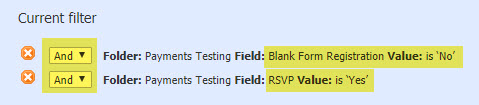
You may then manually send the Registration Confirmation email to those who submitted the Blank RSVP Form once they have been approved. This can be done using 'Send More' on the Registration Confirmation email and selecting only that approved contact or contact(s), with no filter applied on the send screen.
OnePlace
What does a Recurring trigger use as its data source when filtering on an RSVP field? Is the data pulled from a VX memory field or from the OnePlace field direct?
For OnePlace, any filters on form fields (such as RSVP) look at the form submission table. So if new forms have been submitted with RSVP “Accepted” (and this is the filter on the recurring trigger) then it will send to those contacts. If they are manually changed in OnePlace, the recurring trigger won’t pick them up.
Recurring triggers will pick up new contacts added to a OnePlace function or publication (i.e. like “send more” when sending a recurring trigger to a list, each send will only go out to those contacts from the list who weren’t on previous sends on the same trigger).
If I am using a Recurring trigger to send an email, do I have to click 'update invitees' in OnePlace in order for new contacts to be picked up by the Recurring trigger?
Yes, if a new contact is added in a OnePlace function manually you will need to click "update invitees" so that they are picked up by Vuture.
