Keywords: Triggers, Trigger, Deleted Triggers, Deleted user, Disabled trigger, automation.
Overview
Vuture triggers need to be set up and managed or "owned" by an active Vuture user account. If a Vuture user leaves your firm, any triggers they had set up will be automatically disabled when you delete their account.
If you need these triggers to be enabled to continue working, you will need to re-enable them, using an active Vuture User account.
When a Vuture user deletes a fellow user with active triggers on their account, Vuture will send an email to the deleting user to inform them if any active triggers have been stopped and need to be re-enabled. It will include a list of all the triggers and the original trigger owner, so they can go ahead and re-enable them with a new user. To edit who receive these emails, this can be updated in Admin.System.Contacts.
This email will be sent once per deleted user, so if 2 users with active triggers are deleted, Vuture will send one email for each of those users, with a separate, user-specific, list of triggers.
This email will be copied to the Client Success Manager for the Vuture instance, to ensure they are also aware. Please Note: the CSM must have their email address entered in <these> brackets in Admin.System.Contacts.Vuture Account Manager like this <penny.sargent@vutu.re>
An example of the way the Vuture email could look follows:
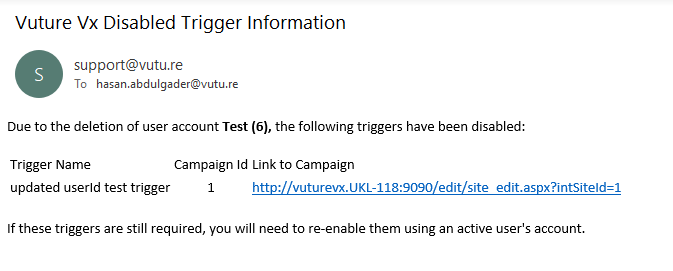
The links in the email have been provided to make it easier to find each trigger and re-enable it.
