Overview
Below is a glossary of Vuture related terms and their definitions, listed in alphabetical order.
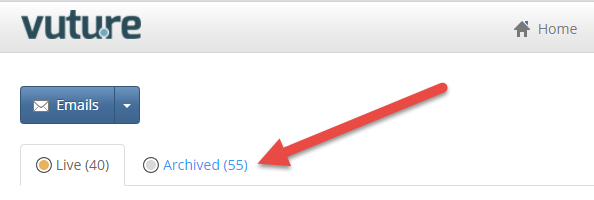
Archive
A list of email campaigns in your container with a status of Archived.
*Note: An email campaign cannot be deleted until it has been archived. All archived campaigns will still provide access to the sending stats for that campaign, unless deleted.
Back-End
The Back-End of Vuture is the part of the system that is accessed by logging in using your email address and password (or Single Sign On) and includes:
- Containers and Email campaigns
- Email send screen
- Admin & Containers screen (Super Admin Roles only)
- Dashboards and reporting
Bounce or Bounceback
An automated electronic mail message from a mail system informing the sender of a delivery problem with their original message. For more background information, please review this article.
Campaign or Email Campaign
An email campaign is a collection of emails, landing pages, forms and uploaded files. Campaigns can either be live or archived. For more information, please review this article.
Container
A folder used to group and organise email campaigns. For more information on containers and best practice, please review this article.
Dashboard
A collection of widgets and reports displayed together to provide a central view of information. Please review this article for an overview of dashboards.
Email
A single email. Before the email is sent, it will sit within the Compose Email Folder. After an email is sent, it will be moved into a Sent Folder (i.e. October 2020).
Front-End
The Front-End of Vuture consists of the landing pages, forms and the online version of emails that are accessed by recipients who are emailed from the Vuture system. These web pages are typically publicly accessible unless they have had security added to them.
Forms in Vuture allow you to collect information (i.e. RSVP Forms, Subscription Forms, etc.) and house it within Vuture's Contacts Module or within a CRM that is integrated with your Vuture Platform.
Hard Bounce
A permanent reason an email cannot be delivered to the recipient. For more information, please review this article.
ICS or iCal
An open file format, also known as iCalendar, which allows Internet users to send meeting requests and tasks to other Internet users, via email, or sharing files with an extension of .ics. For more information on Vuture's Calendar creator, please review this article.
Master Template
Your main template that houses all of your snippets, forms, and landing pages. All Sub-Templates are created from your Master Template.
Microsite
A small cluster of pages which are meant to function as a discrete entity within your existing Vuture Platform, with its own domain name or subdomain - see Wikipedia's entry on Microsite's.
Landing Page
A web page which is accessed via an email. The web page may be used to host content such as forms, images, video or other content which can’t be hosted in an email.
Layout
A layout is a page template made up of static content combined with a collection of editable snippets.
Live Email
A live email send to your marketing list from the Vuture platform. For more information, please review this article.
Resend Email
Allows you to make a copy of the same exact email you just sent and put it back into the Compose Email Folder with a new ID number. From here, you can make any changes you like and send this email out to a new Marketing List or the same list again. For more information, please review this article.
Send Sample
A test email that will act like a real email send and allow you to fully test the email campaign with a CRM or a Vuture List/Contacts Module. This will allow you to test any forms associated with this email (i.e. Prefilled RSVP forms), as well as, any activities writing back to the CRM. For more information, please review this article.
Send Later
Allows you to schedule an email to send at a later time and date. Please note: Send Later is designed to get the email ready to go out as quickly as possible. Hence all pre-processing (i.e. filtering) is done once the Send Later is setup, rather than right before the email is sent from the Vuture system. For more information, please review this article.
Send More
Allows you to send the previously sent email to additional recipients by selecting the same list or a new list. Additional sends are de-duplicated so no contact will receive the email more than once. For more information, please review this article.
Send Test
A test email that gives you the ability to test how your email will look when it lands in your inbox. A Send Test email will not connect to the Vuture Contacts Module or a CRM that is integrated with Vuture. If you would like to test the full functionality of your email, please use a Send Sample email. For more information, please review this article.
Software As A Service (SAAS)
A way of providing software through the cloud, thereby eliminating most internal support issues. For more background information see the Wikipedia page on SAA
Snippet
A snippet is an editable section which is inserted on an email or landing page. A snippet may be a single editable piece of content such as a form or an image, or a collection of items such as an image with text wrapping around it. For more information, please review this article.
Soft Bounce
A temporary reason as to why an email could not be delivered to a recipient. For more information, please review this article.
Sub Template
A saved collection of emails and landing pages for a specific type of email. It is used as a starting point when creating a new campaign. Please review this article for best practice.
Variables
A variable is a centrally held piece of content which you can re-use. Vuture has five types of variables: Global or container variables, campaign variables, system variables, and dynamic variables. Read more about each type of variable here.
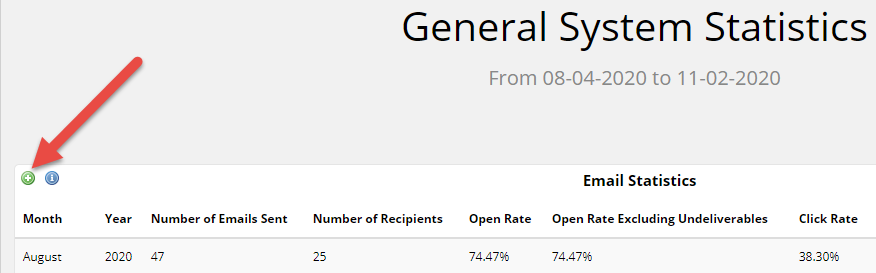
Snapshot information which is held within the dashboard – this could be a chart or a table. To get the full report associated with the widget click the + symbol.
Other Articles You May be Interested In
