Overview
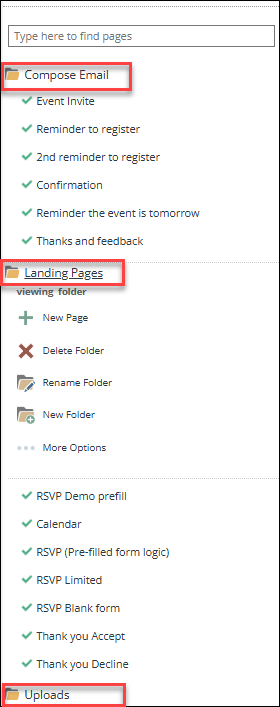
Once you create a campaign you will see it is typically made up of several sections: Compose Email Folder, Landing Pages, Uploads Folder.
Contents
Compose Email Folder
This folder sits at the top of the Navigation panel on the left side of the screen.
It stores all emails in the campaign while they are being created, prior to being Sent. When the email is sent, it will be moved from the Compose Email folder to the Sent Items folder that Vuture will automatically create, named with the Month and Year the email was sent (i.e. November 2019).
If you click onto the Compose Email folder, you are able to create new emails, and folders as required. There is no limit to how many emails a campaign may hold.
You may have many emails for a campaign stored here, e.g. for an Event it may contain an:
- Invitation
- Confirmation email
- Reminder to Register
- Event Reminder
Landing Pages Folder
The Landing Pages folder stores the Landing Pages in the email campaign. As part of a standard invitation template there will typically be a RSVP form pre-filled with contact details, a RSVP Blank form, Thank You Accept, Thank You Decline and a generic Thank You page.
Additional Pages can be created, e.g. for an Event
If you click onto the Landing Pages folder, you are able to create new pages, and new folders as required. There is no limit.
Uploads Folder
The Uploads folder stores the documents used by the campaign such as Agenda documents, menus or any document referenced in your campaign that you do not wish to publish on your Website. PDFs and MS Office docs are supported.
