1. Can InterAction working lists be accessed through the E-Card wizard?
Yes, the wizard shows all lists visible in the web client by default, including working lists. Note that if the configuration setting "Admin.System.Wizard.Only show 'my contacts'" is enabled, then only the My Contact folder will be visible.
2. How do the duplicate suppression rules work in the wizard? Are suppressions made based on email information stored by Vuture or in InterAction?
The duplicate rules in the wizard are all driven by checking the email addresses of recipients that have previously been sent an email in this campaign, regardless of whether they were added manually or via InterAction.
By default, no check is made against InterAction suppression lists. However, if you wish for your InterAction global suppression list to be checked, this can be configured by your Account Manager.
3. If I send something through the wizard to a bad email address, will I be able to send to that same contact again once their email address has been corrected in InterAction?
Yes, since duplicate checks are done against the email address of previous sends in this campaign, correcting an email address will be treated as a new contact (unless the correction is then the same as a previous recipient).
4. When I create a new contact through the wizard, how does the system choose which InterAction folder the contact is sourced in?
By default, the wizard sources contacts in the Firm List.
5. If someone manually adds a contact to the wizard in all upper case and this contact exists in InterAction, will the wizard be able to find them and update their profile.
Yes, the contact matching is case (and accent) insensitive.
6. Is there an option to turn off the 'create a new contact in InterAction' feature?
Currently there is not an option to turn off this feature.
7. I am limited to 200 contacts per E-Card send - can I increase this?
This limit is a configuration setting which can be changed, but we don't recommend it be set higher than 200 because at larger send sizes, this becomes a mass mailing that should respect opt-outs as per regional spam laws.
Also because all the contacts are stored in the user's browser during the wizard process and only uploaded at the final send stage, we have seen issues sending to large number of contacts, in older browsers, where the browser has struggled with the volume of data.
The E-Card wizard is designed for small personalised mailings. We would recommend using a normal Vuture send for larger mailings.
However if you do want to increase the sending limit please contact your Account Manager who can change the value in Admin.Settings.Wizard.Max Number of Recipients.
Also, if you wish for your InterAction global suppression list to be checked for E-Card sends, this can be configured by your Account Manager.
8. My personalisation field is not showing up when my users are using the E-Card wizard.
Check that the personalisation fields tags do not cut across any HTML tags - they must be fully inside or fully outside any HTML tags.
See the article on setting up the wizard for more information.
9. It appears as though only the Main email address is appearing for contacts. Is this as designed?
Yes, Vuture sends the mailing to the main email address provided.
10. Will individual lists need to be created for the attorneys? Or can they simply select from “My Contacts” in InterAction?
Either is an option; we recommend My Contacts only. This appears as the first folder option when selecting an InterAction list.
11. How do we handle e-mail addresses that are not housed in the Business E-mail field? (For example, an attorney wants to send to a Home e-mail address)
The default setting in Vuture is to only pull from the business e-mail address. We use business email as the primary email field. There are no options for the attorney to select which email address the holiday goes to. As a work around they could enter a personal address manually or import a .CSV file of contacts using any email address they prefer.
12. Do we need to create a standard card and a CASL card? What about GDPR?
No, as the E-Cards are considered personal vs marketing. As long as the attorneys don’t talk about business, it is considered a personal email. Personal emails are exempt from GDPR.
13. How will the send count be affected if we allow duplicates?
There are duplicate rules that can be set within the E-Card Wizard settings. For further explanation of each rule, please click here.

Additional Note on Possible Duplicate Sends:
Question - How will the attorney know if contact A already got the ecard?
Answer - The information is in the Email Send Confirmation email which the attorney will receive.
For each duplicate case, there will be a line in that email which says one or more of the following:
The following emails were not sent since they have already received this e-card from the same sender:
The following emails were not sent since they have already received an e-card from the same sender:
The following emails were not sent since they have already received this e-card from another sender:
The following emails were not sent since they have already received an e-card:
14. Can the sender personalize the E-Card template?
The template / design of the card is set by your marketing team, but the attorney can personalize the message and is provided with a preview before sending the e-card.
For instructions on how to allow a fee earner to add a personalized message, please click here.
15. Does the E-Card Wizard take into account contacts that have unsubscribed from last year’s E-Card?
The wizard is driven by checking the email addresses of recipients that have previously been sent an email in this campaign regardless of whether they were added manually or via InterAction. By default, no check is made against InterAction suppression lists. We don’t run these checks as the e-cards are considered a personal email vs marketing which are treated differently. However, if you wish for your InterAction global suppression list to be checked for E-Card sends, this can be configured by your Account Manager.
16. How are the attorneys provided with stats on their individual sends?
Just like with the Email Module, each send has its own set of reporting within the campaign. The same is true for the E-Card Wizard Module, therefore the marketing team would drive the reporting to the attorneys.
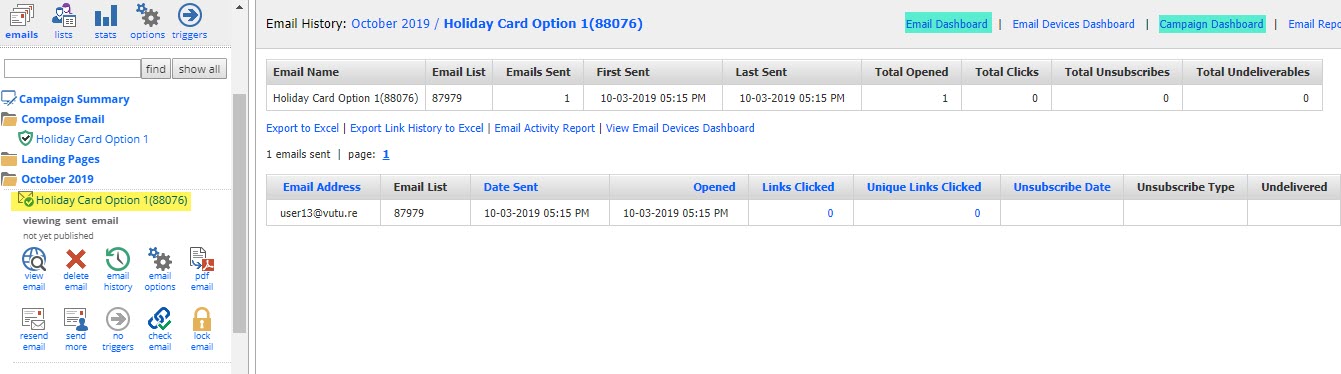
The marketing team would navigate to the email campaign that houses the E-Card Wizard and go into the send folder (e.g. October 2019) to see the reporting. They may also click through to the Email Dashboard or Campaign Dashboard from this screen.
17. Do we need to include unsubscribe links in the E-Card Wizard when sending out a mailing?
As we have mentioned before you do not need to include an unsubscribe link within the mailing if it is sent out with the E-Card Wizard. These are personal emails and not considered to be a marketing email. By default, we do not check unsubscribes when sending out a mailing using the wizard.
However, if you wish to include an unsubscribe link, please ask your Account Manager to enable a check against your InterAction global suppression list for E-Card Wizard sends.
18. The thumbnail is not displaying for my E-Card what can I do?
Select the email from the campaign editing screen and click on "email options". For all emails that are marked with a content type of wizard, the thumbnail will be displayed. If the thumbnail is missing click on the "regenerate thumbnail" link which will recreate the thumbnail. (See this Help Desk Article for more details).
If this does not work then contact Vuture Support who can restart your Vuture application (by clicking on "Admin.Tasks.Recycle Vx Back End" and "Admin.Tasks.Recycle Vx Front End") and then retry "regenerate thumbnail" as described above.
19. Do E-Cards count against my email volume or are they counted separately?
E-Card Wizard sends are recorded and counted like normal email sends, so they will count toward your annual email volume.
20. Does an E-Card user need Flash installed to use the cross-domain ajax feature to access their InterAction contacts?
Flash is not required for the end user since the cross-domain ajax feature can use either Flash or HTML5 as long as you edited the web.config in the provided files and put in the your Vuture URL as described in this article. The test page does state that Flash is required but actually either Flash or HTML5 in the browser are sufficient.
21. Do E-Card links work with Web Tracking? Does it is make a difference if the E-Card was sent to an InterAction contact or a manually entered or CSV uploaded contact?
E-Card sends work the same as a normal send from the platform. Yes, E-Card links work with Web Tracking for both InterAction contacts and manually/CSV added contacts.
22. Why do I not see any bounces recorded in the bounce logs from our recent E-Card sends?
E-Cards are sent directly from the Sender so any bounces go to them and are not recorded in Vuture.
23. I want to send a Vuture email containing a link to E-Card. How can I do that?
