Update for May 2020 - Deleting a Contact in InterAction now deletes from your Alumni Site too. See the Deleting a Contact section below.
Overview
The Vuture Alumni Microsite integrates with your InterAction Alumni folder(s). This article explains the synchronization of how data is shared between the Vuture Alumni Microsite and your InterAction Alumni folder(s).
The following will be covered:
*Only applicable for clients with more than one InterAction Alumni Folder.
Updating the Alumni Profile
When an Alumnus makes a change to their profile, updates are written in real time to the Alumni Directory and to InterAction, following all DCM rules (click here for more information).
If you choose to update an Alumnus profile from InterAction, changes are updated during a nightly sync when the Alumni Directory will check for changes from InterAction. Any InterAction changes will then be automatically reflected in the Alumni Directory.
The nightly sync schedule can be configured by your Account Manager or Vuture Support. They will find instructions on how to do this here.
If you've made changes to an Alumnus profile from InterAction and do not want to wait for the nightly sync, you can manually sync these contacts by following the instructions in this Help Desk Article.
Updating the Folder-Specific Email Address
When an Alumnus changes their email address via the "Change Email" section of the Alumni Site, and the Alumni Manager approves this change in the backend of the Alumni site, the folder-specific email address will be updated in InterAction. For more detailed instructions of this process, please click here.
When an Alumni Manager changes the folder-specific email address on the backend of the Alumni site, and the alumnus confirms the new email address is correct, the folder-specific email address will be updated in InterAction. For more detailed instructions of this process, please click here.
If someone were to change the folder-specific email address in InterAction for an alumnus, the new email address will not write back to the Vuture Alumni site. Please follow these instructions on how to manually bring Vuture's Alumni Site and your InterAction in sync. Please note: It is recommended to always update the folder-specific email address in the Vuture Alumni Site, rather than InterAction.
When new contacts are added into the Alumni Folder(s) in InterAction with the status of "PreApproved", Vuture will pick up these newly added contacts during the nightly sync. These new contacts will be available in the "Manage User" section on the backend of the Alumni Site under the "PreApproved" tab. The Alumni Manager can then approve these new Alumni contacts, which will send them a welcome email to complete their registration to the site (i.e. set password, update information, etc.). For more information on how to add new contacts, please review this Help Desk Article.
Note, changing the status of an Alumni should always be performed in the "Manage User" section of the Alumni Site. For example, changing an Alumni from PreApproved to Approved or from Approved to Suspended. Changing the status of an Alumni in InterAction will not write back to the Vuture Alumni Site.
If you wish to delete a contact from the Alumni site, you'll need to delete them from the "Manage User" section of the Alumni Site. Once a contact has an "Approval Status" of "Deleted", Vuture will add deleted_ to the email address we use for them in their Vuture account and the folder-specific email in InterAction. It will also remove the contact from the Directory and prevent the contact from logging into the site. For more information on how to delete contacts in Vuture, please review this Help Desk Article.
Update for May 2020 - Deleting a Contact in InterAction now Deletes from Alumni Site too when IASync is run
Contacts Deleted in InterAction Will Also be Deleted from Vuture's Secure Portal
We have added a feature to our secure portals when integrated with InterAction (for example, Alumni Site). If an approved user or contact is deleted in InterAction from the approved users list and the IASync Scheduled Task is run, the contact will no longer be able to access any Alumni Sites which use that list.
This update will be automatically available to you when your instance is deployed with our next Release. There is no configuration required.
Re-Adding Deleted Contacts
If a contact is re-added to the alumni list in IA, and the IASync Scheduled Task is run, they will then be able to access the alumni site with their previous log in details.
Multiple Secure Sites
This removal will only affect the secure site which is controlled by the list from where the contact has been removed. This means that if you are working with a secure Alumni Site and a secure Events Site for example, and a contact is deleted from the InterAction list which controls the secure Alumni Site, they will still be able to access the secure Events Site unless they are removed from that list too.
Merging Contacts
The result of merging two contact records in InterAction will depend on the way the merge is carried out - the direction of the merge and which contact "wins" when deciding which pieces of the data will be retained.
If two contact records on IA are merged; one contact not on the Approved Users list to another contact who is on the list, the email address for the contact will be changed, and the newly-merged contact will no longer have access to the Alumni Site. If they attempt to log in, it will fail.
If two contacts are merged, one from on the Approved Users list to another contact not on the list, they will retain the original email address which was "Approved" and the newly-merged contact will still have access to all the Alumni Sites which are controlled by the Approved Users list.
If the email address of a contact is changed they will no longer be recognised by the site and will be restricted from entry to the site.
Previously Deleted Contacts in InterAction
If a contact is deleted or was deleted in the past in InterAction, once the IASync Task is run it will set those contacts to "Deleted" status and remove their access to the Alumni Site. If the deleted contact is re-added to the list in IA and the IASync task is run again they will regain their access.
The IASync Scheduled Task Must be Used.
Contacts will only be disabled by the IASync Schedule Task. Manually syncing inside the Alumni Site will not delete the contact from the site, even if they are no longer in the IA list.
Checking if user has moved between folders in InterAction
If a user gets moved between InterAction folders (e.g. from Current Staff to Alumni) then the user properties need to be updated in Vuture to reflect this.
This is picked up automatically if done using the Vuture Alumni Management tools. If the change is made directly in InterAction there are two scenarios in which we check for this:
1. Daily Sync
When data is synced we check each contact to see if they have been moved to a different folder and update the contact accordingly.
2. View User profile
When a user's profile is being viewed and their details are being loaded we check to see if the contact has moved folder. If so we update the contact details accordingly.
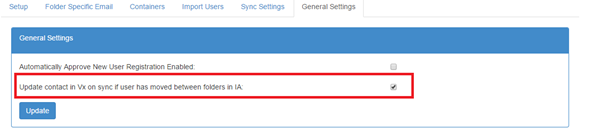
For heavily used sites this could cause a performance impact so it can be disabled, if necessary, using the General Setting illustrated below. Please speak to your Project Manager or Account Manager about making this change.