To Set up the Email Digest Centre with Dynamics
The Digest Centre is a Premium Feature - please contact your Customer Success Manager for more details.
Overview
The Email Digest Centre is the combination of three Vuture products: An RSS feed Digest Site, a Preference Manager site, and a triggered email campaign.
It provides the ability to send scheduled and manual emails to content subscribers, based on their areas of interest. Points to note:
-
Content is synchronised automatically using RSS feeds for each area of preference.
-
Preferences are stored against a contact in Dynamics using a Vuture preference form.
-
Digest emails contain a digest snippet which can be connected to a set of preferences. When the email is sent, or viewed online, the system detects content from the RSS feeds which the contact has not yet seen and includes it in the email.
-
The digest email can be scheduled using triggers, or sent manually if required.
-
The system will not send an email if there is no new content for a particular contact.
-
Vuture keeps a track of articles across multiple separate feeds, and will only show an article once to each contact, irrespective of which feed or feeds it was included in.
The benefits of the Email Digest Centre are: content can be generated on any website that has an RSS feed and that content can be used to automatically populate scheduled digest centre emails. This automates what would otherwise be a manual process of re-entering content in Vuture and manually sending emails.
All the normal email features, including tracking, are available in a digest centre email. In addition there are two new Digest Analysis reports which can help to understand which contacts are receiving which emails and why, or why not. These reports are described on the Knowledge Base here.
Prerequisites
-
This article is for clients who have the Vuture platform integrated with Dynamics.
-
Your Project Manager will use an existing site, or create a secure site such as Alumni or Preference Centre.
-
During the project to implement the Digest Centre, your Project Manager will enable Admin.Roles.Admin.Manage Email Digest RssFeed Configuration and the system configuration "Admin.System.Emails.Email Digest Sending Enabled "
-
You will need Triggers v3.
-
Set ‘Email Digest RssFeed Send Email Version’ to 2 under Admin.Version
-
Create the fields below by going into your Preference Manager website and selecting Options then Configure Dynamic Data. You will then need to create two content types "EmailDigestRssFeeds" and “EmailDigestRssFeedItem”.
EmailDigestRSSFeeds requires the following fields:.

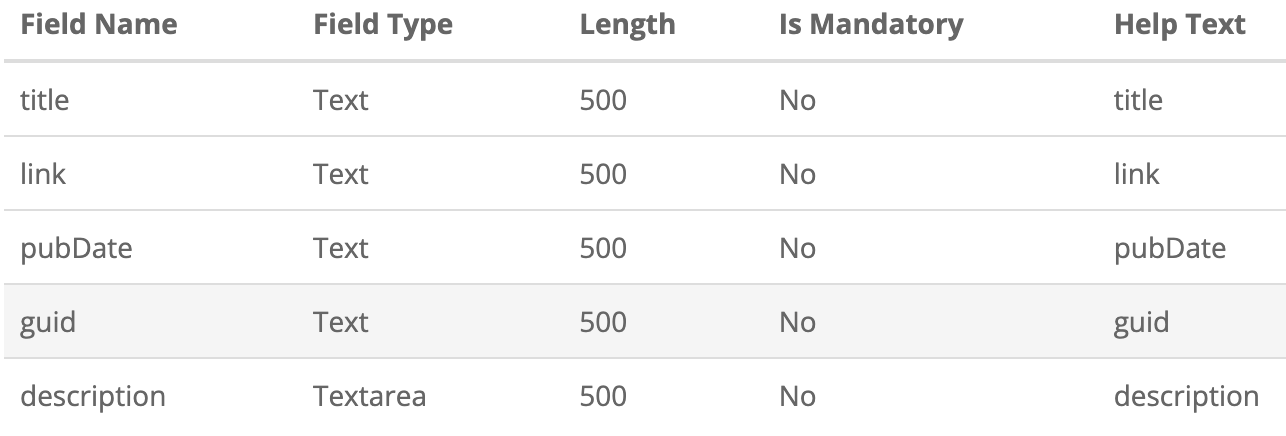
EmailDigestRssFeedItem requires the following fields:
How the Projects Team will Set up Digest Centre
-
Create an Admin Site in Vuture to store the synchronised RSS feed content
Enable "Admin.Roles.Admin.Manage Email Digest RssFeed Configurations" for users’ role
Create a website based on a blank template
Create a new folder in the website for the RSS feeds (e.g. "Email Subscriptions")
Create two content types called "EmailDigestRssFeeds" and "EmailDigestRssFeedItem" by going to "Options->Configure Dynamic Data"
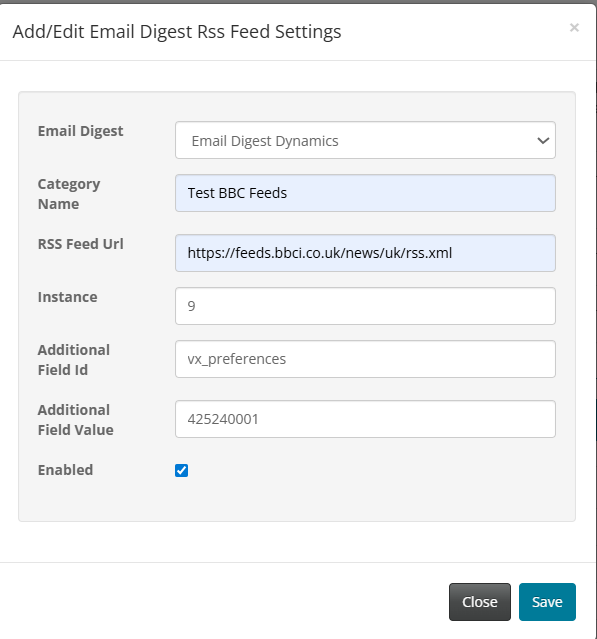
Go to site "Options -->Alumni → Manage Email Digest RssFeeds" and add the details for each of the RSS feeds that the client will be using for their content.
While configuring the RSS feeds in this step use the CRMFieldId and FieldValues(VxValues).
2. Create a Secure Site to synchronise the recipient data
If you don't already have a secure site such as an Alumni or Preference Centre website then create a new website or use the website created in step 1
Go to "Options --> Configure Site Settings --> deploy" to make sure the site has the latest code
In the Alumni set up page add the subscription additional fields which were set up in step 1
Synchronise the contact data
If you are using the digest snippet in the secure site then add it from the System Snippet Panel - Note that for the website digest snippet you currently need to manually edit the parameter 'emailDigestAdminSiteId' in html to match the admin site in step 1.
3. Create an Email Campaign with Email Digest Snippet
Enable the system configuration "Admin.System.Emails.Email Digest Sending Enabled "
Add the Email Digest Snippet from System Snippet Library into your email
Select the correct admin site in the snippet
Test the email by manually sending to a test Dynamics list to check the emails contain the correct subscription categories
Test the email using a recurring trigger to a test list
Each contact should only receive each article in the RSS feed once and should not receive an email if there is no new content.
4. Set up the preference form so that updates are synced instantly rather than the scheduled contact sync
Add the additional fields to Dynamics by adding Preference (vx_preferences) fields in the CRM Metadata Manager. For Dynamics it would look similar to this image:
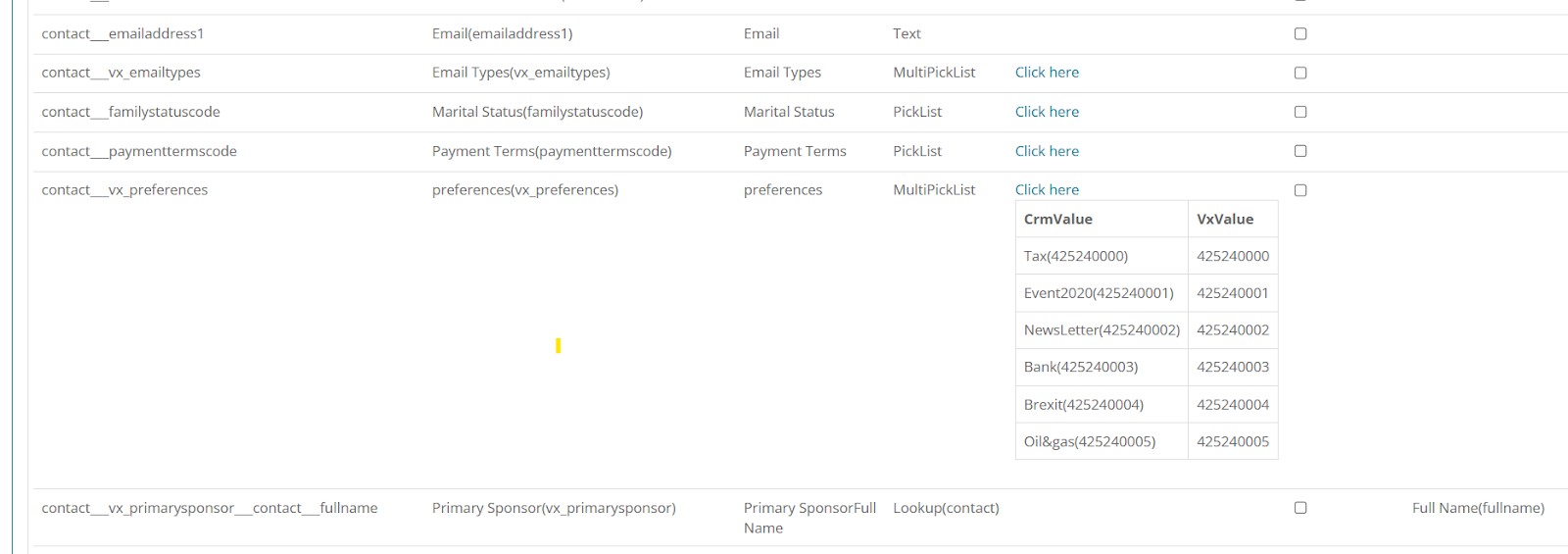
These fields will be saved locally each time we refresh the list in the Contact Module.
5. Set up a Trigger, using a Folder Specific Email (optional)
Using Folder Specific Addresses is optional.
Using a Trigger is optional. It is possible to send Digest mailings manually. However, a large part of Digest mailings is that they can be effortless on your part so we recommend the use of Triggers.
If you choose to use Alternate email addresses, there is an article covering that here.
Create a trigger
Set the Trigger as Date or Recurring
Set Action as Send Email
Choose the digest centre email
Select Dynamics from the list source and select your required list(s)
Tick the check box "Send to alternate email (if available)"
Save the trigger
Test that the digest emails are correctly received to the correct address for each contact.
FAQs
How would a Vuture client update a contact’s preferences (vx_preferences) to cause different RSS Feeds to be sent to them?
Update a contact’s preferences using either of two different methods:
How should Vuture clients use preferences (vx_preferences) in setting up RSS feeds?
While adding the RSS feeds use the AOI as ‘Additional Field Id’ and field value as VxValue (as mentioned in step 4) from the CRM metadata Manager.