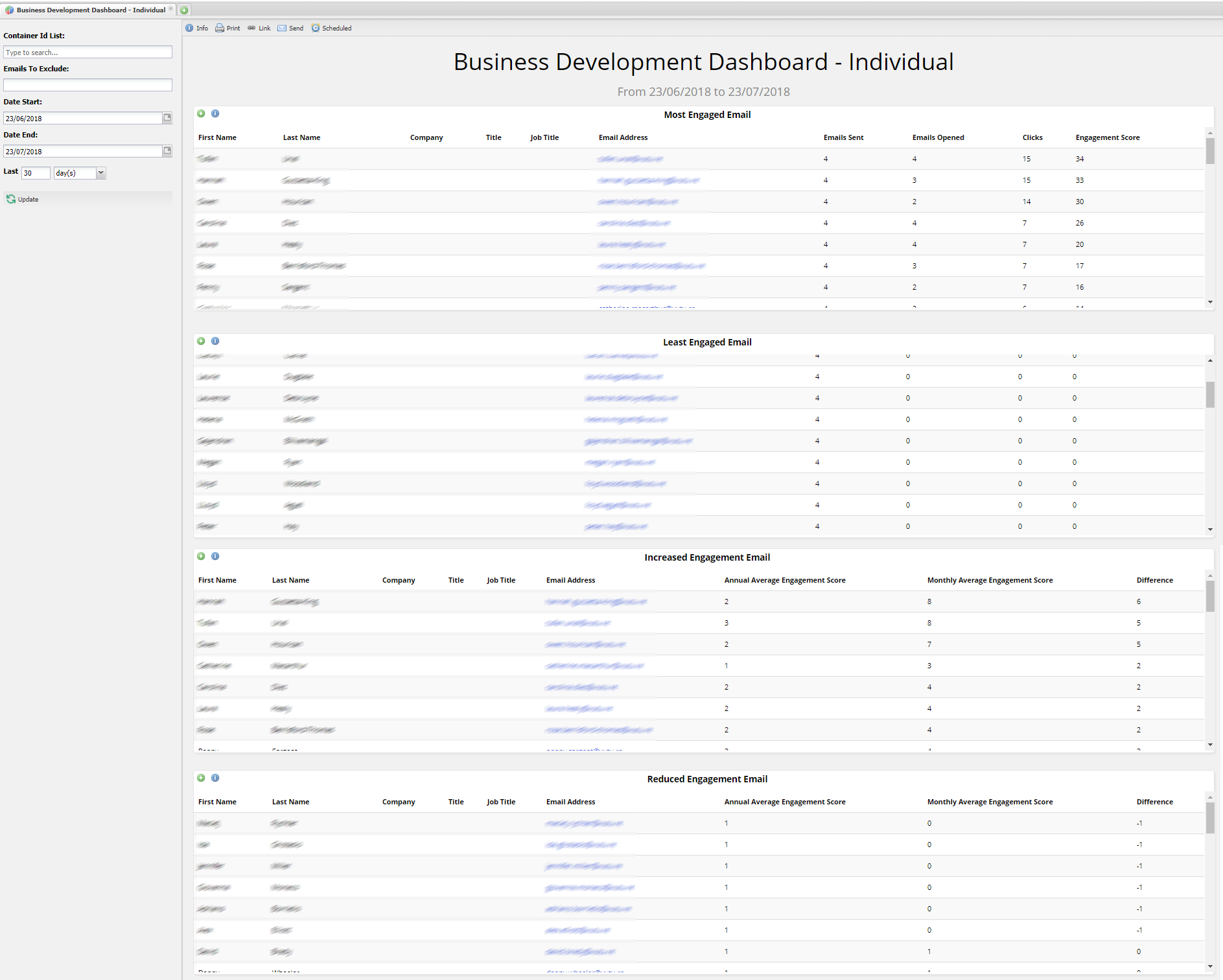
This dashboard gives you a high level overview of the individual contacts who are engaging the most or have recently started to engage more than usual. It also shows you those who are the least engaged and who have started engaging less than normal.
This report is useful to help you identify contacts where there may be an opportunity to develop your relationship further. It also helps you to identify those contacts who perhaps could be engaging with your content more.
FAQs
Q. Why does my report show more clicks than opens?
A. This can happen when you apply a filter to the report. In this report, email opens are filtered by when the email was sent. Clicks, however, are filtered by click date.
For example, an email was sent on 31 August. Later you report on the email, filtering from 1 September to 30 September. If a client opened the email on 2 September and clicked on a link, your filtered report will show the link clicked – because it falls within the date range of 1-30 September. It will not show the Open because opens are filtered on the Sent Date – which is before the beginning of the filter range you have selected.
Q. Is this a bug or a feature?
A. It is neither. It is simply a way of reducing the number of responses in a report. The solution, if you are seeing anomalies in your report numbers, is to increase the date range of your filter to include the date on which the email was sent.
You can send this dashboard to yourself or your colleagues either once or on a recurring basis. Find out how to do this here.
Filters
With this dashboard you can filter to view data from a specific container.
You can filter specific emails you want to exclude from this dashboard.
You can filter by date range. (But note the FAQ question and answer about including the date Sent in your filter.)
Reports in this dashboard
Most engaged Email
69: Business Development - Most Engaged Email
This report shows the individual contact who have engaged the most. This is calculated on the basis of the system engagement score. A contact will receive 1 point for an open and 2 points for a click. The engagement score is the combination of all the points they've accumulated within the filters you have set. The report is sorted by the highest engagement.
When you drill down the actual report you see is: 90 Business Development - Most Engaged Email Full Results
Least Engaged Email
71: Business Development - Least Engaged Email
This report shows the individual contacts who have engaged the least. This is calculated on the basis of the system engagement score. A contact will receive 1 point for an open and 2 points for a click. The engagement score is the combination of all the points they've accumulated within the filters you have set. The report is sorted by those contacts with the lowest engagement score.
When you drill down, the actual report you see is: 91 Business Development - Least Engaged Email Full Results
Increased Engagement Email
152: Business Development - Increased
This report shows the contacts who have increased their engagement in the last month compared with the rest of the year. The way we calculate this is based on their average engagement score for the year compared with the score for the current month. Those with the largest difference will appear in this report. This means these contacts may have been dormant but for some reason are now engaging with your content. It is probably worth investigating them further.
When you drill down, the actual report you see is: 154 Business Development - Increased Engagement Email Full Results
Reduced Engagement Email
153: Business Development - Reduced Engagement Email
This report shows the contacts who have decreased their engagement in the last month compared with the rest of the year. The way we calculate this is based on their average engagement score for the year compared with the score for the current month. Those with the largest difference will appear in this report. These contacts have suddenly begun to disengage with your content in the last month compared with the previous year. It is worth investigating further.
When you drill down, the actual report you see is: 155 Business Development - Reduced Engagement Email Full Results.
