Overview
You can email any of the dashboards to any contact just once or on a regular basis at a specified time.
Contents
To send a dashboard Report
- To access the Report Sending Wizard go to the dashboard you wish to send.
- Click on the send button

- Before you start the process below make sure that you select the correct filters from the menu on the left hand side and update the dashboard.
- Click on the From drop-down to select the sending email address
- Type the subject line you want the email to have
- Type in the email address of the contacts you want to send the dashboard to. As you type the drop-down list will suggest emails for users already registered in Vuture, but you can send to any email address you like. You can add as many recipients as required.
- Type in a Message you'd like to add to your dashboard. This will appear at the top of your email.
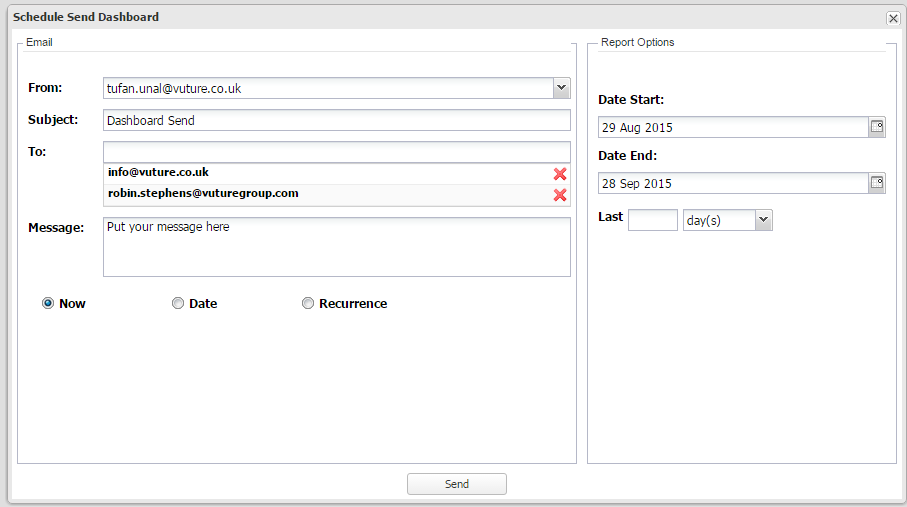
- If you want to send this dashboard just once immediately select now and click send.
Schedule send once in the future
- If you want to schedule this dashboard to be sent once in the future, select Date.
- Pick the date and time you wish to schedule this dashboard.
- Click send
Regularly send this dashboard
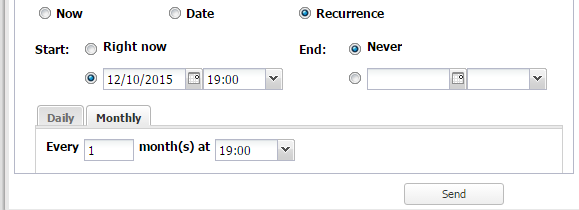
- If you want to schedule a recurring send tick Recurrence.
- Select when you want the first email to be sent under Start this can either be immediately 'Right now' or you can enter the required date and time.
- Select when you want the recurring email to End. If you don't want it to stop select Never.
- Use the Daily/Monthly tabs to select the frequency, day and time you wish to send this dashboard.
- Click send
Expanding reports
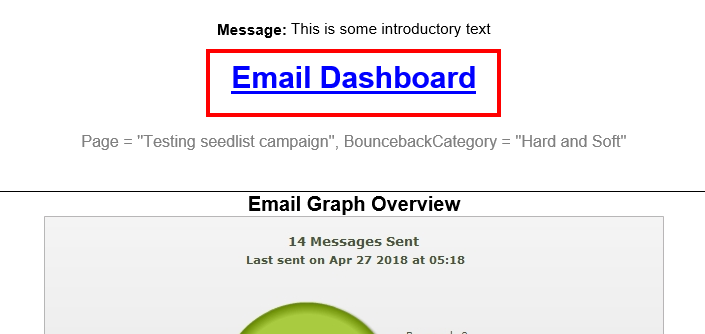
When you receive the email you can click through to the online version of the dashboard by clicking on the title of the dashboard. You can also click through by clicking on detailed results. The recipient will need to have access to Vuture to be able to click through to the online version of these dashboards.
My dashboard isn't sending
If you are sending a Dashboard or Report you need to ensure that the From Address being used for the dashboard is an authorised from domain, whitelisted.
