Overview
A campaign can be single or multiple emails around an Event or broader Marketing Campaign. We suggest that you start a new Campaign for each Event or Marketing Campaign so you keep all the Emails for that Campaign in one place.
How to Create a Campaign
Please use the below instructions on how to create a new campaign.
- Using the Container selector, navigate to the desired Container you want to create your Email Campaign in.

- Click Create Email Campaign

- Type a unique name for the Campaign
- You can type Optional Notes for example, the name of the Marketing List you will be using for the Campaign.
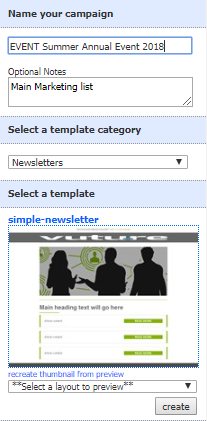
- From the drop down select the template category, if you have more than one, then click onto the desired Template then click Create
- Once the Template has downloaded, type a name for your Email, for example, Invitation
Note: You can change the name of the email later if you wish
- Select the Layout for your Campaign
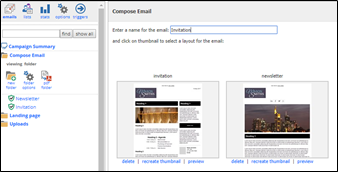
- Click onto the Thumbnail to to open the Email and the Navigation panel
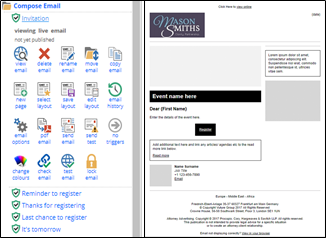
In the Navigation panel on the left hand side you can make changes to your Email.
You can now start to edit the layout and content of your Email.
Next Step: Getting started - editing your email
Go back: Getting Started - navigating around Vuture
