What are the Release Notes?
The Release Notes is an interactive document found in your Vuture system which describes all the newly released (and some Beta) features for the given month. It is personalised for each instance of the Vuture platform by checking the features you currently have enabled, not yet switched on or added by later purchase, for each role at your firm.
The page is available via the Help tab on your Vuture platform Home screen. Initially available to Super Admins only to allow you to decide how, or whether, you share new features with the other users at your firm; it can be made available to other roles in the future if you wish.
How do I access the Release Notes?
From the Home page click on Help and use the down arrow to navigate to Releases.
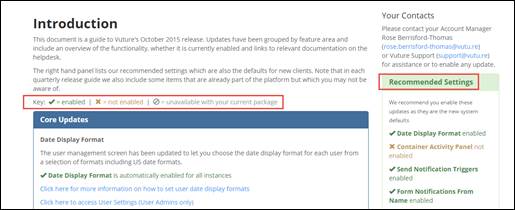
On the Releases page, you will see two sections; the main section on the left describes every updated feature, showing the Vx module (Email, Events, Web, etc) in which they appear. The box on the right groups the updates into Recommended updates, which should be made live in every system, Optional updates, which you can choose to switch on or not and Premium Feature updates (you have to pay for the premium feature in the first place, but you do not have to pay again for updates or enhancements to premium features).
In the left hand box, each feature has a Title, a Description and a status describing whether it is optional, automatically enabled as part of the base configuration, or premium (chargeable). There is a line giving a hyperlink to further information on each topic, and, if it is a role-based feature, a note about whether or not it is already enabled on your instance and for which role.