Most emails can be categorized by type (e.g. Newsletters, Invitations etc.). In order to allow users to opt out of this type of mailing we advise you to set up Campaigns in Ms Dynamics which correspond with the mailing type. Typically this will be in the format *Send no event invitations or *Send no Newsletters as appropriate.
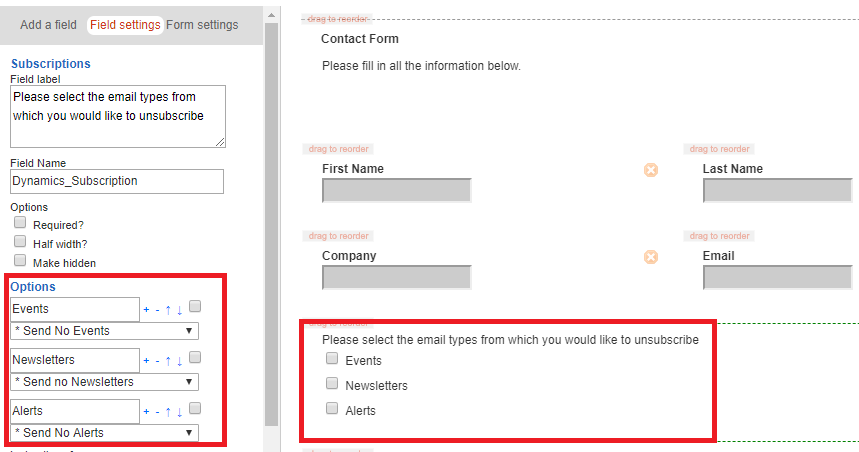
If a recipient clicks on the preference form they will be able to choose from a check box list which type of mailing they no longer wish to receive as in the image below. Vuture will automatically add or remove the recipient from the appropriate folder in Dynamics. For example, if a contact chooses to be excluded from Event invitations, then they will be added to the *Send no event invitations list.
Sending the mail
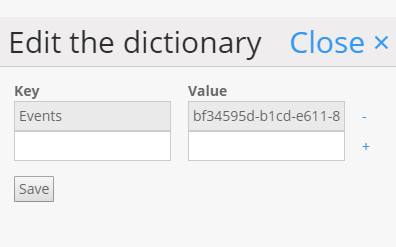
To suppress the *Send no event invitations list when you send an event type email, you will need to provide your account manager with the list ID for the *Send no event invitations list. They will include the ID in the system, against the correct email type (e.g. "Events") through Admin.System.MicrosoftDynamics.ContentTypeDictionary.
At the point of sending the mail, a Vuture user will be prompted to select the type of mailing they are sending (e.g. "Events")
When the send button is hit, the system will first automatically check the appropriate unsubscribe folders:
- Send no marketing
- Send no type of mails (i.e. All users on the *Send no event invitations list)
