Keywords: Email open; link clicked; tracking; cookies; bounces; compliance, disable email tracking, web tracking, per container
Overview
This article sets out to explain how the different types of email tracking, web tracking, cookies, and bounces work in Vuture. It will help you to use these features safely, while complying with your local data protection regulations.
Contact your Client Success Manager for more information or to change any of your tracking options.
Contents
Plus: Useful links to Google Analytics and LinkedIn to explain how their cookies are triggered and when they expire.
For Google Analytics - here are their details
For LinkedIn - they are here. Scroll down to the section Cookies LinkedIn drops on third party sites
What is email tracking?
Email tracking is the collecting of information about the recipients of your emails based on their actions and recording that information in Vuture and your CRM. It allows you to see who is opening and reading your marketing emails and who is clicking on links. Using Email tracking you can determine the success or otherwise of a mailing and establish who among your contacts is most and least engaged.
How does email tracking work?
When a contact receives a marketing email, event invitation or other direct mailing from Vuture, we collect information about the recipient, in the following ways:
Opening emails
If the email is opened either by downloading images in the email or by clicking in a link, we log that activity in your CRM. Several hidden tracking images are included in the email. The link to these images includes a tracking code that identifies the recipient and, if images are downloaded, an Email Open activity is logged against that contact in Vuture and in your CRM. We also record the IP address and email client for that Open in Vuture.
The email open tracking images allow us to estimate how long a recipient spent reading an email by loading them as the contact scrolls through the email.
In certain email clients the tracking images can detect if an email has been printed or if an email has been forwarded. We do not know who the email was forwarded to but if the forwarded recipient opens the email we do record their IP address and the email client in use.
All links in the email include a tracking code that identify the contact and if they click on a link for the first time and have not downloaded images before, then an Email Open activity is logged against their contact record in your database. If they do not download images in the email or click on any links no Email Open activity is logged against their contact record.
Clicking links in emails
All links in our emails include a tracking code in the URL that identifies the mailing and the recipient. Each time an email is clicked, a Link Clicked activity is logged against the contact record in Vuture and your CRM.
Vuture emails use two types of tracking:
1. Email Open tracking by downloading a tracking image in the email
- Each recipient's email contains a different and unique tracking image
- When a recipient receives an email and chooses to download images, the unique tracking image for that email is downloaded from Vuture's server
- Because each tracking image is unique, Vuture can identify the recipient that opened the email when the image is downloaded
- Each unique tracking image only exists within a single email and cannot read information from, or write information to, the recipient's computer
2. Link click tracking using short links
- When a Vuture email is sent, each link is replaced with a short version which includes a unique code that identifies both the recipient and the destination web page
- When the recipient clicks on the short link, Vuture records that the recipient clicked on the link and forwards them to their destination
- All short links are unique and only exist within a single email
- Short links cannot read information from, or write information to, the recipient's computer
Please note: Tracking will also be picked up if a user accesses the email directly from a browser version. Pixel tracking happens when the images are loaded.
Unsubscribes
If a contact clicks to Unsubscribe, we automatically log this information in Vuture and your CRM. This is stored in a global or content-specific "marketing suppression list" to record the contact’s preference and ensure they are not mailed that type of mailing again.
In our event invitations and confirmations, we provide buttons that allow contacts to accept, decline, cancel (and register if they are not the original recipient of the email) for that event. Clicking on these buttons will pass a tracking code in the URL so we can record that choice in our database to help you manage the event.
Please note: We do not currently have a cookie free option with our setup.
How about cookies in emails?
Q. Do you use cookies for email tracking?
A. No, Vuture does not use cookies for email tracking.
Q. Is Email tracking the same as Web tracking?
A. No, it isn’t the same thing. If you, as a Vuture client, choose to add Web Tracking to any of your websites, Vuture will store a cookie in the recipient’s browser if they click on an email link or visit a tracked webpage.
Website cookies
If you have web tracking enabled (this is an optional premium feature) and a contact clicks through from a Vuture email or landing page, a Vuture cookie is saved to the recipient’s browser if not already there. You can place the Vuture web tracking code on any website you choose. When the client (identified by the cookie on their machine) visits the website, Vuture can track the URL of the pages they visit and how long they stay on the page.
Vuture web tracking cookies are persistent cookies and are retained for one year by default. The use of cookies can track a contact’s website journey, uniquely identify their visit, and connect their website journey with their email journey.
Website cookies help Vuture to provide your web visitors with the best user experience and relevant content across your digital marketing channels.
The information stored in the cookie is not transferred to any third parties, but the cookie originates from your Vuture instance and the data is transferred back to your Vuture system to log web tracking activity. If a user disables cookies in their browser, they will not be tracked by Vuture's web tracking.
Web tracking does not work if a recipient clicks a link in their email that redirects them to the website and then chooses to decline the website cookies.
Please note: We have a cookie page on our Vuture website here, which explains our use of cookies. This may also be useful for your review.
How do you track Bounces?
When an email is rejected by a subscriber's email server, it's called a bounce. There are two primary types of bounces, hard bounce and soft bounce. By default, Vuture processes the bounces once an hour. Once we've categorised the bounce it will be added to your email campaign report.
When the recipient's servers send us a bounce message there are hundreds of variations we may receive. We categorise these into straightforward subcategories for you. If you want to view all your bounces during a specified period, you can use the Bouncebacks Dashboard.
To determine which bounce message relates to which email address, Vuture uses a Variable Envelope Return Path (VERP). It is a technique used to more accurately detect and remove undeliverable email addresses.
VERP works by making the Return Path email address unique for each subscriber who receives an email. VERP allows greater control with bounce processing because the exact subscriber's email address, which created the bounce, is always included in the bounce message through the return path address. Without VERP, it is not always possible to tell which email address bounced because not all mailbox providers include the email address in the bounce message.
Is Email tracking legal under GDPR? How about the PECR?
Email tracking is not specifically mentioned in the GDPR except in as much as the tracking involves personal data. However, PECR does talk about cookies and monitoring the way in which contacts interact with “online services”. Here is what the Information Commissioner’s Office (ICO) has to say…
“The Privacy and Electronic Communications (EC Directive) Regulations 2003 (the Regulations) cover the use of cookies and similar technologies for storing information, and accessing information stored, on a user’s equipment such as their computer or mobile.”
“A cookie is a small file, typically of letters and numbers, downloaded on to a device when the user accesses certain websites. Cookies are then sent back to originating website on each subsequent visit. Cookies are useful because they allow a website to recognise a user’s device. The Regulations apply to cookies and also to similar technologies for storing information.”
“The use of cookies and similar technologies has for some time been commonplace and cookies in particular are important in the provision of many online services. Using such technologies is not, therefore, prohibited by the Regulations but they do require that people are told about cookies and given the choice as to which of their online activities are monitored in this way.”
Further guidance from the ICO is here.
To comply with the Regulations therefore, if you are using Vuture web tracking, cookie use should be signposted on all websites, opt in forms and preference forms. Provide a link to your Privacy Policy during signup or at preferences.
Please note: We (Vuture) are not legal advisors, you will need to get your own legal advice on compliance.
Should I tell my clients that we are tracking their actions?
Yes. Your Privacy Policy should include an explanation of the Email Tracking that is carried out.
In order to be compliant in Europe, cookie use on websites has to be signposted.
As email is already a permission based marketing channel, getting consent for opens tracking and cookies is relatively easy. Just add this to the permission being requested and given at the time of email opt-in. The ICO wants to see openness and transparency. That is, don't bury this information deep in a Privacy Policy in language that can never be understood.
To be safe, we suggest that cookie use is signposted on all opt in forms and preference forms.
- Signpost at time of signup that tracking technology is used. Use simple clear language that can be understood by clients.
- Signpost at Manage Preferences that tracking technology is used.
- Change your Privacy Policy so that opting in to email permission is also opting in to open and cookie based tracking. Don't bury this information in the Privacy Policy or difficult to understand language. Include information about tracking that is not part of the regulation too.
- Provide a link to your Privacy Policy during signup/preference management.
- Include a block of information in your Welcome email campaign about privacy and tracking.
The information stored in the cookie is not transferred to any third parties. The cookie originates from your Vuture instance and the data is transferred back to your system, in order to log web tracking activity. If a user disables cookies in their browser there will be no different experience on the your websites; however they will not be tracked by Vuture's web tracking.
We (Vuture) are not legal advisors, you will need to get your own legal advice on compliance.
If you are interested in seeing typical wording used by some clients in their Privacy Policy, you may be interested in the following example:
Example of Email Tracking Notice
Where you receive a marketing email, event invitation or other direct mailing from us, we may collect information about you in the following ways:
- Opening emails: if you open the email either by downloading images in the email or clicking in a link, we log such activity on our database.
- View as web page: If you click on the "view as a web page" link, a tracking code is passed in the link so that the web page is personalised in the same way as the email.
- Links to web pages: If you click on any web link, we pass a tracking code in the link to the web page which we use to log such activity on our database.
- Unsubscribe: If you click unsubscribe, we will automatically log this information on our database. If you unsubscribe from any email invitation or alert, we will continue to store your personal data on a "marketing suppression list" so as to record your preference.
- Event RSVP buttons: In our event invitations and confirmations we provide buttons to allow you to accept, decline, cancel (and register if you are not the original recipient of the invitation) for that event. Clicking on these buttons will pass a tracking code so we can record your choice in our database to help us manage the event.
No cookies are used for email tracking.
Example of Web Tracking Notice
Web tracking, when added to any of your websites, uses the following cookie tracking:
If you click through from one of our emails or landing pages to our website we use additional cookies on our website to connect your e-marketing journey with your website journey. This is to help us to to provide you with the best user experience and relevant content across our digital marketing channels.
Note: 'security/tracker.gif' is an image used in the web tracking process and is referenced in the web tracking code that we provide to clients to add to their website. It is not a cookie itself, but is used to create and/or access the web tracking cookie.
The following table explains which cookies are used:
| Cookie Name | Source | Purpose | Expiry |
{Your Back-end Vuture URL}_VxSessionId
| Vuture | Website
Tracks your website journey | Session Cookie: expires as soon as the browser is closed. |
intEmailHistoryId or vx-email-guid
| Vuture |
Website
Connects your e-marketing journey with your website journey. This is used by the Vuture platform to uniquely identify you if you click onto a [firm name] web page from an email marketing communication from [firm name]. The cookie records the pages you visit on the [firm name] website and time spent on the page.
| ** 1 year |
ASPSESSIONID?????
| ASP.net |
Website
This is used by Vuture to uniquely identify your visit so that the other Vuture cookies set out in the policy function correctly.
| Session Cookie: expires as soon as the browser is closed. |
| | | | |
{sitesUrl}_VxSessionId
| Vuture |
Email Module
This cookie is not used by the Vuture front-end. It is only used where a back-end user is logged in and accessing a front-end page e.g. for our secure pages functionality. It serves no purpose for a normal recipient who does not have a back-end login.
| Session Cookie: expires as soon as the browser is closed. |
| ASPSESSIONID???? | ASP.net |
Email Module
Not used by Vuture. It is a built in .NET session cookie. It is part of the programming framework we use and is created automatically. We do not use it for anything.
| Session Cookie: expires as soon as the browser is closed. |
| | |
| |
{WebsiteURL}_VxSessionId
| Vuture |
Secure Website (e.g. Preference Manager, Alumni or Event Website)
If your firm has the a secure website (i.e. one that requires a login) this cookie uniquely identifies the contact.
| Session Cookie: expires as soon as the browser is closed. |
{WebsiteURL}_VxSessionId
| Vuture |
Public Website
This cookie is not used to track public website visitors. It is only used to identify that a back-end Vuture user is accessing the website.
| Session Cookie: expires as soon as the browser is closed. |
**1 year means that the cookie will be removed by the browser if the contact does not click on a link in a Vuture email for one year. It is the clicking on the link that sets the cookie - opening an email on its own does not. Once the cookie has gone, a contact needs to click on a link again to get the cookie. The 1 year is not configurable.
Update from Spring 2020 Release:
Google Chrome Browser and Secure Cookies: Vuture Vx has been adapted to be compatible with recent changes made to the Google Chrome browser relating to secure cookies (more on this here).
Vuture session cookies will now have the SameSite=None and Secure=true attributes set on them, in order to allow the system to function uninterrupted when these changes take effect, and when they are rolled out to other browsers in the future.
Further Explanations of Cookies and Terms you may see mentioned
vx-email-guid & intEmailHistoryId:
These cookies are both the same thing. They connect the e-marketing journey with the website journey. They are used by the Vuture platform to uniquely identify a person if they click onto a web page from an email marketing communication. The cookie records the pages the contact visits on the website and time spent on the page.
Q. What is a 1st Party Cookie?
A. 1st party is when the cookie is dropped when we redirect to the website from an email.
Q. What is a 3rd Party Cookie?
A. A 3rd party cookie, is if the cookie is dropped by our platform when an anonymous contact (someone who has not interacted with one of our emails) visits a non-Vuture website which has web tracking implemented.
Can I switch email tracking off? What will happen if I don't have it?
It is possible to switch off email Open tracking using downloaded images, on a per container basis. If you want to disable email Open tracking using downloaded images globally then you can disable the feature in all containers.
Once you have disabled this for a particular container, all emails sent from the container will not contain any tracking images and therefore email Opens will not be tracked when a recipient downloads the images in the email.
Email Opens will still be tracked if a recipient clicks on a link and any landing pages or forms that they click through to will still be personalised. This ensures that unsubscribes and RSVPs still work correctly.
To switch tracking off on a per container basis, you must go to "Admin.Containers and Users". Once you are within your desired container, go to the “Container settings” tab. Unchecking the option "Enable Email tracking for this container" will stop tracking images being included in emails sent from this container.
Warning: This will reduce Email Open statistics since email Opens will only be recorded when a link is clicked in an email and not when images are downloaded.
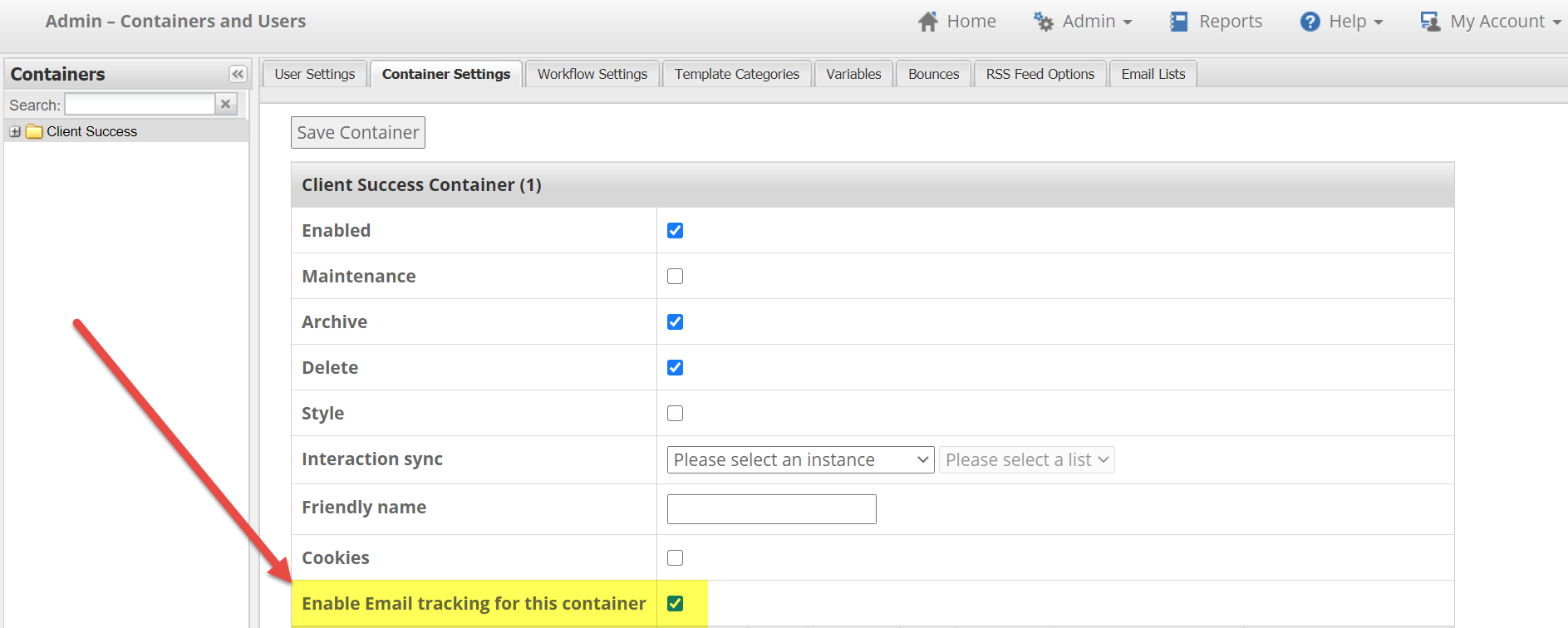
For a full summary of your current options, please review the Vuture Email Tracking Summary below.
Vuture Email Tracking Summary
This section is a summary of each type of email tracking, what is tracked, how the tracking works, and whether it can be disabled.
1. Email Open Tracking Images
| Description | Hidden tracking images loaded in an email |
| What is tracked? |
- When they opened the email
- How long they spent reading it
- Did they forward it?
- Did they print it?
- IP addresses and user agent of their email client
|
| How are contacts tracked? | Downloads up to 3 small hidden images (for open, print and forward) when the user chooses to download images. Downloaded images send back an identifier for the specific mailing and contact. |
| Can currently be disabled? | This can currently be disabled globally and per container. Please note: This cannot be disabled per send or per recipient. |
| Notes | Disabling email open tracking images will not prevent any core personalisation functionality from working but will reduce email open statistics since email opens will only be recorded when a link is clicked in an email. |
Example Tracking Images
The following tracking images are included in the code of each email:
https://myvutureurl.com/email/b318d2c0-b78f-4275-a6a4-48d6f4e70dcd/analytics.gif
https:// myvutureurl.com email/b318d2c0-b78f-4275-a6a4-48d6f4e70dcd/print.gif
https:// myvutureurl.com /email/b318d2c0-b78f-4275-a6a4-48d6f4e70dcd/forward.gif
where b318d2c0-b78f-4275-a6a4-48d6f4e70dcd is a unique identifier for the mailing and recipient
contact.
2. Link Click Tracking
| Description | Shortened link that includes a unique identifier for the contact and mailing, and a unique identifier for the destination URL |
| What is tracked? |
- The URL they have clicked on and the time they clicked it (each click is recorded separately)
- IP address and user agent of their browser
|
| How are contacts tracked? | Links in the email are converted to a short link which includes two codes: one that identifies the contact and one that identifies the URL they are visiting. When they click on the shortened link the Link Click action is recorded and the contact is forwarded to the destination URL. |
| Can currently be disabled? | This cannot currently be disabled at all. |
| Notes | Disabling link click tracking is not currently possible and would prevent the following from working:
- Personalised landing page
- Pre-filled forms or RSVPs
- One-click registration
- Automatic unsubscribes
|
Example Link Tracking
Destination URL is: https://vutur.e
An example tracked link looks like:
https://myvutureurl.com/e/raegvjouq9nutq/b318d2c0-b78f-4275-a6a4-48d6f4e70dcd
where b318d2c0-b78f-4275-a6a4-48d6f4e70dcd is a unique identifier for the mailing and recipient
contact and raegvjouq9nutq is a short code for the destination URL
3. Web Tracking (optional premium feature)
| Description | Cookie that links an email recipient to their website visits. |
| What is tracked? |
- Web page they visited
- How long they visited the page
- IP addresses and user agent of their browser
|
| How are contacts tracked? | Downloads a persistent cookie in a recipient's browser when they click on an email link, which stores a unique identifier allowing the visitor to be identified next time they visit a tracked website. |
| Can currently be disabled? | This can currently be disabled globally and per container. Please note: This cannot be disabled per send or per recipient. |
| Notes | Visitors can switch off cookies themselves which would prevent tracking. |
Example Web Tracking
intEmailHistoryId = 246009123
Cookie Expiry = 1 year
where 246009123 is a unique identifier for the contact
4. Bounce Tracking (using VERP)
| Description | Variation of the bounceback (return path) email address so that bounced emails can be uniquely identified. |
| What is tracked? |
- When the email bounced
- Why it bounced
|
| How are contacts tracked? | When an email bounces it is sent back to a Vuture-managed mailbox. Using VERP (Variable Envelope Return Path) each email has a unique return address so that we can identify which email has bounced. This is because many email systems strip the body of the email when it bounces so we cannot rely on that to identify the original recipient. |
| Can currently be disabled? | This can currently be disabled globally. Please note: This cannot be disabled per container, send, or user. |
| Notes | If switched off, bounce tracking will be less accurate. |
Example Bounce Tracking
Bounceback Email Address = 123-12345-first.last=vutu.re@myvuturedomain.com
where 123 is the Vuture instance, 1234 is a unique id for the contact and first.last=vutu.re is the
email address of the recipient with @ converted to =
