This feature works for all CRMS and none. It is looking at the data gathered via Vuture forms and stored in the Vuture database.
After you finish testing your forms it can be useful to clear your test data before sending out your real mailing.
This can be done by first selecting the page with your form on it and clicking the "view stats" button.
On the Statistics page there is an option called "Clear all form responses" which will remove all form submissions to date from the Vuture database, made via this form.
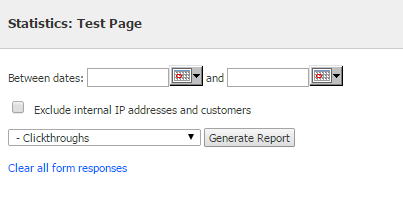
Note that there is no "undo" and that it will only remove data in Vuture and will not remove any data from any CRM.
If you don't see the "Clear all form responses" option then contact your Account Manager to have it included in your Role by adding the feature "Emails.Clear all form responses".
