Update for March 2021
We have:
a. improved the emailed notifications we send, to indicate that a client has exceeded their threshold and
b. changed the way we handle InterAction thresholds being exceeded.
The new way is controlled by a config. When the config is enabled, a send is cancelled if it would exceed the threshold, before any emails are sent. This is an improvement on the previous method of checking list sizes. It is faster, and causes fewer delays when dealing with very large lists.
All new clients to Vuture will be put on the new method automatically. Current clients should discuss switching over with their Client Success Manager.
Introduction
This article describes how to get alerted when InterAction is unable to return all contacts in a list to Vuture. This can occur if certain InterAction configuration settings are lower than the size of the lists being loaded - see this helpdesk article for more details on those settings: InterAction Maximum Results Returned Configuration
There are two levels of notifications available, an on-screen notification to a user and an email notification for each send that exceeds the threshold value. The email notification is more appropriate for Super Admin users. The email notification will be sent at a maximum of once every 12 hours (to prevent multiple notifications which could otherwise arise from recurring triggers). The notification email will be sent to the contacts listed in the following config:
Admin.System.Diagnostics. InterAction Threshold Exceeded EmailTo Addresses.
Vuture has two methods of alerting users to a threshold being exceeded. You do not need to have both enabled. The newer one should replace the current method.
Current Method: Check folder size on send
This is on the config:
Admin.System.Emails.Check Interaction folder size at send
When enabled, Vuture will check each group of lists used in generation of the email to see if they exceed the threshold limit. The number of records in the suppression folders and in the marketing list(s) you are choosing to send to in one send, must not exceed your threshold figure, including:
- Each Marketing list selected as the list source, combined if sending to multiple lists.
- Each suppression folder (eg Send No Invites) and each unsubscribe folder (eg global unsubscribes) combined
- The bouncebacks folder (or folders if more than one)
This method is not wrong but it can cause delays for the sending user. We have therefore developed the new method.
New Method: a Notification email plus Cancel the send when a threshold is hit
This is on the config:
Admin.System.Interaction.Cancel send when threshold is hit
During a send, or when downloading a list on the send screen, if a list violates the InterAction threshold we will email you a new notification which will look similar to the one below. This email holds details of the list(s) that exceed the threshold, the list(s) size and your current InterAction threshold settings.
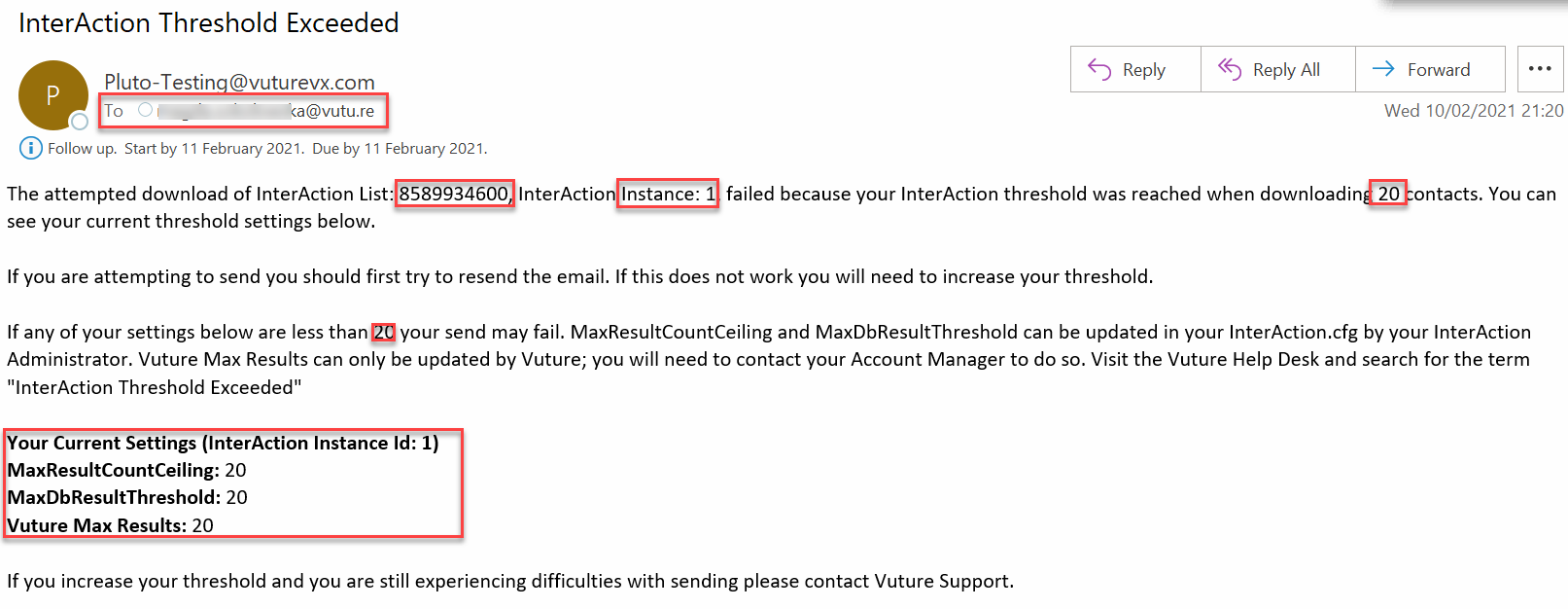
All of the items boxed in red in the email example above will be personalised to your firm's settings. The email includes details of which list is causing the issue.
Cancelling a Send when the Threshold is reached
When this config is enabled:
Admin.System.InterAction.Cancel send when threshold is hit
If a send is taking place and a list download exceeds the threshold, the send will be cancelled and the notification email will be sent. This is disabled by default because it is a new feature, but when enabled it will prevent you from emailing subscribed or suppressed contacts when your threshold is hit.
The check does not take place on the send screen for bounceback and suppression folders, but when the email send takes place. This improves performance over the old implementation as these checks can happen in the background while the send is taking place. If the threshold is exceeded by downloading any list, the send will be cancelled.
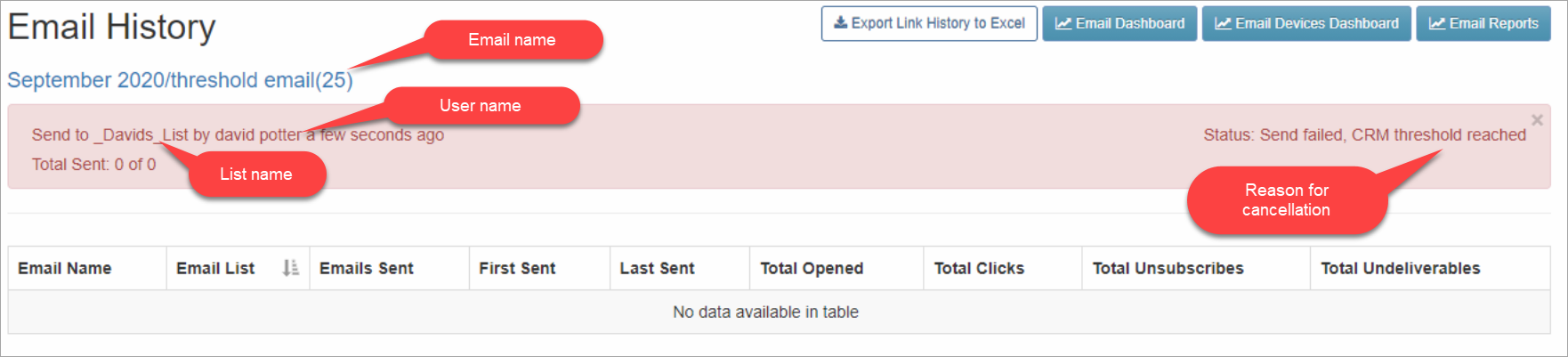
The send will also show as cancelled on the email history screen. An example of the email history screen is shown below.
How are List Sizes calculated?
Any Marketing lists selected together as one send will be counted together, and for all sends the global unsubscribes and the content type suppressions (Send No Invites for example) will also be counted together.
For example:
Threshold: 15,000
Global unsubscribe list: 10,000
Content specific unsubscribe list: 10,000
Bounces: 10,000
Marketing list: 10,000
This mailing will not work. It will be ok when we download the marketing list and the bounces, but will hit the threshold when we download unsubscribes (10+10 is greater than 15).
Another example:
Threshold: 15,000
Global unsubscribe list: 8,000
Content specific unsubscribe list: 8,000
Bounces: 10,000
Marketing list: 10,000
This mailing will also not work as per above.
Final example:
Threshold: 15,000
Global unsubscribe list: 8,000
Content specific unsubscribe list: 4,000
Bounces: 10,000
Marketing list: 10,000
This mailing will work because 8+4 is less than 15.
Warning: Our recommendation is that, unless you have a particularly powerful InterAction, you do not have any folder larger than 50,000 contacts. Larger folders may impact performance.
See here for a best practice article about large mailings. https://support.vutu.re/hc/en-us/articles/360020695378-Best-Practice-for-sending-large-email-sends
And here for another best practice article which addresses consent mailings primarily but which also has some good advice about large mailings in general. https://support.vutu.re/hc/en-us/articles/360020695358-Advice-for-Large-Consent-Mailings
FAQs
Q. Once the threshold is surpassed, how does Vuture decide on which contacts are sent the email?
A. If the config Admin.System.Interaction.Cancel send when threshold is hit is enabled, no contacts will be emailed.
Q. Given the threshold limit, at what level against threshold does Vuture issue the emailed warning alert?
A. When a call from InterAction returns the exclusion list of contacts it will also have a flag to say the threshold has been hit. We have an option to stop sending at that point.
Q. What folders count against the threshold?
A. We download:
- the marketing lists used as a list source
- the unsubscribes
- the bounces
Each of these is a separate call, and the thresholds would apply to each call individually.
However, the unsubscribes usually consist of a number of lists (main lists + content specific unsubscribe lists) - these would be brought back in one call and all count against any thresholds set in IA
Q. Can I get more than one user notified by email if there is a problem with a send?
A. Yes. Enter as many email addresses as you like, comma separated, in the config: Admin.System.Diagnostics.InterAction Threshold Exceeded EmailTo Address
Q. As a Super Admin user, can I change what the message says?
A. No. The message text is fixed since it is common to all instances and other errors. However, it will be personalised for you by including List ID and List Size.
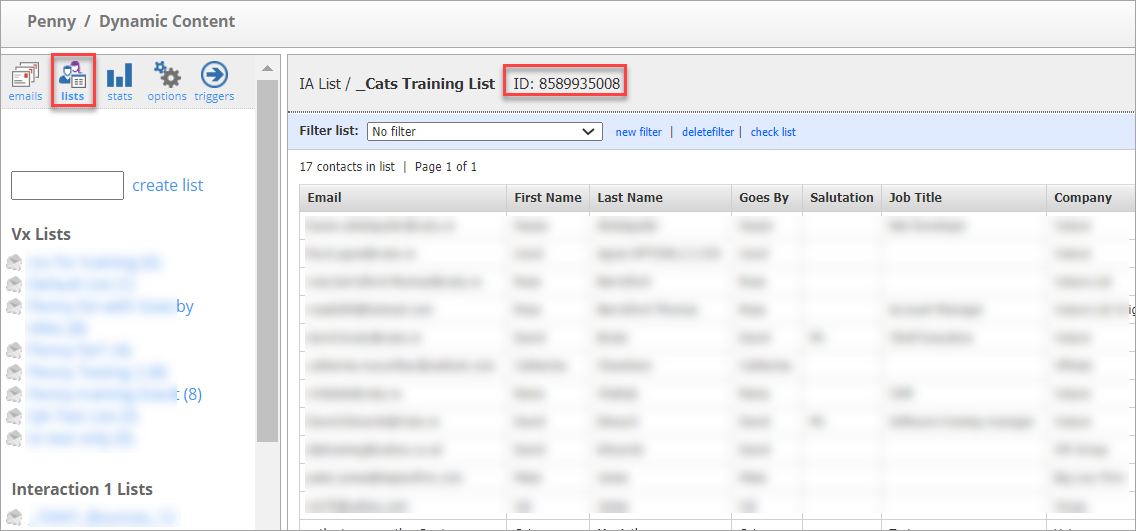
Q. I don’t know which list ID relates to which List Name. How do I find the list ID of a list so I know which list the email is referring to?
A. There are several ways to check the ID of an InterAction list. One quick way would be to visit the Lists area in a campaign, find the list name and click on it and then look at the top of the screen like this: You will see the list name and the ID together.