Update for October 2020: If your Litmus v1 Integration is no longer working, please ask your Client Success Manager to switch your Litmus setup to v2.
*Setup for this feature is chargeable. If you do not already have this available, please reach out to your Client Success Manager.
Prerequisites
Ask your Client Success Manager to switch Admin.System.Versions.Litmus API Version to version 2.
You will need to set up an account with Litmus (more on that below).
(Clients still on the v1 integration should now consider switching to v2. To read about v1 click here.)
What is Litmus?
Litmus is a third party email preview and testing service. Depending on the type of Litmus subscription you have, Litmus allows you to:
- See how the email will look in a range of email clients including mobile devices
- Check the email against a number of spam filters
- Check the email HTML structure for errors
- Preview the subject line in different email clients
October 2019: Our integration with Litmus has been updated to v2. This brings us in line with the updated API's from Litmus. We will retain the ability to preview emails across multiple email clients from within the Vuture platform.
All users who wish to use Litmus through the Vx platform, must first have a valid, active account with Litmus. However, you can first take advantage of their free trial and then choose to sign up for a Litmus account if you wish.
Which Litmus Account do you need to purchase?
https://www.litmus.com/pricing/
Vuture cannot advise you on specifically which account because it will depend on your firm's number of users and other factors. However, we can advise you that:
- V1 integration is not supported
- The accounts would need to be able to run rendering checks and also spam checks. The plus account appears to be the smallest plan that includes both of these
- You need a package that will allow for a certain number of log-in's. For example, a firm might have a package where you can have 5 user accounts. If the firm needs to have 10 people with their own login, that would need to be an upgraded litmus account
How much information is passed to Litmus from Vuture?
We only send the HTML of the email and a page identifier. Nothing else is passed to Litmus.
Litmus then runs in an iFrame so nothing is passed back to Vuture.
How do I use Litmus from within Vuture?
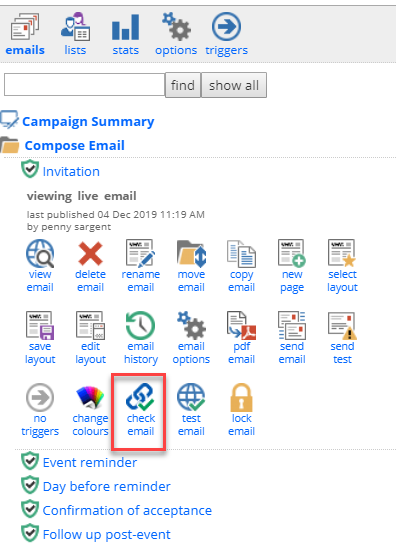
Click on the email you want to preview. (You must first have published the page at least once to see the Litmus preview).
Click on the "Check Email" option.
The Litmus screen will display, giving you a link to connect to Litmus if you are not already logged in, and an option to Sign up for a new account if you do not already have one.
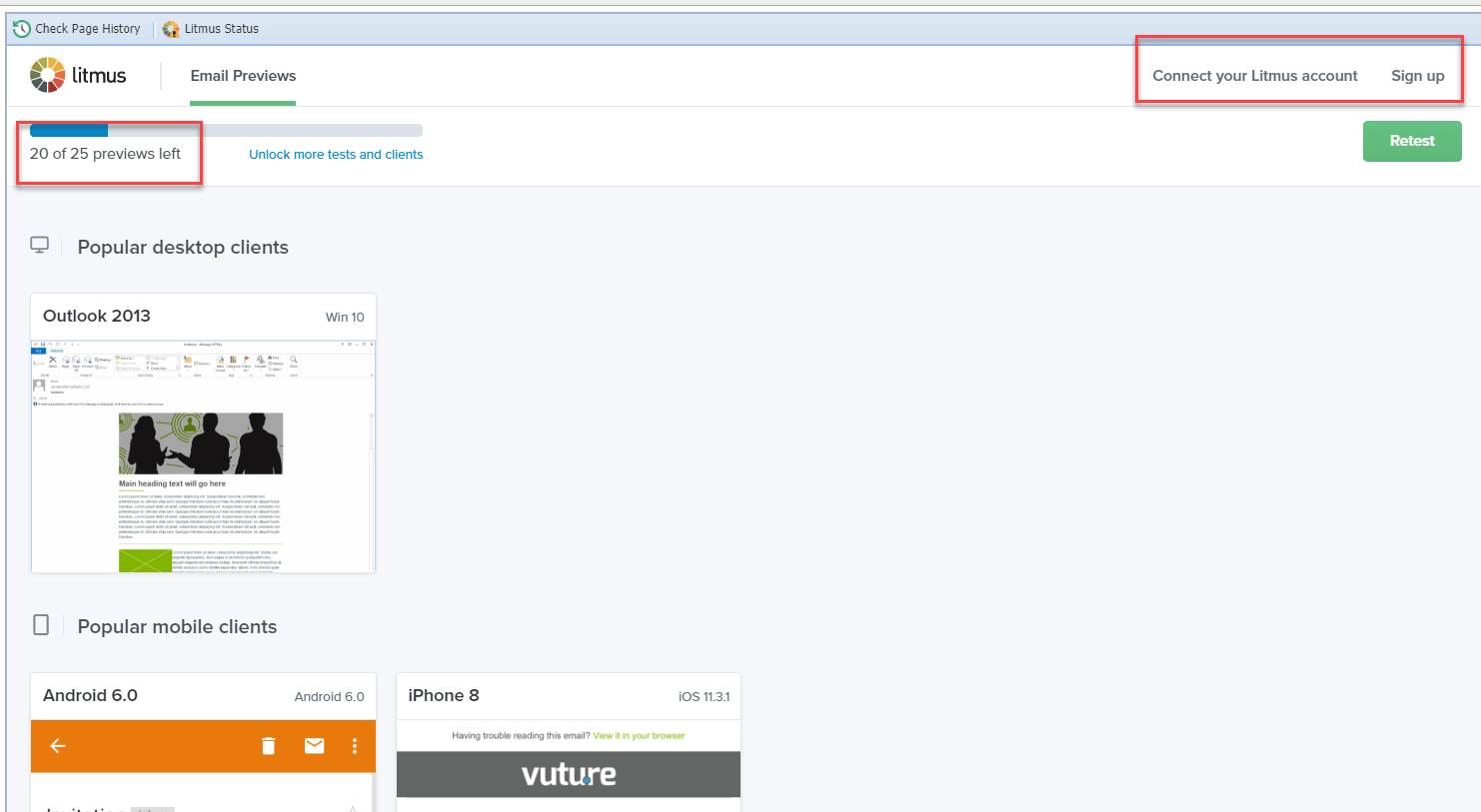
You will be invited to Connect your Litmus account or Sign up from here. Alternatively, use up your 25 free previews first.
The email clients that Litmus supports will display your email as they will appear to your contacts.
Which email clients does Litmus support?
Alternatively, the current full available list can be confirmed by checking the Litmus API - once logged in to Litmus go to:
https://litmus.com/emails/clients.xml
The list as of February 2019 is:
android4
android5
android6
android71gmailapp
android8gmailapp
androidgmailapp
androidgmailimap
androidgoogleinbox
androidoutlook
androidsamsung6
androidsamsung7
aolonline
aolonlinespam
appmail10
appmail11
appmail12
appmail9
barracuda
chromeaolonline
chromecomcast
chromefreenetde
chromegmailnew
chromegmxde
chromegoogleapps
chromegoogleinbox
chromelibero
chromemailru
chromeoffice365
chromeoutlookcom
chrometonlinede
chromewebde
chromeyahoo
colorblind
comcast
dkcheck
dkimcheck
eopspam
ffaolonline
ffcomcast
fffreenetde
ffgmailnew
ffgmxde
ffgoogleapps
ffgoogleinbox
fflibero
ffmailru
ffoffice365
ffoutlookcom
fftonlinede
ffwebde
ffyahoo
freenetde
gmailios
gmailnew
gmailnewspam
gmxde
gmxspam
godaddyspam
googleapps
googleappsspam
googleinboxios
googleinboxspam
ipad
ipadmini
ipadpro10p5in
ipadpro13in
iphone6
iphone6plus
iphone6s
iphone6splus
iphone7
iphone7plus
iphone8
iphone8plus
iphonese
iphonex
iphonexr
iphonexs
iphonexsmax
libero
mailcomspam
mailru
mailruspam
messagelabs
notes7
notes85
notes9
office365
office365spam
ol2000
ol2002
ol2003
ol2007
ol2010
ol2011
ol2013
ol2013dpi120
ol2015
ol2016
ol2019
ol2019mac
outlookcom
outlookcomspam
outlookfilter
outlookios
plaintext
senderidcheck
spamassassin3
spfcheck
thunderbirdlatest
tonlinede
webde
webdespam
windows10mail
yahoo
yahoospam
yandexspam
Litmus FAQ
1. Why can't I see some of my Litmus tests?
Sometimes not all of the email clients are available for testing from the Litmus service. In that case Vuture will not be able to generate the thumbnail for that particular email client until the client becomes available again.
Check the Litmus status page - https://status.litmus.com - to check for any issues with their service.
