There might be a few reasons for this. You can follow the steps below to troubleshoot.
Step 1. Junk Folder
Firstly, find out whether the emails you send them end up in their Junk folder. If they don't, go to step 2.
If they do end up in their junk folder, and they are the only client that you experience this with, it is likely that this client has a strict inbox filter. If your email goes into more than one contact's Junk folder click here for what to do.
Ask them to move your email to their Inbox and ask them to click on "Add to safe sender" by clicking on the following box in Outlook:

They will be given the following options. Ask them to click on Add Sender to Safe Senders List.
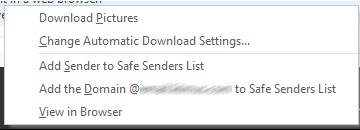
This effectively adds your email address to a local Allow List on their machine. Your emails should end up in their Inbox from now on.
Step 2. Emails are not in the Junk folder
If your emails aren't in their Junk folder then it is likely that they are being blocked by the company's email filter. These filters can be physical servers installed above the company's network such as Barracuda. Or they could also be third-party filters such as Cloudmark where the emails are filtered through the third party before they reach the company's server.
These email filters can be configured in many ways to minimize the number of SPAM emails that get to the employees' Inboxes. But it is important to note that these are company-wide filters and apply to all employees within that organization. Often, if your emails are being blocked at this level you may also find that there are other contacts in the same company who aren't getting your emails.
The first thing to make sure you have in place is an authenticated Custom Return Path. This vastly increases your chances of your emails ending up in the Inbox rather than being silently deleted. Get in touch with your Customer Success Manager to find out whether you have this set up. There is an additional charge for setting up a Custom Return Path but is an investment that will help your deliverability and it is a standard that becoming more and more necessary.
Step 3. Emails are still nowhere to be seen
If you have set up a Custom Return Path and your emails are still not getting through to your client, the easiest way to resolve this is to have the client add your sending domain and sending IP to an Allow List at the administrative level. You can find out more information here and also a template of what you could send to your client.
