Overview
In this article, you'll learn what list hygiene is, why it's important, and best practices to incorporate into your list hygiene strategy.
Contents
What is list hygiene?
List hygiene is important in order to keep an email marketing list viable. A list should be reviewed periodically to remove bounced email addresses, remove unengaged subscribers, and update any email addresses. It may also be necessary to periodically verify permission from the subscriber that they still want to receive messages from your organization.
Please note, Vuture will automatically suppress contacts who bounce consistently. However, these contacts information should be reviewed. Any contact whose email address is no longer valid, should be removed from the bounce suppression folder and archived so that they do not get added to any future lists. For more information on this, please review this article on bounces.
How do you know if your list needs to be scrubbed?
The very first thing you should do is check your metrics. Looking over a six to twelve month time frame, what does your open rate, click rate, and bounce or unsubscribe rate look like? How do these rates change from month to month? Do you see any dips in opens and clicks? Any increases in bounces or unsubscribes? How do your most recent sent mailings compare?
It is very likely that over time, you'll see a decrease in open and click rates, caused by a build-up of disengaged individuals. This means, you are sending to a high percentage of contacts that are not opening or clicking any of your emails. In fact, email list churn can eat up to 30% of your list each year.
And unfortunately, if your subscribers aren't opening or clicking, they also aren't being converted into customers.
Even worse, if they're tired of getting your emails and flagging you as spam, then they can be impacting your deliverability to the people on your list who do want to hear from you.
Additionally, some of these unengaged contacts, who haven't opened or clicked on anything in the last 3-12 months, could have had their email addresses turned into recycled spam traps. Consistently hitting these traps signals to ISPs and Blocklists that you practice poor data hygiene and are likely a spammer, causing your email to go right into the junk folder or worse, getting blocklisted.
So, how does email list cleaning help? Read on to discover the benefits of list cleaning.
Why clean your email list?
When you don't take care of something the way you should, it usually becomes unhealthy. Your email list is no different.
Having a large percentage of unengaged subscribers in your list means you're wasting valuable time, marketing energy, and revenue, marketing to people who aren't interested. It will also negatively impact your sender reputation, and therefore, your email deliverability.
This means, having a data hygiene process in place, is critical to your email marketing strategy. Below are just a few benefits you can take advantage of:
1. Better click and open rates
Click and open rates are percentages calculated from the total number of emails sent. Removing the non-openers and non-clickers by cleaning your list, increases the number of people who are participating versus the number you're sending. And even though these are the same people that were clicking and opening before, your clean list has just done one very important thing - removed the people who are reporting you as spam. Having a clean list also decreases the likeliness of hitting recycled spam traps.
2. Reduced bounce numbers
Bounced emails are just as bad for your reputation - and your email's deliverability - as spam complaints. A bounced email happens because a receiver's inbox is full, there's an error in their address, or sometimes a technical error. Either way, you want to keep your percentage of these down to keep your deliverability up.
3. Better Sender Reputation
Reputation is the level of trust you have as a sender. Reputation can be earned by demonstrating good sending behavior. It can, on the flip-side go down if you demonstrate poor practice.
An example of good sending behavior is to only send to contacts who have engaged (i.e. opens & clicks) with your emails in the past 6-12 months. An example of poor practice is sending to old and/or non-engaged contacts (i.e. opens & clicks) in the past 6-12 months.
Best Practice to add to your List Hygiene strategy
1. Get rid of the no-action subscribers
If someone is on your list but never opens your emails, remove them for the list. Why let them skew your metrics and open up the potential of them marking you as spam?
2. Be aware of where your data is coming from
Only send to contacts who have opted-in to receive emails from you. These are contacts who have submitted your Subscription form or provided consent in another legal way.
Remove any contacts who have not engaged in 6-12 months and/or where no clear opt-in was given.
3. Keep an eye on syntax errors
Someone quickly typed in an email address and didn't proof it, leaving you with an email address "@mgail" instead of "@gmail" and now you have an inactive email address. Check for obvious syntax errors where you can.
4. Target re-engagement
Low-activity subscribers may still want to engage. Send them an email letting them know you want to reconnect and ask them to click a confirmation button if they're interested. You may also wish to link to your Preferences form asking them to update their areas of interest. That way, you can send them the most targeted emails.
If these contacts don't respond to your mailing, you may then remove them from your lists and archive them in your database.
5. Keep your contact's information up-to-date
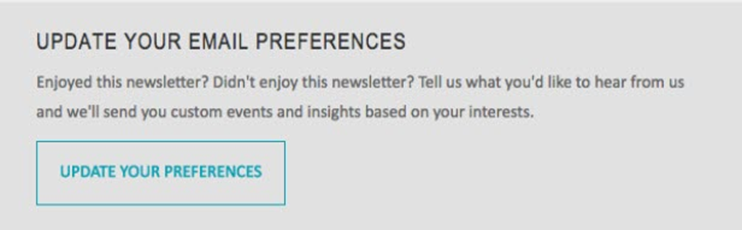
Ask your contact's to update their contact information and areas of interests regularly in a call to action (CTA) in your emails. That way, they can easily see the information you have stored, they can easily change their email address, job title, last name or company, and can change their areas of interest as needed.
Below is an example of a CTA you can include at the bottom of your newsletters.