Overview
This article gives you an overview of what blocklists are, how they work and what step Vuture takes if one of our IP addresses is blocklisted.
Contents
What is an email blocklist?
A blocklist is a real-time list that identifies IP addresses or domains that are known to send spam. They're used by organizations like internet service providers (ISPs), free mailbox providers, and anti-spam vendors to prevent spam from coming into their systems.
What are blocklists providers?
Blocklist operators exist to help police the spam industry and support Internet Service Providers. Most of these providers manage two different lists.
- The list of their own traps: These are called pristine traps or recycled traps. Read more about these spam traps here.
- The list of the blocklisted IP addresses, domains and email addresses.
The second list is typically senders who have emailed one of the email addresses on the first list. Or have a security risk of some sort. For example some domains can be blocklisted because they link to a known security threat like a worm or virus.
Sometimes sending to one trap is enough to end up being listed. Sometimes, it takes multiple sends over a period of time to trigger a listing. This depends on the blocklist provider. There are many different blocklist providers that exist and not all are equal or important.
Being listed with some blocklists wont impact you at all. Being listed on others could seriously affect your deliverability. We will notify you if you are on a bad blocklist.
While it may seem annoying to have emails you're carefully crafting rejected before they reach your subscribers, blocklists are quite helpful. Nearly 85% of emails sent daily is considered spam, so blocklists exist to keep a huge amount of unwanted messages out of people's inboxes.
Spamhaus, the operators of one of the biggest blocklists, has created a graphic to make it a bit easier to understand how and when a blocklist interacts with an email. Your email will go through some tests to see if it should be sent to the inbox or filtered as spam.
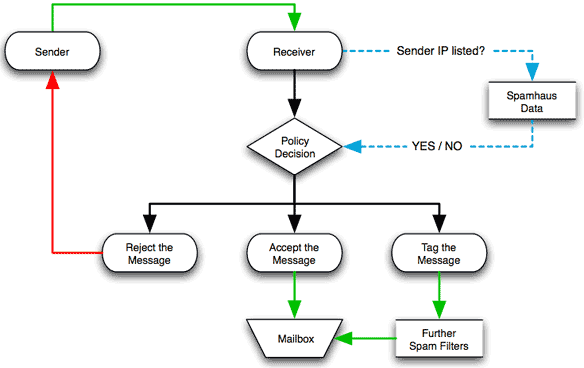
Source: Spamhaus
To summarize, you send your email (Sender) and it's received by an ISP (Receiver) who then decides if your email looks legitimate. If the ISP is using a blocklist, the email IP address is checked against the list. It then goes through the spam filters of the ISP to check for anything they don't allow. If the email passes these tests, it's sent to the inbox.
The actual rejection of an email address will come down to the policies of the ISP, as a blocklist is just one of the tools used to decide if an email is legitimate or not.
In the graphic, you can see an email can be rejected, delivered, or flagged as questionable based on the information from the blocklist and the policies of the ISP.
List of the most common blocklists
The most popular blocklists are maintained by companies that specialize in doing so. While there are many lists online, these are some of the most widely used:
-
Spamhaus Block List (SBL) - Spamhaus runs numerous lists that are used by companies and ISPs around the world - SBL Spamhaus Block List, XBL Exploits Block List, DBL Domain Block List, and PBL Policy Block List. SBL is the one most people are likely to run into when doing normal email marketing and sending to ISPs. They use known addresses and IPs of spammers, as well as spam trap addresses, to create their lists. Their spam trap addresses are commonly found on purchased lists.
-
Spamcop - Spamcop uses spamtrap addresses and spam reports to create their lists. They also apply a point system based on spam complaints before any address is added.
-
Invaluement - Invaluement uses a combination of 3 blocklists that they manage - ivmURI, ivmSIP, ivmSIP/24. Much like Spamhaus, each list is tracking different information but between them IP and domains are on their lists.
-
Barracuda - Barracuda's list is from the company that sells data, online software, and email security hardware and is primarily made up of addresses that spam their system.
-
URIBL - URIBL is a Realtime URI Blocklist (RHSBL) served via DNS to identify Unsolicited Bulk and Commercial Email (UCE/UBE) based on the links within the email.
-
SURBL - SURBLs are lists web sites that have appeared in unsolicited messages. Unlike most lists, SURBLs are not lists of message senders.
-
Composite Blocking List (CBL) - The Composite Blocking List (CBL) is a DNS-based blocklist. It includes email services suspected of sending spam as a result of a virus or malware infection. The CBL gets its data from large SMTP mail server installations, some of which are spam trap servers.
-
Passive Spam Block List (PSBL) - The Passive Spam Block List (PSBL) lists IP addresses that are unknown mail servers, when they send email to a spam trap and the message cannot be identified as non-spam.
How do companies get on blocklists?
Here are some things that can lead to blocklisting:
- Spam complaints - If the people receiving your email click the Spam button it leads ISPs to think your email content or list hygiene is bad. Even lists that are clean and opted in can have this happen, but it's still counted as a spam complaint. The more complaints, the more likely an IP will be on a blocklist.
- Bad lists or addresses - A lot of bounced email addresses are a tip to ISPs that your list may not be opted in or current. Some blocklists use spamtrap addresses to find spammers. A spamtrap is an email address that isn't used by anyone but might still be publicly found and harvested for lists. Any email sent to it will not be from opted-in lists and are often found on very old or purchased lists.
- A surge in list size - A good email marketing list will grow over time and new contacts, clients or prospects sign up to receive emails. If the size of an email list grows by a lot in a short amount of time, most ISPs (and email service providers) will suspect a list has been purchased.
Need to update your data hygiene strategy or come up with one altogether? Read this Help Desk Article for more information on list hygiene.
What does Vuture do?
We have tools that monitor these and many more blocklists 24 hours a day. These tools allow us to see which of our IP addresses are blocklisted as they happen.
When we receive a notification that one of our IP addresses has been listed we take the following steps:
- We identify which blocklist triggered the listing and which IP address has been listed.
- We try and find out which client caused the listing.
- Some, but not all providers give us more information about what triggered the listing. They typically tell us the subject line of the offending email campaign or sometimes the time when the listing was triggered.
- By process of elimination we can then work out which client and which campaign and mailing list triggered the listing.
- We identify whether the client has been listed before or whether this is their first time.
- We reach out to the offending client and request that they temporarily stop any further sending to that list. We look to understand more about their data and their send.
- We provide advice and suggestions on the actions the client needs to take depending on the circumstances.
- Once the client has taken the necessary steps we will reach out to the blocklist provider to remove the listing - also called delisting. We usually have to provide details of the actions that have been taken.
- If this is the only offense or there hasn't been a listing in a long time the delisting can be automatic even before we've reached out.
- Though this doesn't happen very often, if a client repeatedly gets blocklisted we will move them to a different IP pool so that they do not affect other clients.
How can being on a blocklist affect you?
Some of the major blocklists are used by ISPs as a gauge on who are good senders. If you are listed by these providers your emails may not be delivered to those particular ISPs. Some of them won't block your emails completely, they may just increase the chance of you ending up in the spam folder. It is a good general rule of thumb to get yourselves delisted from any blocklists and maintain good data hygiene practices. You can read more about how to avoid ending up in junk here.
Further links
Find out more about spam traps
Find out more about the steps to be removed from a blocklist
