How does your Vuture instance connect to your InterAction Application Server?
Your Vuture instance is your own dedicated web application that runs in the cloud and is hosted in one of our data centres.
- The application is not multi-tenanted and each client gets their own separate application, database and file store with dedicated credentials and encryption.
- The connection between Vuture and InterAction is a secure HTTPS link to your InterAction Web Client with requests always initiated from Vuture.
- You will need to open port (443) for incoming HTTPS traffic from the IP address of your Vuture instance, plus an additional testing IP address - we will provide you with these IP addresses.
- You should route the incoming HTTPS traffic from these IP addresses from the external interface of your firewall to the internal IP address of your InterAction Application server - typically this is done by creating a NAT (network address translation) rule on your firewall.
- You will need to set up a URL with a published DNS entry, pointing to the external IP address of your firewall, and a valid SSL security certificate for Vuture to connect to your InterAction Web Client.
- You should add this URL as a secure binding to IIS on your InterAction Application Server. It is not necessary or desirable to change any InterAction settings relating to HTTPS or SSL and you should continue to access the InterAction web client internally over HTTP.
Vuture can connect to an existing InterAction Application Server - or if you are expecting a high volume of traffic (email volumes in the millions) or you want to isolate the Vuture connection for security reasons - you can set up a new InterAction Application Server, connected to your existing Live InterAction database.
If you are working with LexisNexis on setting up a second InterAction Application Server we recommend you say it will be in a separate network zone rather than in a DMZ as they think this means you are opening up the whole of your InterAction to the internet which is clearly not desired.
The InterAction Application Server Vuture connects to can reside anywhere in your internal or perimeter networks as long as incoming HTTPS traffic can be routed to it. Some clients use reverse proxy or gateway solutions for added security which are fine as long as they don't modify the HTTPS requests and responses in any way.
When Vuture authenticates against your InterAction we recommend having both a Vuture InterAction Account - with username and password - and a Windows Account set up on your IIS. That Windows Account can either authenticate against your existing Active Directory or if you are using a second InterAction Application Server and it is not connected to your domain you can set up a local Windows account and configure IIS Windows Authentication to use that local account.
Typical Network Configuration: Example 1 - connecting to an existing InterAction Application Server
Typical Network Configuration: Example 2 - connecting to a secondary InterAction Application Server in a separate network zone
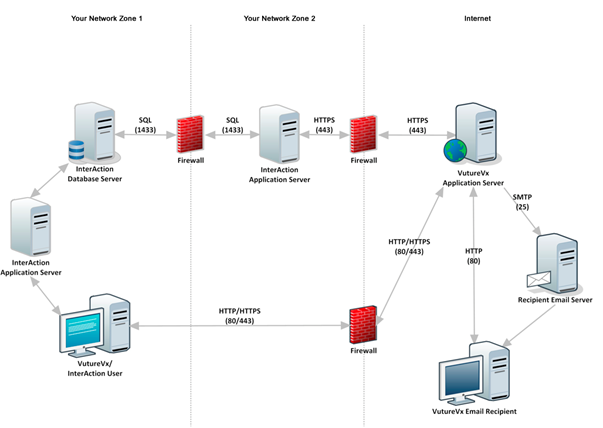
Advantages and disadvantages of each integration architecture
Vuture does not have a preferred integration architecture method and we work with your IT team and security policies to find the best fit between the two approaches above. The most suitable architecture will be determined by your InfoSec policies for allowing external parties to connect to your network and your usage of a DMZ
- Connecting to a DMZ based InterAction application server does not require you to move your existing Application servers from the internal network. The majority of our clients create an additional IA Application server in the DMZ if this approach is chosen.
- The connection from Vuture is over HTTPS, on port 443, using a valid SSL certificate and restricted by IP address to a Vuture server in our data centre.
Method 1: Connect to your existing InterAction Application server
- Does not require a new application server
- Keeps the number of application servers to maintain to a minimum
- As Vuture connects to the same server as your users, you will need to ensure that it has the spare operating capacity
- Any outages on your internal Application server will affect the Vuture platform availability to end recipients
Method 2: Connect to a DMZ based InterAction Application server
- Vuture connects to a dedicated Application server allowing to you manage the connection and security without affecting your internal users
- There is no impact on your existing server's load and performance
- Outages, restarts and maintaining your internal servers does not affect your Vuture platform availability to end recipients
- Marketing activity with large volume sends and form submissions will not affect your internal user's usage or performance of InterAction
- Any restarts required during your Vuture implementation project will not affect your user's usage of InterAction
How does data flow between Vuture and InterAction?
- Typically you will create a Vuture system InterAction account (see details here) which should have permission to read and write to all of your marketing folders, contacts and additional fields.
- When you create users in Vuture you can also enter their InterAction username and Vuture will only display the folders that that user has access to.
- All requests to InterAction are made using the Vuture system account but when requesting folders from the email send screen we pass the user's InterAction login name as a parameter and InterAction will return just the lists that user has access to.
- Pulling back folders and contacts from InterAction happens in real time.
- Writing back of most data such as adding activities and updating contact details is added to a queue which writes back the data asynchronously. We can control how quickly the data is written back to avoid overloading your InterAction server.
Data that Vuture can read and write:
- List of folders which can be restricted based on folder type
- Contacts within the selected folder
- Activities are written on email send, email open, link clicked, form submitted, unsubscribe and bounce
- Contacts can be added and removed from lists
- Contact information and additional fields can be updated
Additional Information, on how data flows between Vuture and InterAction, is available in the pdf downloads on this page.
Email sending (Contact, List/Field information)
Forms (Contact & List/Field information)
Activities (queued, Automatic, on demand)
Data Security
-
Connection to your IA Application Server is locked to IP address and secured by HTTPS
-
A limited number of web client calls (
see the full list here) are made to read and write data using a single Vuture account - we don't need any other user's InterAction password
-
You can add an extra layer of security by having IIS/Windows NTLM authentication as well as InterAction user authentication
-
Your Data Change Management (DCM) rules are respected
- Data being written to InterAction is managed through a queue which can throttle the number of requests being made and can retry or pause data transfer in the event that InterAction is not available or busy
- Vuture only retrieves data from InterAction as it is needed
- Basic list data is loaded to send out marketing campaigns, all other data is loaded for each campaign recipient as requested
Basic data comprises:
- Email Address
- First and last Name
- Company
- Job Title
- InterAction Contact Id
- InterAction List Id
- Sponsor
Data is retained in the Vuture platform for reporting purposes but can be archived on an agreed regular basis
We run daily vulnerability tests against our infrastructure to proactively look for issues and we perform real-time monitoring of traffic as it enters our system using next generation Web Application Firewalls which automatically block suspicious activity and is backed up by a team of security analysts who are available 24x7 to deal with any detected issue.
