There are countless factors that influence email deliverability. Unfortunately understanding the precise reasons that cause your emails to go into spam can be a bit of a mystery. ISPs are secretive about the algorithms they use simply because they don’t want real spammers to be able to bypass them. Often there is not one single reason why an email may go into the spam folder but a combination of reasons.
The list below is not an exhaustive list but they are things you can do pre-emptively to ensure that you do everything you can to maximize your chances of ending up in your recipient’s inboxes.
1. Setup a custom return path (CRP) with all the available authentications set up correctly. This includes SPF, DKIM, and DMARC.
The are 2 ways to check that these have been set up correctly:
a. Using the email deliverability health check on the instance (click on Home.Help.Email deliverability healthcheck). It will give you all the information required, plus give recommendations for your action.
Or
b. Go to https://www.mail-tester.com/
Send a test email to the temporary email address listed and then " Check the score".
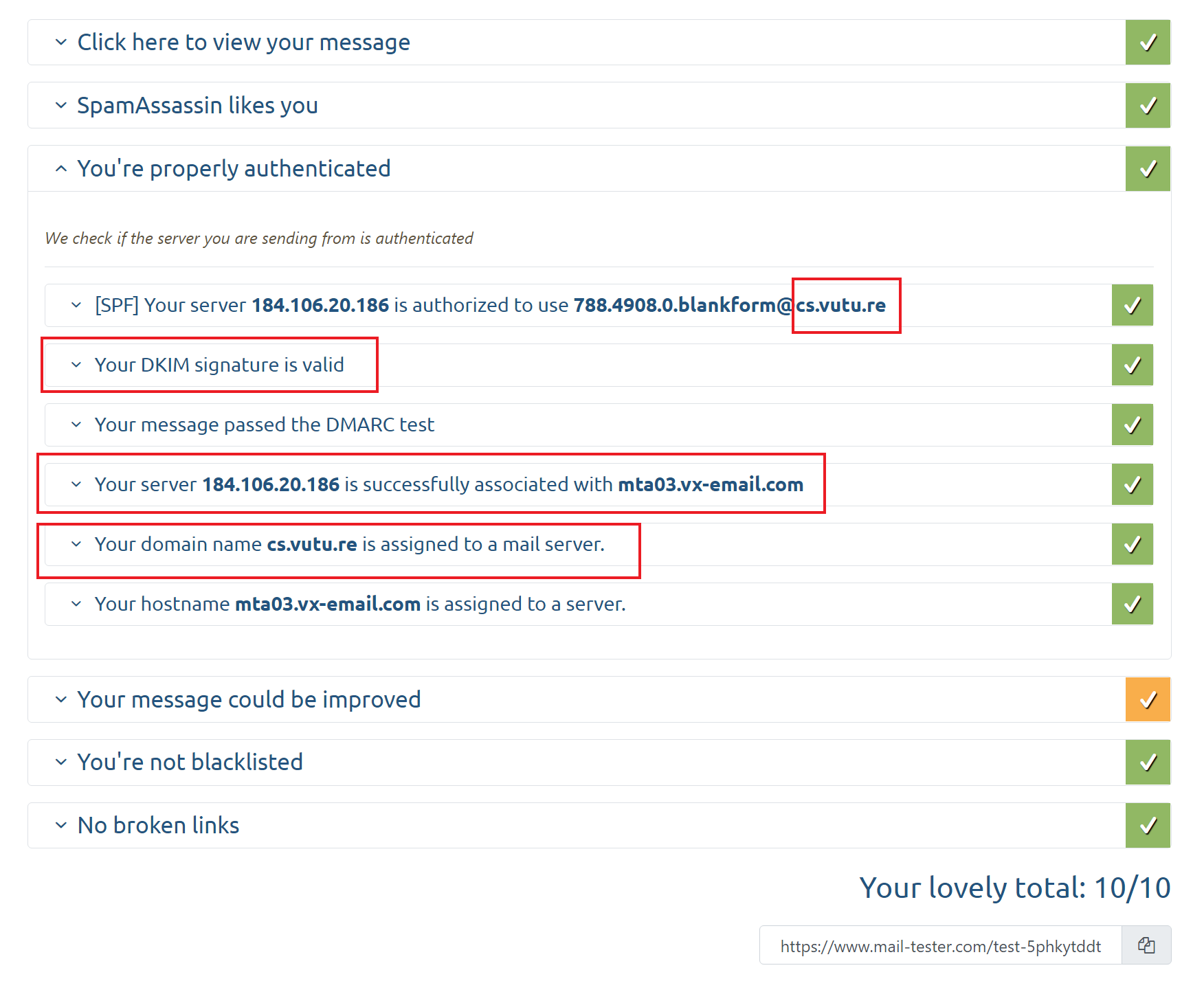
The fields show the Custom Return Path, DKIM Setup, DMARC Setup(Optional), and Server that sent the email. A minimum score of 9/10 is recommended.
2. Only send to contacts who have opted-in to receive emails from you.
- People who haven't opted-in are less likely to engage with your emails. Low open rates can reduce your reputation in the eyes of the ISPs/receivers.
- These people are also more likely to mark your email as spam or complain to the ISP. If this happens too many times your sender reputation can be reduced and your emails are more likely to be marked as spam.
- It's also against the law and could result in some hefty fines for engaging them. Unless someone confirmed they want to receive your marketing emails (according to the CAN-SPAM Act, this is called "express permission"), do not send to them under any circumstances.
- Other laws to be aware of:
-
Canada's Anti-Spam Legislation (CASL). A 2014 anti-spam law, CASL is one of the toughest regulations of its kind in the entire world. Businesses must get consent from Canadian consumers before emailing them.
-
General Data Protection Regulation (GDPR). CASL probably sounds familiar, given its parallels to the GDPR, which went into effect in 2018. However, the GDPR goes far beyond email with very strong consent provisions for collecting and using customer data.
-
California Consumer Privacy Act (CCPA). Creates new California consumer rights relating to the access to, deletion of, and sharing of personal information that is collected by businesses.
3. Keep your data clean and remove any invalid email addresses, unsubscribes and bouncers from your list. Don't continue to send to these emails.
- If you send to these emails you are likely to reduce your sending reputation.
4. Prune your email lists from time to time.
- This is as necessary as proper hygiene. Cleaning email lists every six months keeps them healthy, removing the inactive and unengaged members (i.e. no opens or clicks) of your email audience. These people may be pulling down your email marketing metrics and holding your email campaigns back from being even bigger successes.
- What happens with you don't prune your lists? Your bounce rates will skyrocket and even your most well-crafted emails may be mistaken for junk. Both situations lead to a lower email sender reputation.
- You can send a reconfirmation opt-in email to non-responsive subscribers, even adding a link to their preference page.
5. Never purchase lists. Purchased lists are against spam policy.
- On the surface, purchased lists sound like a good deal: you automatically get a large list of potential customers and with almost no effort. The downside is that sending out mass emails to any of these lists will quickly lower your reputation among spam filters. Not only are many of the emails on the list probably unused, but there could even be spam traps.
6. Avoid sending to old contacts that haven’t engaged in a long time. Consider introducing a sun-setting strategy for these contacts.
- Receivers often turn old email addresses into spam traps without warning and the more you send to traps the lower your reputation can become.
- It's better to have a smaller mailing list with a high engagement rate than a large mailing list with a small engagement rate. A low engagement rate means that your emails are more likely to end up in the spam folder.
7. Embrace the welcome email to new subscribers.
- Upon submitting your Subscription form, new subscribers should receive an email from you shortly after to welcome them into your email community along with next steps (e.g. update preferences, get the latest news, check out upcoming events, follow on social media, etc).
- This is also a great way to engage your new subscribers right away and keep your brand top of mind. Welcome emails have on average 4x the open rate and 5x the click-through rate of a standard email marketing campaign. It also shows a positive engagement to ISPs which leads to a better sender reputation.
- Find out how to setup an automated welcome email with a recurring trigger here.
8. Throttle your emails.
- Email throttling controls the amount of email messages sent to one ISP (Internet Service Provider) or remote server at one time. Sometimes ISPs block messages when a high volume is sent by one sender at one time, because they might be concerned its spam.
- With throttling enabled, this will add a 1 second gap in between emails sent to contacts at the same domain. While this will result in a campaign taking longer to send, it should have a positive effect on delivery. Read more about email throttling here.
9. Make sure the content you send is targeted and relevant.
- A major way you can avoid the spam folder is by focusing on email content that's relevant to your readers. After all, the more they enjoy receiving your emails, the less likely they are to flag them as spam.
- Here are a few tips to stay relevant:
- Know your subscribers. Understand their preferences.
- Create lists based on the interests your subscribers check off on their preferences form and send in smaller batches, with your most engaged contacts first (the ones that are most likely to open your message the moment it arrives). This practice builds your IP's credibility in the eyes of your subscribers' ISPs. It also helps to send super relevant content to your contacts.
- Always aim to add value to your reader's lives with each email you send. If there's no value in it for them, don't send it.
10. Don't use link shortening services or linking to domains with a poor reputation.
- Some link shortening services are often on blocklists so we recommend not using these in email campaigns.
- Avoid linking to sites that are not well known or respected in case they have a poor reputation.
11. Make sure that your unsubscribe link is clear and visible in your emails.
- If your recipient doesn't want to receive your email it is better that they unsubscribe than to mark the email as junk.
- It is also the law. The CAN-SPAM Act requires every email to include an unsubscribe link. It must be easy to find and simple to opt out of all future emails.
12. Include your physical address in all email marketing messages.
- Another stipulation of the CAN-SPAM Act is that you must include your address in all of your email marketing messages. In general, this shows that you're a real business with a physical location.
- Most companies add their address to their email footer.
13. Encourage your recipients to add you as an approved sender or add you to their contact list.
- They can do this either at the domain level or at the IP level. Read more information on here.
14. Make sure that you regularly review and update your HTML code.
- HTML code can become outdated which can lead to reduced sending reputation. Updating the HTML means that you can take advantage of new more efficient ways of coding. Get in touch with your Account Manager to arrange this (Chargeable work).
15. Avoid using all caps or multiple exclamation marks in your subject lines.
16. Keep a fairly even image to text ratio in your email content. Additionally, it has been historically recommended to Link images rather than embed them to improve deliverability, it seems that now this not as much of a concern. However, it may be something to check if you have embedded images and have deliverability issues, try linking them instead.
Simple Analogy: Sending reputation is a bit like a friendship. Imagine that you keep doing things to a friend that breaks their trust in you such as missing birthdays, or being rude to them, sending them nasty messages or talking about them behind their back. They may not break their friendship with you straight away but if you continue to do either the same thing repeatedly it is likely they will stop being friends with you. Similarly, if you keep doing things that are considered poor practice then the receivers are more likely to mark you as spam.
