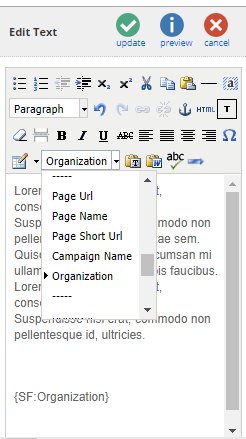
Vuture allows personalisation fields to be used in email subject lines and the body of emails and landing pages.
The following are personalisation fields available for OnePlace CRM users. They can be selected from the text editor (or manually typed) and will feed from the OnePlace instance.
{Email}
{First Name}
{Last Name}
{Goes By}
{Company}
{Job Title}
{From Name}
{From Email}
{From Job Title}
{Title}
{Date}
{Salutation}
{City}
{Country}
{DateISO} (e.g. 2018-07-06)
{DateTimeISO} (e.g. 2018-07-06 10:23)
Please note, if you would like to use:
{Title}
{Salutation}
{City}
{Country};
your Account Manager can set them up by following these steps:
1. Add the fields to "Admin.System.Salesforce.FormFields" as shown in the table below:
| Key | Value |
| City | City__c |
| Country | Country__c |
| Salutation | Salutation__c |
| Title | Title__c |
2. Click on "Create Objects" to update the Vuture object in Salesforce with the new fields.
3, Click "Validate" to confirm that the fields have been created correctly.
IMPORTANT: If there is any issue creating or validating the fields, revert the change in point 1 above and contact Vuture Technical Services
4. In "Admin.System.EditOptions" Enable "Include address fields"
5. Create a OnePlace form in an email campaign and verify the fields are working correctly.
Personalised Variables
Personalised variables allow you to personalise the content of emails or landing pages. It works by dynamically displaying the value of a OnePlace contact field.
To use this functionality please contact your account manager. You will need to provide them with the OnePlace field name (e.g. Organization) and label (e.g. OrganizationName__c) which they will add in "Admin.System.Salesforce.Personalisecontactandleadfields" as well as enable "Admin.System.Salesforce.Replacementoncustomfields"
Please note, the Field name should only contain alphanumeric characters.
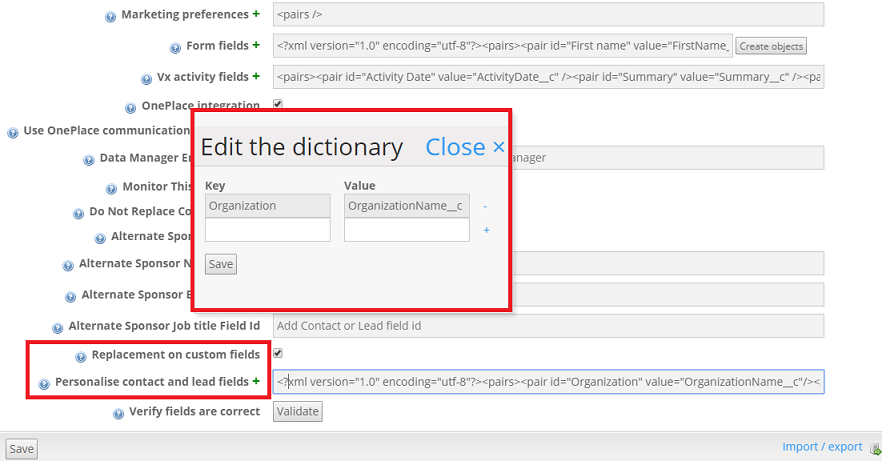
Once set up, you will be able to add the field into your text through the text editor or manually, using the "Key" as the placeholder text prefixed by "SF:" (e.g. {SF: Organization})