Keywords: Payments Module, Stripe, FAQ, InterAction, Standalone
Payments FAQ Overview
This article answers the frequently asked questions about the Payments Module. Check out the full list of questions below and click through to find the answer.
There is also a full User Guide referenced here.
Contents
General
- How can a client request a refund if someone purchases a ticket on their behalf? Do they need to know the name of the person who purchased the ticket for them, the confirmation code, or can they use their own name?
- If I want a refund but my ticket was purchased on an order with other tickets, can I get a refund for just one ticket or only the whole order?
- Do you support recurring payments?
- Can I use multiple Stripe accounts?
- Who helps us set up the integration and training? Is this person familiar with Stripe?
- How are we able to segment what payments are for and how much has been paid for an event?
- Are we able to login to the Stripe account and see the segments?
- Are we able to export information from Stripe with payment details (amount, person’s name, event participants names)?
- Are we able to create multiple event payment pages as needed?
- Are we able to upload an image to the page (not a logo, but a reference to the event)?
- Are we able to add a longer description on the payment page?
- What does the payment confirmation page look like and is a confirmation email sent to the contact AND a designated address?
- Can we adjust the browser tab description?
- What integration method is used to connect to Stripe?
- What is the minimum amount I can charge with Stripe?
- Will the Payment page prefill with my contact's details, if it is accessed from a Blank Form in Vuture?
- How can I change the text in the site footer page, or in the Payment Successful email? For example, when my company has a new address?
- Can you submit payments for more than 1 person? Will both of those people get individual invoices or only the main person who submitted it?
- Would both of those contacts have the same invoice ID # in InterAction?
- Can the confirmation emails go to each of the individuals for the payments if more than one person was submitted in a submission?
- Can the client see the cancellation request and the invoice number and amount?
- Name change in Stripe - if they need to change the person who is attending the paid for event, would the invoice update with the new name and send to the new person?
General
How can a client request a refund if someone purchases a ticket on their behalf? Do they need to know the name of the person who purchased the ticket for them, the confirmation code, or can they use their own name?
The confirmation code would be easiest, but the Vuture reporting contains the name so you can find the confirmation code. The refund is done through Stripe.
If I want a refund but my ticket was purchased on an order with other tickets, can I get a refund for just one ticket or only the whole order?
It should be possible to offer partial refunds through Stripe - see their website for more details.
Do you support recurring payments?
Stripe does have support for recurring payment, which they call subscriptions, but there is currently no way in Vuture to set up recurring payments.
Can I use multiple Stripe accounts?
Currently you are limited to a single Stripe account per Vuture instance.
Who helps us set up the integration and training? Is this person familiar with Stripe?
Your Project Manager will setup the integration on the Vuture side (there are some actions that need to be carried out on your side including your Stripe account) and will book in training with our training team. They are familiar with the Stripe integration through Vuture. You may need to contact Stripe Support for queries beyond this scope.
How are we able to segment what payments are for and how much has been paid for an event?
Each Payment landing page you set up comes with its own Payment report. This includes every person who has paid for the event (either marked in green or yellow) and those who still have yet to pay (marked in white). It exports in Excel so it is easy to run a total figure for a specific event and to see every individual transaction. For more information on this report, please review this article.
Are we able to login to the Stripe account and see the segments?
It’s your Stripe account, we don’t have access to it. Stripe holds the information Vx sends to them which will include what the person paid for. Stripe is only passed the name of the payments page, information on how many of each item were purchased, and the card details. No personal information about individual tickets will be passed through to Stripe.
Are we able to export information from Stripe with payment details (amount, person’s name, event participants names)?
You can export details from Stripe. Stripe contains the payment page name, total amount paid, a brief description of each item purchased, and the cardholder’s name. It does not contain personal information about individual tickets, this is available in Vuture reports.
Are we able to create multiple event payment pages as needed?
Yes, you can create as many payment pages as you need within an event email campaign.
Are we able to upload an image to the page (not a logo, but a reference to the event)?
No, you can just use your logo on the payment pages.
Are we able to add a longer description on the payment page? We usually have a paragraph that relates to the event.
There is space for a description. It is limited to one paragraph.
What does the payment confirmation page look like and is a confirmation email sent to the contact AND a designated address?
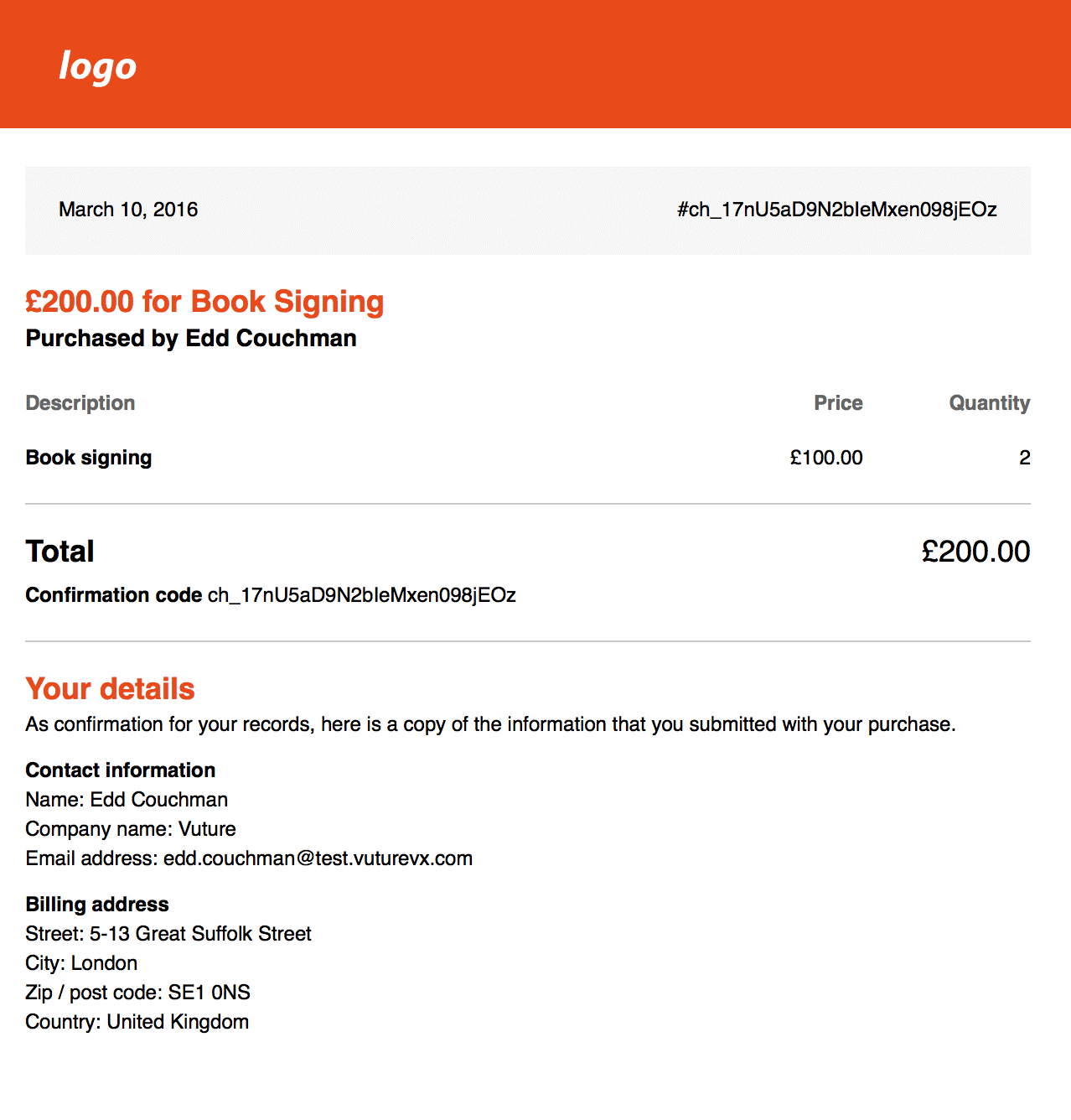
The payment confirmation emails, or receipts, are sent to the contact and also BCC'd to the "Receipt from address" (this is configured as part of the Vuture setup). See example below:
Can we adjust the browser tab description?
Not currently.
What integration method is used to connect to Stripe?
We connect directly to the Stripe API.
Although the notes on the Stripe PCI compliance page says is it is discouraged to avoid handling card information, we do not store any of the card information. It is passed directly to Stripe and never recorded in our system.
What is the minimum amount I can charge with Stripe?
This is up to Stripe and can be found here.
Will the Payment page prefill with my contact's details, if it is accessed from a Blank Form in Vuture?
Yes, Vuture can now prefill the following details in the payments page in Stripe when the contact submits a blank form and is redirected to the payments page:
Full Name
Email Address
Company
This information is stored in the Payments configuration page. Ask your Customer Success Manager or Support to access: Admin.System.Payments. From here they can edit a variety of configs including:
- Receipt From address
- Receipt From name
- Site footer text
- Receipt footer text
- Success message text - including who to contact if client has problems with the payment
IMPORTANT: If any changes are made to these config settings, it is necessary to Save the config page before leaving the Admin area. It is also necessary to then go to the Payments page in the campaign and re-save that page with a Publish. If these two areas are not saved again, any changes (for example to a footer address) will not be visible.
Can you submit payments for more than 1 person? Will both of those people get individual invoices or only the main person who submitted it?
Yes, you can submit payments for more than 1 person by checking the box "Is this an event?". However, the main person who completed the payment page will get the invoice. Additionally, the Payment Additional field will be written back only for this person.
Best practice is for each registrant to submit their own RSVP form and payment page, for each person to receive an invoice, and have the RSVP and Payment Additional fields write back to their individual contact record.
Would both of those contacts have the same invoice ID # in IA?
In the example above, the main person who submitted the payment is the only one who would have any information write back to their IA Contact Record.
Can the confirmation emails go to each of the individuals for the payments if more than one person was submitted in a submission?
No. Please see best practice advice above.
Can the client see the cancellation request and the invoice number and amount?
All refunds/cancellations are handled in Stripe.
Name change in Stripe - if they need to change the person who is attending the paid for event, would the invoice update with the new name and send to the new person?
No. The invoice is only sent after the payment is first completed. This is likely a Stripe question on changing the name of the person who paid.
Can a client update the name of a person listed on the Stripe Payment page invoice in Vx?
To ensure the change is completed on both the Stripe Payments page in Vuture and in the email confirmation from the client’s @payment emails, you will need to go into Admin>System>Payments>Scroll down to the two footer fields and update the information. Once completed, the client will also need to be sure to save their payment page after the change has been made.
InterAction Specific
Can a completed payment write back to an additional field in InterAction?
Yes, it is possible to write back to an additional field in InterAction, as well as, write back an activity. For more information on the additional field write back, please review this article.
Can I pull a list of paid clients from InterAction or only from Vuture?
You can get a list of paid clients in InterAction by searching on activities. Vuture reporting groups payments by campaign.
In the IA activity, will we see how much was paid for an event if a discount code was applied vs. full payment?
The activities contain the total amount paid and details of each unit sold. They do not include discount information.
Where is the name information captured? In IA or Stripe?
The name information is captured in the Vuture report and is written back in the InterAction activity against the contact.
Can the pay-on-the-day options be set separately for each payment form if I have more than one payment form in a campaign?
Yes, it is possible to set the pay-on-the-day options separately for each payment form in a campaign. This applies to both existing and new payments.
If one individual pays for multiple people, does that single payment for multiple people write back as a single InterAction activity or does it create InterAction contacts for each individual?
No, we write the activity back against the original contact making the payment only.
Is it possible use multiple confirmation email addresses?
No, you can only use one email address.
