There is a webinar covering this topic which is available, on demand, here.
What is an Active Directory?
An Active Directory (AD) is a database (or directory) that contains critical information about an organisation’s environment, including what users and computers there are and who’s allowed to do what. It typically contains Security Groups and Distribution Groups.
Vuture is mostly interested in the distribution groups (lists) within the AD, as this will contain the employee information (name, email, job title, etc) that our clients will need to send emails via the platform.
Why would an integration with the AD be useful, over uploading standalone or .csv lists?
Uploading .csv involves manual effort
It is a manual job to extract the data, or build and administer an internal process to extract and import data.
The data integrity is at risk
By extracting the data manually and reimporting, the data becomes a snapshot, and very quickly can become out of date. Furthermore, there is opportunity for data corruption during the extract/upload process.
Will any version of AD work for this integration?
The only version that will not work is purely On Prem. As long as you have a hybrid version or use Azure it will work fine.
Is the AD integration the same as a CRM integration?
Integration - No. The AD is not a CRM, as it does not allow Marketing to go in and manage contact information, preferences, invites, etc., nor does it write back any activities (or anything at all) to the AD. The integration is Read Only and is managed by your IT team.
User Experience - Yes. The user experience is almost exactly the same in Vuture. For example, selecting a data source, selecting a list, and sending an email. The AD will be presented to enabled users in the drop down list of integrated CRMs, as a potential data source.
Reporting - Yes. All the usual Vuture reports and dashboards are available, exactly as with any send from Vuture.
Will the AD integration write to our CRM?
No. The AD integration, and any CRM integration you may already have, are two completely different products. There is no write back to the AD and there is no cross over between your AD and your CRM.
What could be some possible scenarios for using AD integrated with Vuture?
Scenario 1:
Client wishes to email a copy of a client mailing to all London or all New York staff, using the Distribution Groups available in the AD.
Scenario 2:
Client wishes to email staff in a Disaster Recovery situation. Distribution Groups divided by location, will assist in this process.
Scenario 3:
Client wishes an automatic, Welcome or Onboarding email to go out to all new staff, triggered by their new email address being added to AD. The Welcome email could contain basic, personalised content. The Recurring trigger could be set up to send daily, and the list automatically refreshes on send.
What will this AD solution do?
The solution will Sync and it will Send:
Sync
- The integration will pull in the latest Active Directory Distribution Groups & Members; and it will give users the ability to view the resulting lists in the Contacts Module (although use of the Contacts Module is not an essential prerequisite.)
- The integration will do an automatic Refresh of the list on Send, and hourly thereafter. If you need to Refresh otherwise, there is a manual Refresh the Data button, on the Send screen. Alternatively, there is a manual Refresh option from within the Contacts module.
Send
- Email any groups available on the AD Connector, using the standard send, or using connector-enabled triggers.
- Use core fields from the group members, to personalize email sends and/or to filter the list before sending.
- Consistent branding is made available for all communications.
- Opens, Clicks and Forwards will enable clients to understand their internal engagement from their staff. This information will be stored in Vuture and will be available from Vuture reporting.
Do we need to have a whole new set of templates?
No, if you are happy to have the same brand identity for external and internal communications, then your existing templates will be fine. You could also get new templates made, for internal use only, if you wish.
Further FAQs
Q. Is it possible to add contacts to a list in AD Connector and have this add contacts to the active directory on the client's side?
A. No this is not possible. The Active Directory Connector is read only. We do not write back to the client's AD.
Q. Can I use my AD integration to manage internal events?
A. No. The AD integration is read only. It will not write back event responses. There is an article explaining this here.
Q. The client has lots of dynamic lists in AD, can we pull these through into Vuture?
A. Yes.
Q. In AD terms, what is the difference between dynamic lists and static lists?
A. Unlike regular distribution groups that contain a defined set of members, the membership list for dynamic distribution groups is calculated each time a message is sent to the group, based on the filters and conditions that you define. When an email message is sent to a dynamic distribution group, it is delivered to all recipients in the organization that match the criteria defined for that group. For example, you might set up a dynamic list for everyone in a department and it will automatically pick up everyone who is marked as being in the department.
Q. How long will an AD project normally take?
A. It should take about a month, but that will depend on the client, the quantity of lists and the availability of the client's IT team members.
Q. Can you select Multiple Lists?
A. It is currently not possible to select multiple lists when use Active Directory.
Q. Connection is failing.
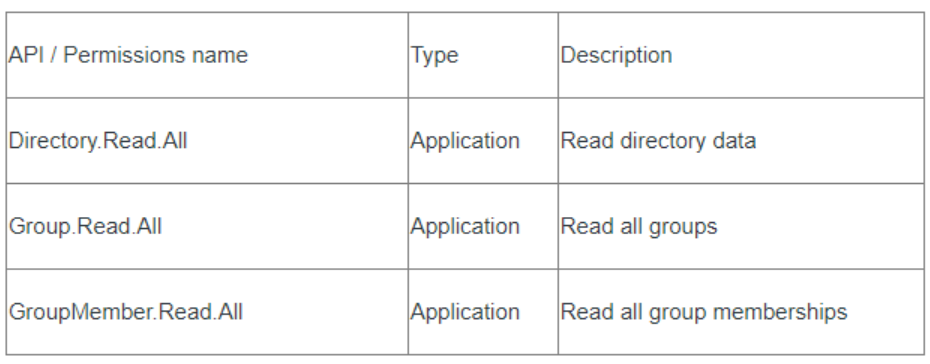
A. If the API permission type is incorrectly set as delegate then the api call will fail. Ensure that API permission types are always just Application; NOT both types (delegate and Application).
Q. Can I delete Active Directory lists from the Global Lists section in the Contacts Module?
A. This is currently not possible, please reach out to Vuture Support if you are needing to delete any lists.
