When retrieving contacts from the CRM to be displayed on the Send Email/Send More screen Vx will pull back all contacts on the list(s) irrespective of the fact the contact is subscribed or not. By default, unsubscribed contacts are suppressed at the point sending, based on the Dynamics contact field name configured in "Admin.system.MicrosoftDynamics.Unsubscribe field name"
You can enable a global setting that will change this default behaviour and not retrieve unsubscribed contacts on the Email Send/Send More screen. To set this, please contact your Account Manager. You will have to provide them with the contact field information. Please note, you are only able to filter on one contact field at a time.
For two-option fields, (i.e. true ['1'] or false ['0']) you should provide the name of the field (see images below). Your account manager will enable "Admin.System.MicrosoftDynamics.Hide Unsubscribe Contacts" and add the field name in "Admin.system.MicrosoftDynamics.Unsubscribe field name". Adding the name of the field will filter out contacts who have a value of true ('1'), in the example below, this is the 'Do not Allow' value.
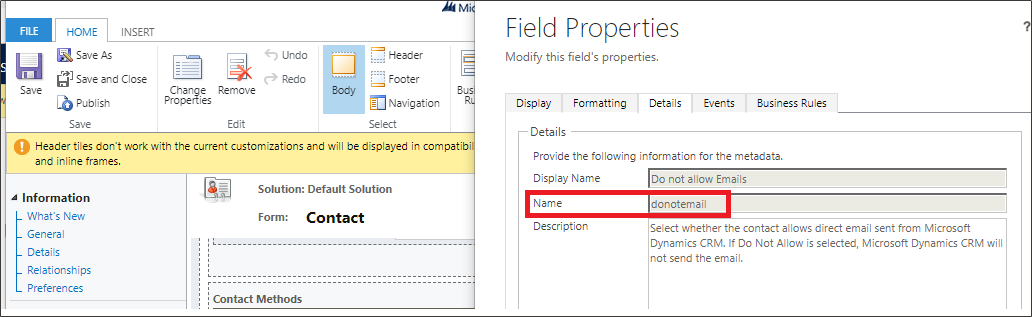
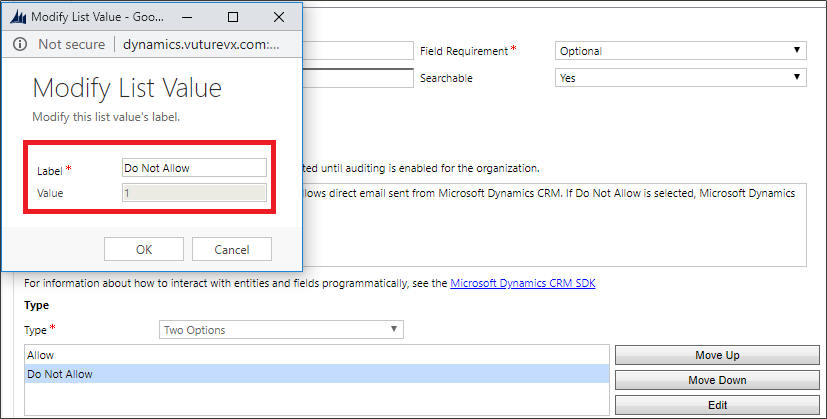

-
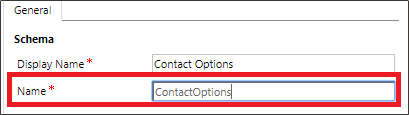
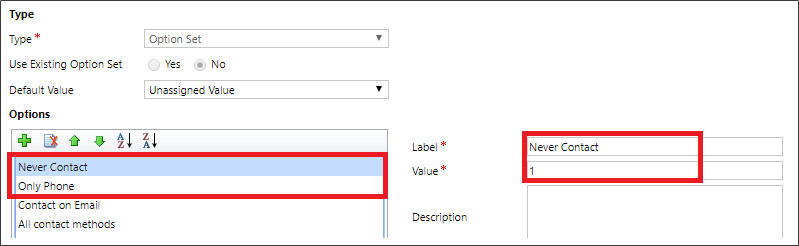
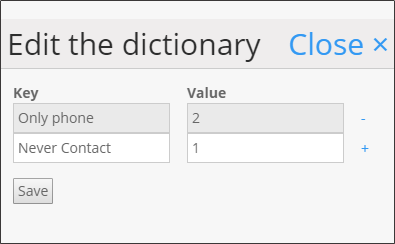
For Option-set fields, you will need to provide the field name as well as the values on which you want to filter out. Your account manager will enable "Admin.System.MicrosoftDynamics.Hide Unsubscribe Contacts", add the unsubscribe field name in "Admin.system.MicrosoftDynamics.Unsubscribe field name" and values to filter out in "Admin.system.MicrosoftDynamics.Possible unsubscribed values". The example below will filter out contacts with the values: "Never Contact" ('1') and "Only phone" ('2').