If you have a ContactEase CRM integrated with Vuture, and you then switch to using the Connector in order to benefit from using the Events App, you will notice the following differences in user experience across the different screens of the Vuture platform:
Send Email Screen
Email Lists – only lists imported from the CRM into the Vuture Connector will be displayed at the point of sending an email. You can only send to a single list per email send.
Email Type – The values come from previously configured Email Types for unsubscribes. To change these, please contact your Account Manager. They can update these settings in the CRM Metadata Manager.
"Refresh this list" - pulls from ContactEase and updates the list in the Send Email Screen in real time to show you the latest data.
"Status" column – can have two possible values: Subscribed and Unsubscribed. A contact will be shown as Unsubscribed only when they have unsubscribed globally. If they have unsubscribed only from certain email types, they will be shown as Subscribed.
If you currently have features (some triggers, Forward to a friend, View as Contact) working in the integrated version which are not yet available in the connector version, you could have two systems running together, called different names.
Your account manager can enable the Connector for ContactEase in one instance. You could use this one for importing lists, adding fields to forms and the Events App including sending invites and receiving RSVPs. Ask them to name it CE with Connector in Admin.ExternalSystems.
They can then set the same CRM login details for the another copy of the same ContactEase but not enable the connector in that instance. Instead they would use the classic Vuture integration. Ask them to name it CE with Integration. You could then choose "CE with Integration" from the drop down in the Send Email screen.
There is an article here about using Categories to filter with ContactEase.
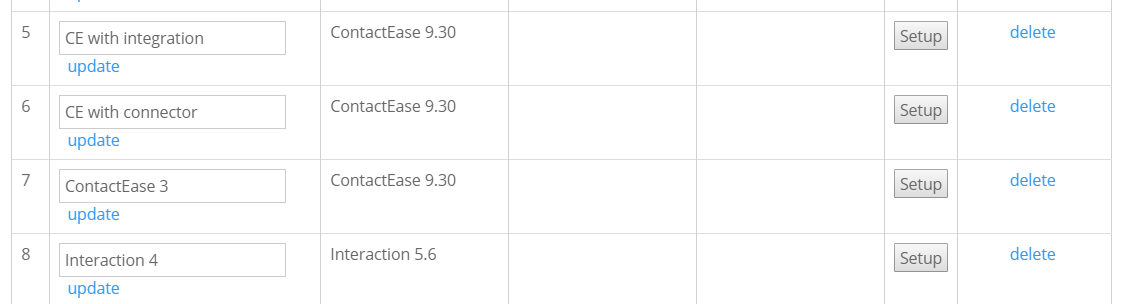
Image showing multiple CRM instances linked to one Vuture instance, including two integrations of the same ContactEase database, one linked with the connector and one linked with the classic Vuture integration.
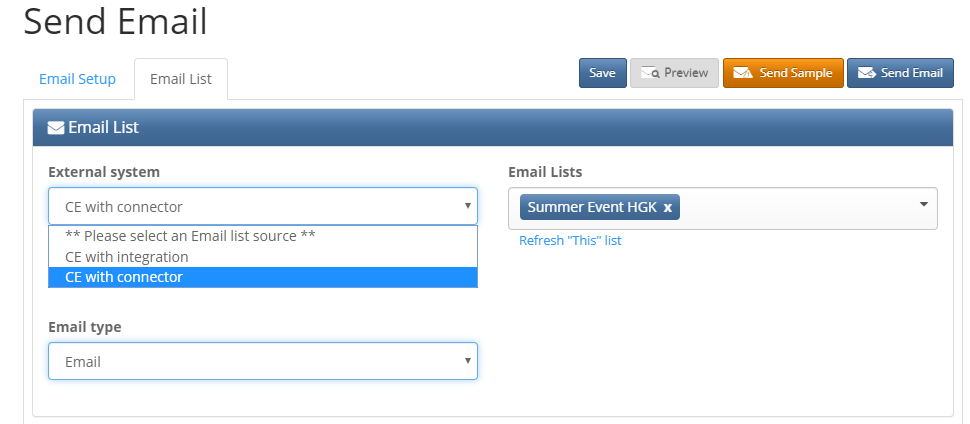
Image showing the two ContactEase integrations in the Send Email screen.
Test Email Screen
Email Lists – only lists imported from the CRM in the Vuture Connector will be displayed. You can only select one list.
For more information on the Test Email Screen, please click here.
Campaign Summary Screen
Email Lists – only lists imported from the CRM in the Vuture Connector will be displayed.
For more information on the Campaign Summary screen, please click here.
