When looking to find a way in which an IA user could find every contact with the additional email address Home in the Description and change the primary email address description to Has Alternate, here are some options:
There are at least three ways to do this, but each of them involves the user being comfortable with at least one of the three import functions and the ability to export data from IA. You should consult your LexisNexis Client Adviser to discuss this, or contact the LexisNexis InterAction Support Team for assistance if necessary.
Suggested Solution 1:
- Create a search to find all contacts with an email address where location = home or description = “Home”
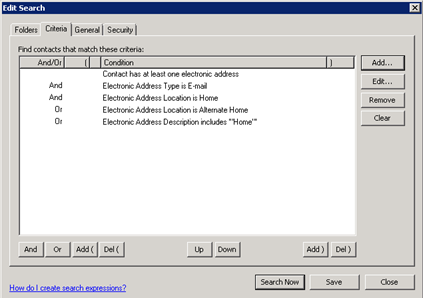
- Export the data using IA’s inbuilt tool
- Include the address id, and contact id, primary email address, primary description, 2nd email description, 2nd email address
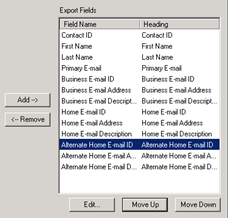
- Open the resulting exported CSV file
- Remove any columns not required

- Update the Primary Email address description to Has Alternate

- Update the 2nd email description to your Alternate tag (e.g. ForVuture or PersonalEmail)
- Use either Advanced Import or Application Collaboration to create an import that updates the description of the matching Address for the relevant contact.
Suggested Solution 2:
Use SQL Query to update the matching contacts’ address description. Note: This solution will probably require the assistance of your IT department or an InterAction consultant.
Suggested Solution 3:
Use SQL to extract the data and also format the extracted data to be suitable for use in the import.
Use Advanced import or Application Collaboration to update the data. Note: This solution will probably require the assistance of your IT department or an InterAction consultant.
