Overview
By default, Vuture's secure web sites such as Alumni Site or Secure Event Site require an email address and a password to log in. Double Opt-In Login is an alternative method of accessing a secure site that doesn't require the user to remember their password. Instead they enter their email address and if it matches a registered user they then receive an email with a temporary link that lets them log straight into the site.
Log in Process
When a recipient clicks on a link to the secure site, and they don't have a secure site token, they are directed to a login page which only asks for their email address. Once submitted, they receive an email with a temporary link to the secure page if they exist as an enabled user in the secure site database. This link is only valid for a predetermined time limit, which you can specify, in minutes.
For users who do not already exist in the secure site database, you are able to send a different email which can be fully customised. This email could contain a link to a registration page which will allows the contact to register as new user.
Double Opt-In Login Set up
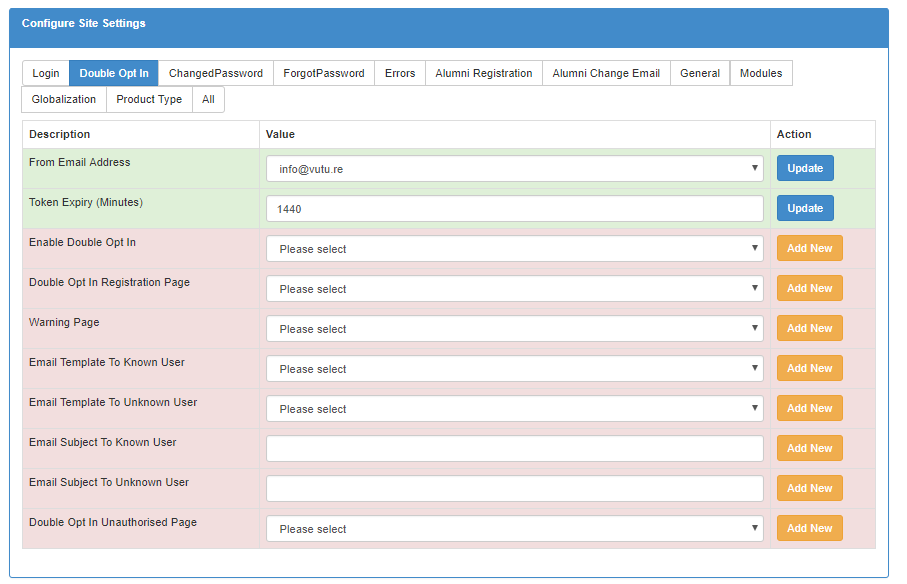
To configure this feature you will have to go to “SecureSite.Options.ConfigureSiteSettings.DoubleOptIn".
Once in the correct site you will have to enter the following fields:
-
Enable Double Opt In: Set to "True" to enable the feature
-
Double Opt In Registration Page: Select your login page in which your contact will enter their email address
-
Warning page: Select the page which will tell contacts an email is on the way
-
Email template to known users: Select email to be sent to contacts who already exist in the database, remember to include a link to the site
-
Email template to unknown users: Select email to be sent to contacts who do not exist in the database
-
From Email address: Select from a dropdown of Authorised FROM addresses
-
Token Expiry (Minutes): Defaulted to 24 hrs (1440 minutes). It is best practice to include the length of token validation in the email to the known user
-
Email Subject To Known User: For the Email template to known users
-
Email Subject To Unknown User: For the Email template to unknown users
-
Double Opt In Unauthorised Page: Error page for unauthorised access
Additional Security Measure - article updated January 2023
When submitting an email address on the Alumni or Preference Manager Forgot Password page we have changed the response to say: “If this user exists an email will be sent with further instructions.”
We have also changed the redirect on the secure sites Forgot Password page, which will stay on the same Forgot Password page instead of going to the Thank You page.
We will display the same message when contacts submit their email address, no matter whether the email address exists in our database or not. This change will increase the security around these pages, making it harder to discover whether or not particular email addresses exist in the secure site.
