Templates and template categories can be managed from the admin section of the platform.
Note that your user role will need to have the feature "Admin.Roles.Admin.Template Categories" enabled for the container you are administering.
Navigate to Admin - Roles - Select Role - Template Management
Depending on the enablement:
Select Edit category
Select Delete category
Select Delete
Select Create Category
Save the Role
Click on "Admin" from the home screen, select a container from the left hand tree and then select the "Template Categories" tab.
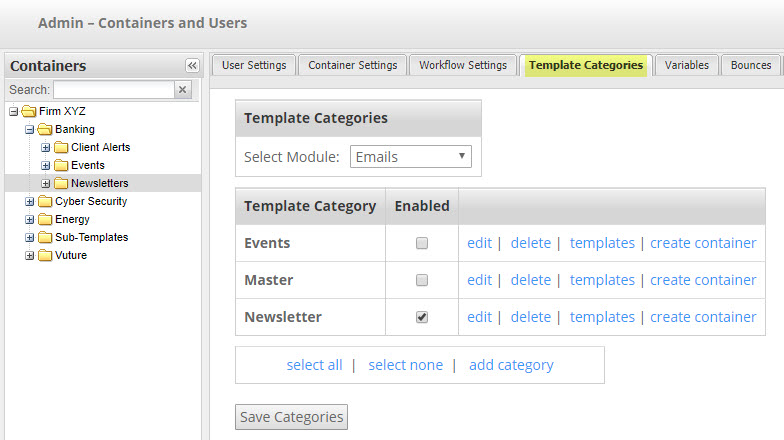
Template categories are collections of templates which can be made available on a per-container basis, allowing you to control template access by the type of work a user is undertaking.
Note: We'd recommend avoiding using special character when naming the templates.
In this area you are able to:
- select which categories the container you are in has access to
- create new template categories
- delete template categories (note you have to delete all templates in the category first)
- view the list of templates in a template category by clicking on the "templates" link:
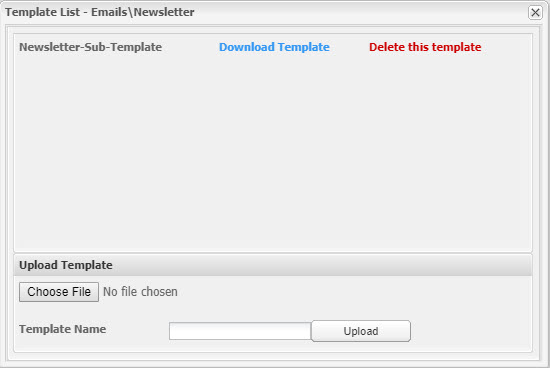
From the template list you can:
- download the template in zip format
- delete the template
- upload a template in zip format into the template category
