LexisNexis InterAction currently releases software patches on a quarterly cycle and the 2017 Q1 patch makes a change to the structure of Marketing lists. This patch has an updated release (a hotfix) dated the 15th of May. If you downloaded the update files prior to this, please ensure you get the latest files from the InterAction support site.
Applying the patch changes the manner in which sponsored lists are organised and displayed within InterAction by separating Sponsored Marketing Lists into a new folder class, allowing you to categorise and segment sponsored lists by folder types.
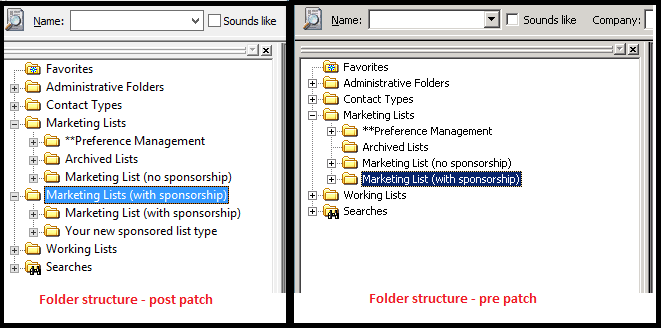
This is achieved by altering the InterAction metadata (data that defines your environment's configuration) to include a new Folder Class called Marketing Lists (with sponsorship) to the already existing four folder classes shown below:
- Admin Folders
- Contact Types
- Marketing Lists
- Working Lists
The new folder class has a folderClassId of 5, and the original Marketing List folderClassId retains its original value of 2
How to tell if the process outlined below is required
Check the version of the client InterAction using the "Check Version" feature on Admin.System.InterAction. If the version number is 6.20.63 or higher, then InterAction has been upgraded, and the steps below will need to be followed.
How this patch affects the integration with Vuture
By default, Vuture is able to retrieve all folders that the integration user has access to, which is controlled at the folder level in InterAction. In addition to this, there are two configuration settings in Vuture that can be used to alter the folders retrieved and displayed to Vuture users:
-
Admin.System.InterAction.ShowOnlyMarketingLists - which if enabled restricts the folders returned to only marketing lists
-
Admin.System.InterAction.XpathFilter - which if enabled evaluates a set of rules, restricting the folders returned to only those that meet the criteria set out in the XPATH filter
If you are planning to upgrade to the latest version of InterAction, these settings will have an effect on the folders that are returned. The changes to your Vuture configuration to provide uninterrupted service are outlined below.
If you have ShowOnlyMarketingLists enabled
Post upgrade, this feature should be disabled, and an XPATH filter added to your system. The XPATH expression below will retrieve & display both the Marketing & Sponsored Marketing Lists
//result[folderClassId=2 or folderClassId=5]
If you have an XPATH filter
Your current XPATH filter will need to be modified to include the newly created folder class in the defined set of rules to evaluate. Please edit the section that evaluates folderClassId to read as:
//result[folderClassId=2 or folderClassId=5][folderName......][folderId.....]
If you have neither of these options enabled
Your Account Manager or the support team will need to add a new XPATH filter to your Vuture instance to allow you to see the newly created Sponsored Marketing List folders, with the following filter setting:
//result[folderClassId=2 or folderClassId=5]
Will you have to change or update your Lists, Anti-Lists or any folders Vuture has access to?
Vuture uses the InterAction folder Id to identify any list configured on your system, regardless of how it is used, e.g. a list, anti-list, suppression or bounce-back folders. This update does not change the folder Ids, and only adds a new Folder Type location.
As long as you do not delete the existing folder and recreate them, you should not need to update your Vuture configuration.
Please contact your Account Manager or Support if you are upgrading so they can check the value of the two Vuture configuration settings mentioned above. There is also a downloadable document covering Upgrades attached to this article.
