How does your Vuture instance connect to your Dynamics CRM Server?
Your Vuture instance is your own dedicated web application hosted in one of our Rackspace (for UK, US or Hong Kong) or Azure (for Canada) data centres.
- The application is multi-instance rather than multi-tenant so each client gets their own separate application, database and file store with dedicated credentials and encryption.
- The connection between Vuture and Dynamics CRM is a secure HTTPS link to your Dynamics instance with requests always initiated from Vuture.
- You will need to open port (443) for incoming HTTPS traffic from the IP address of your Vuture instance, plus an additional testing IP address - we will provide you with these IP addresses. If your Dynamics instance is on the Microsoft cloud then you don't need to worry about this.
- You should route the incoming HTTPS traffic from these IP addresses from the external interface of your firewall to the internal IP address of your Dynamics CRM server - typically this is done by creating a NAT (network address translation) rule on your firewall. If your Dynamics instance is on the Microsoft cloud then you don't need to worry about this.
- You will need to setup a URL with a published DNS entry, pointing to the external IP address of your firewall, and a valid SSL security certificate for Vuture to connect to your Dynamics CRM instance. If your Dynamics instance is hosted on the Microsoft cloud then you will need to provide us the URL that you use to access your CRM.
- You should add this URL as a secure binding to IIS on your Dynamics instance. It is not necessary or desirable to change any Dynamics CRM settings relating to HTTPS or SSL and you should continue to access Dynamics CRM internally as you normally would. For a cloud based instance the default access method is HTTPS for all traffic.
For On-Premises instances
Vuture can connect to an existing Dynamics CRM Front-end Server - or if you are expecting a high volume of traffic (email volumes in the millions) or you want to isolate the Vuture connection for security reasons - you can setup a new Dynamics CRM Frontend Server, connected to your existing Dynamics CRM Backend server.
In order to connect to your Dynamics CRM instance, Vuture needs a user account that has access to your Dynamics CRM with the following roles:
- System Administrator
- System Customizer (this role can be removed at a later time once Vuture has configured all the customization)
Connecting Vuture to your Dynamics CRM instance
For Dynamics On-Prem:
To connect your Vuture instance to your instance of MS Dynamics CRM use the following settings within "Admin>System>MicrosoftDynamics"

Scroll down a little to configure the type of authentication that your Dynamics CRM instance uses and choose Active Directory:

For Dynamics 365 Online:
To connect your Vuture instance to your instance of MS Dynamics CRM 365 online use the following settings within "Admin>System>MicrosoftDynamics"
Important: For Dynamics 365 connections you need to split the username (which is the email) into two parts as follows:
user.name@emaildomain.com will be broken into:
- user.name
- emaildomain.com
The first part will be entered in Admin username and the second part will be entered in Authentication domain..
Scroll down a little to configure the type of authentication that your Dynamics CRM instance uses and choose Office 365:

How does data flow between Vuture and Dynamics CRM?
- Typically you will create a Vuture system Dynamics CRM account as described above. which should have permission to read and write to all of your marketing folders, contacts and additional fields. To see how to create a user account for your Dynamics CRM server see the following links:
- All requests to Dynamics CRM are made using the Vuture system account so whatever the system account has access to, all your Vuture users will have access to as well.
- Pulling back marketing lists and contacts from Dynamics
CRM happens in real time. - Writing back of most data such as adding activities and updating contact details is added to a queue which writes back the data asynchronously. We can control how quickly the data is written back to avoid overloading your Dynamics CRM server.
Data that Vuture can read and write:
- List of folders which can be restricted based on folder type
- Contacts within the selected folder
- Activities are written on email send, email open, link clicked, form submitted, unsubscribe and bounce (Vuture will write back soft bounces as an activity into Dynamics. For hard bounces we will update the field and mark the contact as a suppressed bounce once the set hard bounce threshold has been met)
- Contacts can be added and removed from lists
- Contact information and additional fields can be updated
What data will Vuture access on my CRM?
You can find a detailed list of all the out-of-the-box entities and custom entities that Vuture will interact with on your Dynamics CRM instance here.
What if I am upgrading my Dynamics CRM?
Vuture uses the Dynamics CRM SDK to interact with Dynamics CRM. The SDK (Software Development Kit) is a resource developed by the Microsoft Dynamics team itself and is constantly updated to keep in sync with the latest versions of the CRM while still providing support for older versions. The beauty of the SDK is that it offers a common interface to Vuture while taking care of any changes to the Dynamics CRM API. This ensures that Vuture can work with all future version of the CRM with no or very little tweaks.
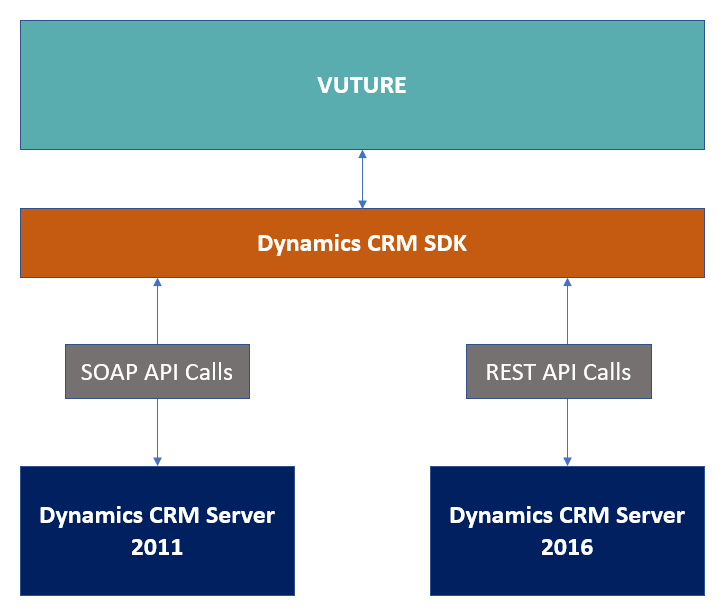
As per the guidance from Microsoft themselves:
When you develop plug-ins and custom workflow activities, continue to link those projects to the Dynamics 365 SDK assemblies. The Dynamics 365 SDK assemblies will be updated to use the Web API. This update will be fully transparent to you and any code written using the SDK itself will be supported.
Reference: https://msdn.microsoft.com/en-us/library/dn281891(v=crm.8).aspx
Data Security
- Connection to your Dynamics CRM Application Server is locked to IP address and secured by HTTPS. If you are using Dynamics 365 Online with Azure AD then you can still benefit from IP based restrictions as described here.
- A limited number of SDK calls (see the full list here) are made to read and write data using a single Vuture account - we don't need any other user's Dynamics CRM password
- You can add an extra layer of security by having IIS/Windows NTLM authentication as well as Dynamics CRM user authentication
- Your Data Change Management (DCM) rules are respected
- Data being written to Dynamics CRM is managed through a queue which can throttle the number of requests being made and can retry or pause data transfer in the event that Dynamics CRM is not available or busy
- Vuture only retrieves data from Dynamics CRM as it is needed
- Basic list data is loaded to send out marketing campaigns, all other data is loaded for each campaign recipient as requested
Basic data comprises:
- Email Address
- First and last Name
- Company
- Job Title
- Dynamics CRM Contact Id
- Dynamics CRM Marketing List Id
- Sponsor
Data is retained in the Vuture platform for reporting purposes but can be archived on an agreed regular basis.
We run daily vulnerability tests against our infrastructure to proactively look for issues and we perform real-time monitoring of traffic as it enters our system. A team of security analysts are available 24x7 to deal with any detected issue.
