Overview
Events App Offline Mode allows you to use the Events App to register attendees for your event or add walk-ins even if there is no WiFi connection or if the connection is coming and going.
Contents
Prerequisites
Your Vuture Representative can make the feature available using the system setting "Admin.System.EventsDisplay Offline Option on Event Configuration."
Once enabled, when you are setting up an event you can enable offline capability, for that event only, by checking the tick box on the event configuration screen called Enable Offline Mode.
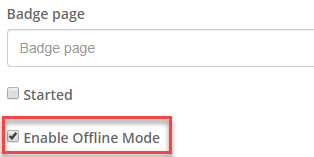
Once enabled the Event App will continue to operate when there is no internet connection, storing all updates locally.
Once the WiFi connection is restored, all updates will be written back to Vuture and your CRM.
Important Note: You must ensure that you access the Event App at least once, while connected to the internet, from the device that will be going offline, in order to sync the attendee data. If you are unsure of the WiFi connectivity at an event venue, you could login to the Event App once, prior to arriving at the event location.
While the device is offline you will see an offline icon at the top of the screen to indicate the app is in offline mode.
You can mark contacts as Attended and you can Register Walk-ins while offline. You will see a count at the top of the screen to show the number of queued updates waiting to be written back.
The Arrival Notification emails will not work whilst offline. Arrival Notification emails will be queued and sent as soon as the device is online. If you know that you will be offline for the duration of the event we recommend not enabling Arrival Notifications.
Ending your Event when Offline
To end your event in the Event App you must go online first and sync back all the data. Until that has happened you will not be able to click the End Event button.
Important Notes when Offline
- Offline Mode will not work with Private browsing so please check this in your browser before using.
- The More Info option will also not work whilst offline.
