Technical details on how the integration works
We use a meeting ID to register contacts for the webinars in Webex using the Webex XML API’s. Then once the event has taken place, we retrieve basic attendance information and write back an attendance activity to your CRM.
NOTE: The Webex XML API’s are going to be deprecated in 2023, so we will switch over to using the REST API prior to the end of life date. This transition will be seamless and should not require any action from you.
How does authentication take place?
We authenticate with the Webex API’s using Oauth2, and we lock this down to the following 2 API’s scopes
All_Read (Read only scope, which allows us to pull back attendance information)
Meeting_Modify (Read/Write scope to allow us to create registrants for for the selected webinar)
Which APIs are used?
The Webex API’s endpoints we use are:
Oauth Authentication
Authorise - https://api.webex.com/v1/oauth2/authorize
Authentication - https://api.webex.com/v1/oauth2/token
Webinar APIs
Base URL - https://{SiteName}.webex.com/WBXService/XMLService
java:com.webex.service.binding.ep.GetSessionInfo - We use this api to get the session details to find the session type whether Meeting or Event Session and also check whether the access token is validated successfully.
java:com.webex.service.binding.attendee.RegisterMeetingAttendee - Register the contact to the webinar.
java:com.webex.service.binding.meeting.GetMeeting - Get Meeting webinar details
java:com.webex.service.binding.history.LstmeetingattendeeHistory - Get attendee details for the Meeting webinar
java:com.webex.service.binding.event.GetEvent - Get Event webinar details
java:com.webex.service.binding.history.LsteventattendeeHistory - Get attendee details for the Event webinar
java:com.webex.service.binding.attendee.LstMeetingAttendee - Get registrants for the webinar session
What components are used for this integration?
We use the Webex XML API’s and Authenticate using OAuth 2.
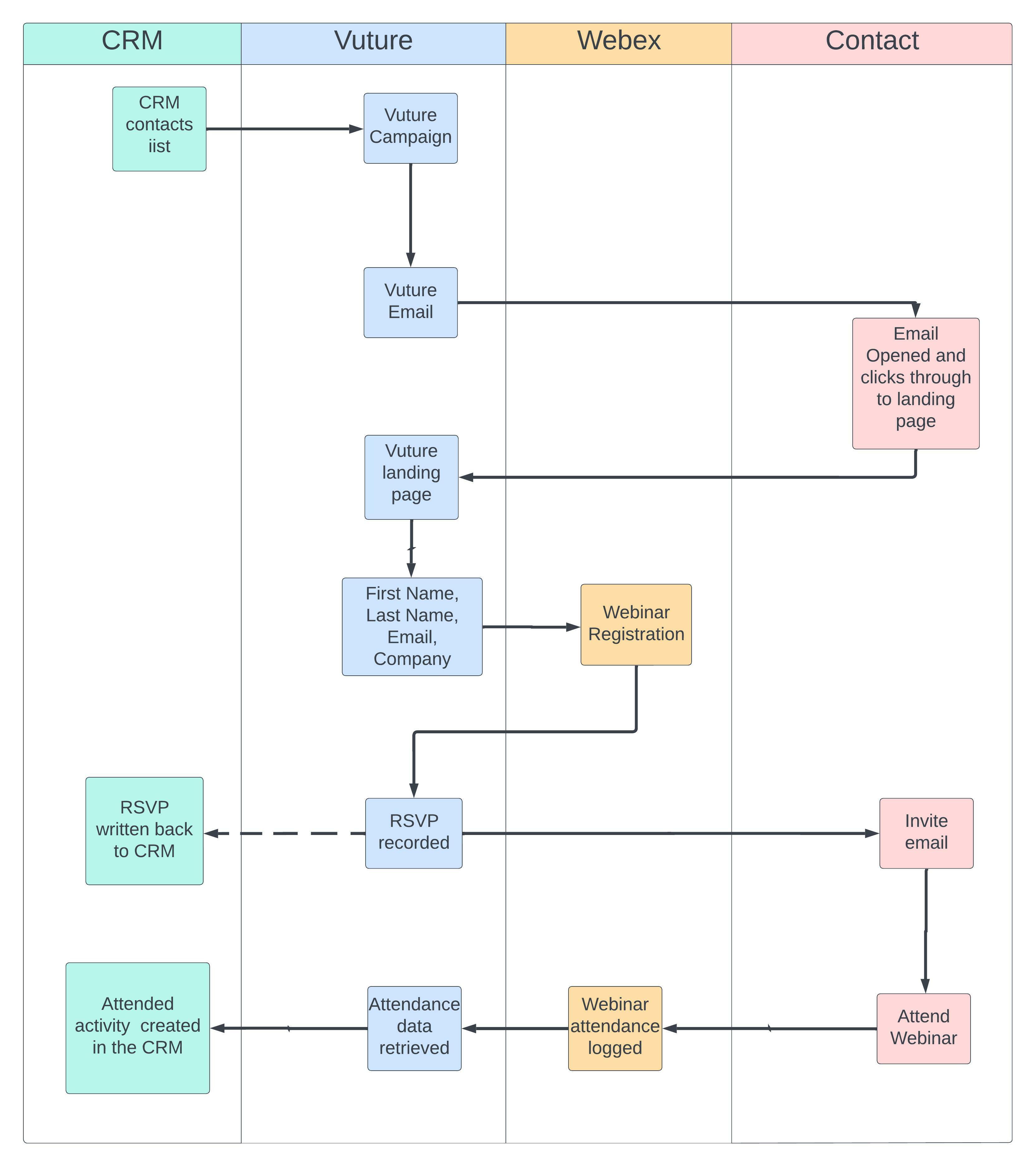
Could you provide an architectural diagram showing the data flow and all components involved
What are the system requirements to implement this?
You will need a Webex licence with access to the webinar product, and developer privileges (please contact your Webex account manager for more details). You will also need to have the Webex product enabled in your Vuture instance (your Customer Success Manager can help you with this)
What are the specific data synchronized?
We will register basic user information with Webex (First Name, Last name, Email and Company), and on a registration success response from the Webex API’s, we will then mark the contacts as RSVP’d in your CRM using the configured RSVP field.
Once the event has concluded, we will then use the email addresses in an API call to pull back attendance information from Webex (which is simply an attended flag). We then use this to write back an attendance activity to your CRM (in the same way as we do with other events).
What type of accounts and permissions are required to sync data between WebEx and Vuture?
Our Customer Success Manager will ensure you have everything you need to get started by enabling the required configs in your Vuture instance.
On the Webex side, you will need a Webex licence with access to the webinar product, and developer privileges (please contact your Webex account manager for more details on this).
Is data transferred to any other 3rd party systems?
No. We only send data directly from Vuture to Webex via their secure API’s. Data is then written from Vuture to your CRM using the normal secure connection.
How often will the data sync be performed?
This is scheduled task and is set by default to run once a day at 6am, but this can be configured as needed.
Is attendee data transferred automatically after meetings?
Yes. Once the webinar has been concluded we will call the Webex API automatically as specified in the configured time and schedule.
Please note that Webex does not treat meetings and webinars differently, webinars are just a different type of meeting. Whilst meetings should work in theory, we have not tested the integration for meetings, so officially it only supports Webinars.
Do you require remote access for any support or initial setup?
Normally no, this would not be required unless an issue is encountered. When the product is purchased, we will enable the required configs which will give you access to the webinar set up tool, and the functionality to add the webinar ID’s to your campaign. Once the configs are activated, you will be able to set up and configure your API credentials yourself using our guides on the helpdesk. If you encounter any issues, we can assist by logging into your instance directly without the need for remote desktop access.
Please provide documentation explaining the technical details including API technical/security details, admin guides etc.?
Here are some guides on our Help Desk:
https://support.vutu.re/hc/en-us/articles/4405498265361-Webex-integration-with-Vuture
(Overview of the procedure including step by step process and prerequisites)
https://support.vutu.re/hc/en-us/articles/4416387295121
(Article explaining that you need a single account and co-hosts)
https://support.vutu.re/hc/en-us/articles/4405874839313-To-Generate-your-Webex-API-Credentials
(Article helping you set up your Webex credentials)
https://support.vutu.re/hc/en-us/articles/4408491119505-For-Clients-Webex-Webinar-Setup-Tool
(A secure way to enter your credentials for yourself)
Here is a link to Webex' own help site.
https://developer.webex.com/docs/platform-introduction