The article below details how to connect to our internal installation of ContactEase. This environment is hosted and managed internally and shared the Dev, QA, Sales and Account Managment teams.
The ContactEase environment is an out-of-the-box version of the platform and is installed on our cloud servers in Rackspace on v59.vuturevx.com
Settings
| Details
|
|---|
| Server Installed on | V59 |
| Remote Connection URL | v59.vuturevx.com |
| Server Username | Administrator |
| Server Password | kwad@vuture |
You will be able to access this environment from anywhere as long as you have Wi-Fi or network connectivity.
Connecting your instance to this environment
To connect your vuture instance to this environment of ContactEase use the following settings within "Admin.System.ContactEase1" or "Admin.System.ContactEase2" or "Admin.System.ContactEase3"
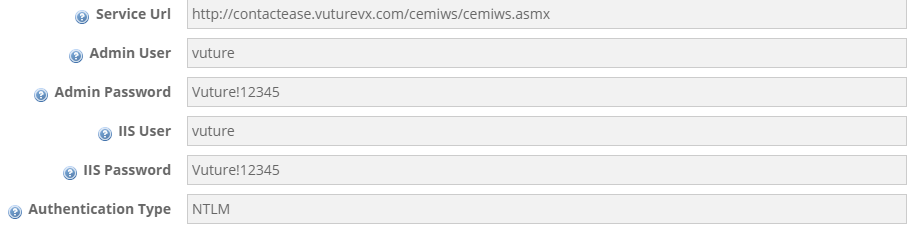
The data is listed below, for your convenience so you can copy/paste the values easily
A sample configuration file is attached to this article and can be imported into Admin.System.ContactEase1 within your Vuture platform.
