Overview
When sending an email you can choose to personalise the From Address that is displayed in the recipient's email client.
Contents
By default all emails are sent using the From Address you select from the drop-down on the send email screen. Next to the From Address is a drop-down field called "Personalised From".
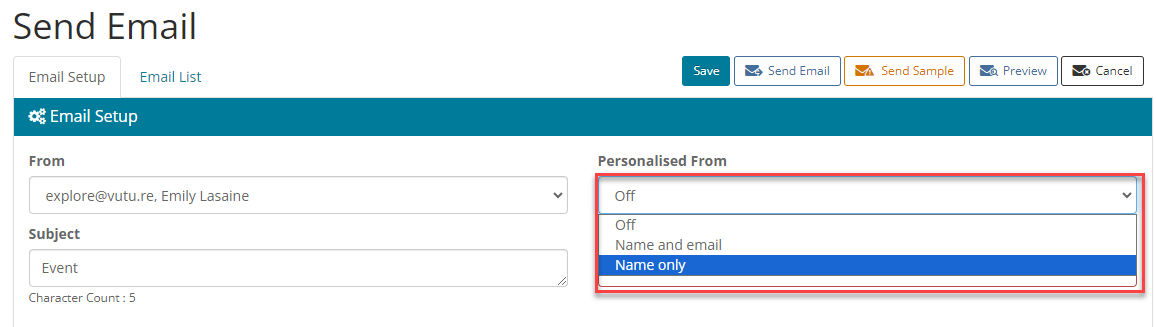
Personalised From options
None
This option does not personalise the From Address - each email is sent using the From Address selected in the From field.
Name and email
This option personalises the From Address for each contact using the Email Address and Name of the Salesforce list Contact Owner.
Name only
This option personalises the From Address for each contact using the Email Address selected in the From Address dropdown but uses the Name of the Salesforce List Contact Owner. The advantage of this option is that you can avoid Out of Office messages going back to a partner or fee-earner, but their name will be displayed in the From Address that the recipient sees.
In order to see the Personalised From dropdown your Vuture Administrator will need to enable "Admin.Roles.Emails.Personalise on From Name" for your role.
Alternate personalised From
It is possible to use additional Salesforce fields for personalised From sends. If you are interested in this feature, you must contact you account manager and provide the following details:
- Salesforce ID for Sponsor "Name" field
- Salesforce ID for Sponsor "Email" field
- Salesforce ID for Sponsor "Job Title" field
Important: You will only be able to use a single option (alternate versus default) at any given stage. If you have enabled the use of an alternate sponsor, these details will also be used for the sponsor placeholders (i.e. {From Name} ; {From Job Title} ; {From Email}).
Your account manager will enable the feature and enter the field IDs in "Admin.System.Salesforce"

