Overview
This article applies to InterAction only. However, we are releasing Dynamic Content for Dynamics clients in May or June 2025 and thereafter this article will apply to them too.
Dynamic content allows you to personalise the content of an email depending on the recorded preferences of the contact.
Any block of content (or snippet) on the email can be tagged as dynamic content. This allows you to apply a filter to the content using the same filtering that is used for email lists.
When the email is sent to a contact, the filter is applied and blocks of content - where the contact meets the filter criteria - are displayed. The other dynamic content blocks remain hidden.
All other content on the email is displayed as normal.
A popular use case of using Dynamic Content, is to send a personalised confirmation email once someone registers to an event.
For InterAction users, there is a full 'How To' here: Send Confirmation Emails using Dynamic Content for IA
Dynamic Content FAQ
- Once you add in the Dynamic Content to your email, can the text of the email be changed? If it can be changed, do we have to add in the dynamic content again?
- When setting up Dynamic Content, do you have to set up separate additional information fields for each piece of dynamic content or can you use a List Item additional information field and select from the list items?
- How do you delete a Dynamic Content filter?
- Can I use Dynamic Content on a landing page to display blocks of content, depending on how someone responded to an additional field on the form?
1. Once you add in the Dynamic Content to your email, can the text of the email be changed? If it can be changed, do we have to add in the dynamic content again?
Content is made dynamic by adding additional field tags to the snippet. So it is the snippet that is dynamic and not the words or text within it. Meaning you can make the snippet dynamic and then edit the text, images, links as much as you like before you send.
To confirm you can amend the text of the snippet which has dynamic content.
2. When setting up Dynamic Content, do you have to set up separate additional information fields for each piece of dynamic content or can you use a List Item additional information field and select from the list items?
Both options are possible.
For example, you can use additional field options that might be called ‘Topics of interest’ and appear as check boxes on the client preference form e.g. Finance, Legal, Fiduciary, Environmental etc.
Or, a dynamic snippet can be tagged with an additional field of Accept or Declined for a particular event.
As long as the contact is in the list being emailed and have selected some of those additional field options in advance of the email send they will only see those snippets of information tagged with the relevant additional fields.
Warning: If a contact has no preferences marked in the CRM there is a risk that they will receive a completely blank email. To mitigate this risk, you could introduce the newsletter (for example) with a generic paragraph of news which all recipients will get, no matter what their preferences.
3. How do you delete a Dynamic Content filter?
These are just normal email filters so you can delete a filter by going into any email campaign in the container you created the filter, click send email, select the list that the filter was created against, select the filter to be deleted then click delete filter.
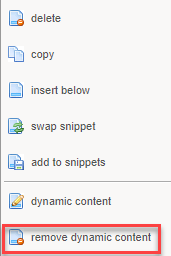
To remove the dynamic content from the email, in edit layout mode, right click and select remove dynamic content.
4. Can I use Dynamic Content on a landing page to display blocks of content, depending on how someone responded to an additional field on the form?
For example, could I have a single Thank You page with a snippet (block of content) that would only be displayed for those who RSVP'd yes and a snippet that would only be displayed for those who RSVP'd no?
Answer - No, this is not possible with Dynamic Content, because there is not enough time for the additional field information to write back to the CRM and then communicate this back to Vuture. Instead, it would display blank content on the Thank You page and neither message would appear.
