FAQ
- Why shouldn't my contacts just forward the email in their email client (e.g. Outlook)? Why should I encourage them to utilize the Forward to a Friend Form in Vuture?
- For the Basic Forward to a Friend Form, can I input multiple email addresses to forward the email to?
- When using the advanced Forward to a Friend Form, where would you suggest the placeholder {email_message} be used and how would it work/what does it do?
- When using the advanced Forward to a Friend Form, where does the {email_url} direct the colleague to? Is it to the sent email URL in the original campaign history?
- Does the email that is sent to the colleague, need to be in the same campaign as the forward to a friend form (i.e. where all our global forms are), or can it be in a separate campaign/container?
- Will the email that is sent to the colleague have the container variables applied, e.g. {{DISCLAIMER}}? If so it would make sense to place the email in a different container as a different disclaimer would be required.
- If the forwarded recipient clicks through to a form how do I handle the system populating their details?
- Where can I see reporting for those who have used the Forward to a Friend Form?
- Can I have multiple Forward to a Friend Forms in different languages?
- Does clicking a link in a forwarded email drop a web tracking cookie so that the forwarded recipient can be tracked?
- Why isn't My forward to a friend form writing back an InterAction activity?
- How do I prevent the email address of the forwarded recipient from being recorded in InterAction?
- What are the options for recording who the email was forwarded to in Vuture and InterAction and controlling if a Who Knows Who relationship is created between the original contact and the forwarded contact?
- How many email addresses can I forward to at one time? Is there a limit?
- Can we bulk add multiple email addresses to the To box?
1. Why shouldn't my contacts just forward the email in their email client (e.g. Outlook)? Why should I encourage them to utilize the Forward to a Friend Form in Vuture?
Please review this Help Desk Article for more detailed information.
2. For the Basic Forward to a Friend Form, can I input multiple email addresses to forward the email to?
Yes. You may input multiple email addresses in the basic Forward to a Friend Form by separating them with a comma and no space (e.g. "user11@vuture,user12@vutu.re") or you can use semi colons.
3. When using the advanced Forward to a Friend Form, where would you suggest the placeholder {email_message} be used and how would it work/what does it do?
It includes the full body of the email where the placeholder is inserted. It is best placed as the last placeholder of the forwarded email template.
4. When using the advanced Forward to a Friend Form, where does the {email_url} direct the colleague to? Is it to the sent email URL in the original campaign history?
Yes – the online version of the sent email.
5. Does the email that is sent to the colleague, need to be in the same campaign as the forward to a friend form (i.e. where all our global forms are), or can it be in a separate campaign/container?
No it does not need to be in the Global Forms Campaign. It should be in its own unique campaign with a link to the Forward to a Friend Form.
6. Will the email that is sent to the colleague have the container variables applied, e.g. {{DISCLAIMER}}? If so it would make sense to place the email in a different container as a different disclaimer would be required.
Yes.
7. If the forwarded recipient clicks through to a form how do I handle the system populating their details?
Because the system does not store the forwarded contact's details, forms and personalisation fields cannot be pre-populated. If your form contains the personalisation fields {First Name} {Last Name} and a forwarded contact clicks through to the page, they will be replaced with the text "your details" allowing you to add a link to blank form using the format:
If this is not {First Name} {Last Name} please click here.
Alternatively, you can bypass a prefilled form by utilizing this feature to send forwarded recipients to the blank version of the form instead.
8. Where can I see reporting for those who have used the Forward to a Friend Form?
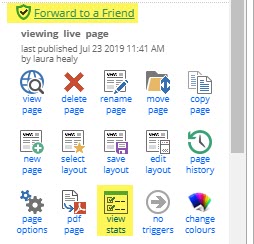
Navigate to your Global Forms campaign (e.g. where your Forward to a Friend Form is located), click on the form name, then click on the "View Stats" icon.
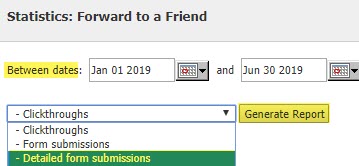
You'll then need to select your start/end dates, select the "Detailed Form Submissions" from the drop-down, then click on "Generate Report" to download a CSV. This download will include all form submission data of the Forward to a Friend Form for the time frame you've selected.
9. Can I have multiple Forward to a Friend Forms in different languages?
Yes. Read this article to find out more.
10. Does clicking a link in a forwarded email drop a web tracking cookie so that the forwarded recipient can be tracked?
If you have Vuture's Web Tracking Module enabled, this will drop a cookie on recipients clicking through on standard email links. Cookies will not be dropped, however, in an email forwarded using the Forward to Friend feature since Web Tracking needs to link to a contact in an existing list.
From a privacy point of view the forwarded contact has also not provided their email address and therefore has not given explicit consent.
One option for this is for the forwarded email to have a link to a blank form (you can use a link to a prefilled form that falls back to a blank form) so the forwarded contact can register their details and thus provide consent. This will add them to a list and any emails sent to this list e.g. a triggered confirmation email, will drop the cookie when they click through.
11. Why isn't My forward to a friend form writing back an InterAction activity?
The forward to a friend form must not be a disconnected form otherwise it will not write back InterAction activities. Make sure under form settings, the "Form data options" is set to "Pre-fill contact details".
12. How do I prevent the email address of the forwarded recipient from being recorded in InterAction?
This can be disabled by unticking the system configuration "Admin.System.Emails.Append Recipient Email on Forward Activity". Contact Vuture Support or your Account Manager for assistance with this.
13. What are the options for recording who the email was forwarded to in Vuture and InterAction and controlling whether a Who Knows Whom relationship is created between the original contact and the forwarded contact?
There are two separate settings here - they can be set independently or together and do not affect each other.
a. Recording the person who was forwarded the email
If the system configuration setting "Admin.System.Emails.Append Recipient Email on Forward Activity" is enabled, then the recipient's email address is included in the Email Forwarded activity that is written back to InterAction.
Regardless of whether this setting is enabled, the form submissions for the Forward to a Friend form can be downloaded from the View Stats screen.
Since the person who is being forwarded has not provided their email address directly you should not consider their data as a consenting contact. Instead you should link to a blank form from the forwarded email and use that to collect the forwarded contact's details in your CRM.
b. Create a Who Knows Whom relationship between the original recipient and the forwarded contact
There is a separate configuration setting "Admin.System.InterAction.Create relationships for new contacts” which controls what happens when a forwarded person fills in a blank form. If enabled, a Who Knows Whom relationship is created in InterAction between the original recipient and the newly created forwarded contact.
14. How many email addresses can I forward to at one time? Is there a limit?
No, there is no limit technically. Multiple email addresses can be entered, with a comma between each one, and no spaces.
However, you should be thinking about best practice and whether it is appropriate to encourage forwarding to multiple contacts who may not have consented to receive marketing emails from you.
One to one emails, between two individuals who know each other, are exempt from requiring consent but if you (mis)use the Forward to a Friend feature to send tens or more emails at a time, you could be moving into marketing territory.
15. Can we bulk add multiple email addresses to the To box?
Yes, you can. Multiple email addresses can be entered, with a comma between each one, and no spaces. If using the Advanced Forward to a Friend Form, please keep in mind that all email address will receive the same messages.
The Best Practice observation, in Question 14's answer above, applies here.
