Keywords: reports; excel; tagging; tags; mailing totals; InterAction contact ID, web client ID, windows ID
Introduction
The Container Activity panel includes the following Excel reports which also include any mailing tagging - see this helpdesk article for more information about tagging emails.
| Mailing Totals | One row per mailing with totals for sent, opened, clicked, unsubscribed and bounced |
| Key Client Data | Mailing data for key client contacts |
| Campaign Metrics Report | One row for each person that has opened an email from campaigns in the chosen date range and container |
How to enable Container Activity Excel Reports
To access the reports you need to have the Container Activity feature enabled.
Please contact Vuture Support or your Account Manager to enable "Admin.Roles.Admin.Container Activity" for the roles that require it.
Once this is enabled you will see a new link called "activity" on each container home screen.

InterAction Contact Id Format
By default the InterAction Contact Id of each contact is included in Web Client Format. This can be changed to Windows Client format by asking your Vuture Administrator to enable the setting "Admin.System.InterAction.Display Contacts In Windows Id Format". If you have more than one InterAction instance this needs to be enabled for each InterAction.
This option is currently only available for reports in the Container Activity Panel.
Downloading Container Activity Excel Reports
Click on the "activity" link from the home screen and the "Container Activity" window will load.
Choose your required date range from the date picker and tick "Include Subcontainers" if you want to include data from all subcontainers below your current container.
Mailing Totals Report
IMPORTANT: This report relies on a Vuture scheduled task being enabled to populate the data - click here for instructions on how to enable
This report gives a one line per mailing activity report for the selected containers.
Please contact your Account Manager or Vuture Support to enable this report for the required roles which is done at "Admin.Roles.Reports.Mailing Metrics"
Click on the "Excel Data" tab and then "Mailing Totals" to download the Excel Report.
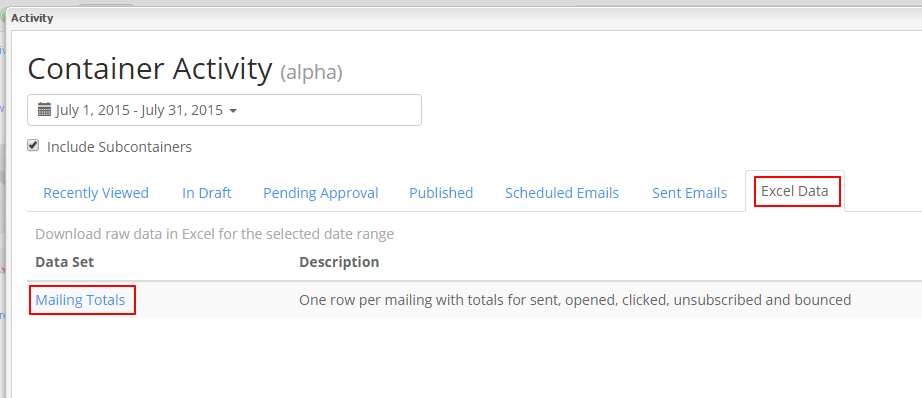
The "Mailing Totals" report includes the following data points:
-
EmailSentDate: date and time the email was sent
-
Container: full name of the container
-
Campaign:name of the email campaign
-
EmailName: page name of the email
-
EmailSubject: subject of the mailing
-
ListName: name of the list
-
TotalSent: total recipients sent to
-
Opens: total number of opens for that mailing
-
Clicks: total number of clicks for that mailing
-
Unsubscribes: total number of unsubscribes for that mailing
-
Bounces: total number of bounces for that mailing
-
Open Percentage: open rate for that mailing
- Clicks percentage: percentage of total clicks per email sent
- Clicks per open percentage: percentage of total clicks per opened emails
-
Average Unsubscribes: unsubscribe rate for that mailing
-
Average Bounces: bounce rate for that mailing
-
EmailFrom: From Address of the mailing
-
ListSource: source of the email list (0 = Vx, 1 = InterAction 1 etc.)
-
EmailListId: list id (for InterAction lists this is the IA folder id)
-
Tags: one column per Tag Category with a semi-colon separated list of Tags. The separator character can be changed if required by your Vuture Administrator using the setting "Admin.System.Reports.Tag Separator Character"
-
EmailSentId: id of that mailing
-
SitePageId: page id of the email that was sent
-
ContainerId: container id that the email was sent from
Key Client Data Report
IMPORTANT: To use the Key Client Reports you must have synchronised at least one InterAction Key Client Folder with your Vuture System. See this helpdesk article for details on how to set up this sync.
This report includes one link for each mailing sent to your key client that meets the selected date and container criteria.
Please contact your Account Manager or Vuture Support to enable this report for the required roles which is done at "Admin.Roles.Reports.Key Clients"
The key client list is automatically synchronised once per day from particular folders in InterAction. Contact your Account Manager or Vuture Support for assistance in setting up this sync.
Click on the "Excel Data" tab and then "Key Client Data" to download the Excel Report.
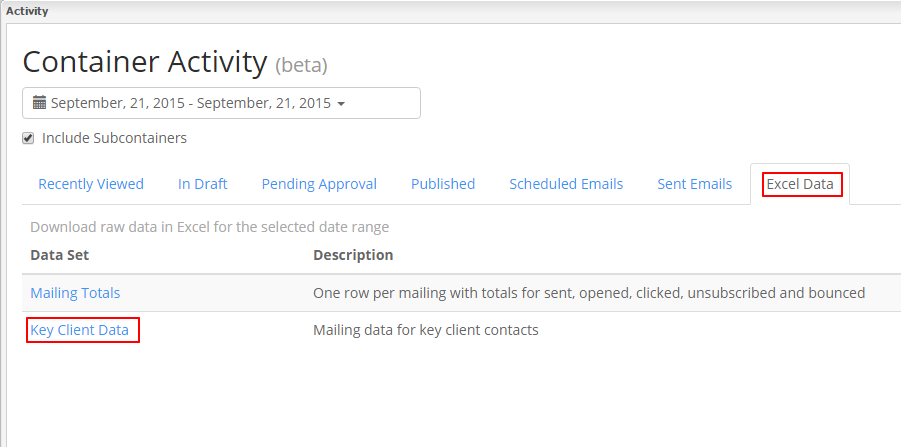
The Key Client Data report includes the following columns:
-
Name: key client name
-
Title: key client title
-
Company: key client company
-
Key Client: yes/no
-
Client Type: name of folder that client was synced from
-
Date Sent: date the mailing was sent
-
Campaign: email subject
-
Opened: was the email opened yes/no
-
Clicked: was the email clicked yes/no
-
Campaign Type: email type
Key Client Mailing Report
It is also possible to report on Key Clients on a per mailing basis. This is done from the email history screen where a new link called "Email Activity Report" is available once Key Client Reporting is enabled. This report includes:
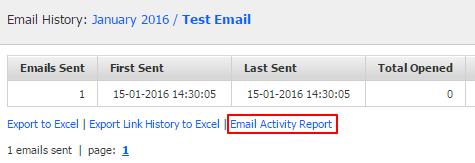
- InteractionContactId
- Name
- Title
- Company
- EmailAddress
-
KeyClient: yes/no
-
Opened: yes/no
-
Clicked: yes/no
-
Unsubscribed: yes/no
-
Bounced: yes/no
-
LinksClicked : list of links clicked
Please contact your Account Manager or Vuture Support to enable this report for the required roles, which is done at "Admin.Roles.Reports.Campaign Metrics"
The report shows data for each person that has opened an email from campaigns in the chosen date range and container (and optionally sub containers).
From the Container Activity Panel you can run this report against the current container or the current container and all sub-containers. If you would like to select only certain containers for this report then you can do this by going to "Admin.Reports" where the Campaign Metrics Report is available in the drop down.
The data returned is :
- First Name
- Last Name
- Goes by
- Title
- Campaign Name
- Campaign Tags
- Campaign sent date
- Email Address of recipient
- Domain of recipient
- Date and time opened
- Total number of links clicked
- Unique links clicked
- From: address of email
- Contactid of recipient (this maybe the ID in InterAction or other CRM)
- Sponsor's name
- The total number of campaigns that the recipient has ever been sent (Including outside of this container and date range)