Overview
When creating new websites a staging URL is always generated in the format:
http://{siteId}.{containerSubdomain}
where {siteId} is unique sequential number given to each new website you create and {containerSubdomain} is the domain set up for that container.
For example, if the domain for your current container is "mywebsites.com" and you create a new site which is given siteId 100 then the staging URL for the site will be "100.mywebsites.com"
Typically one domain can be used for all containers but there is no limit to the number of domains that can be setup and you can control which containers they are available in.
Setup
If you want to use a new domain name then register it and point the A record for the domain and its wildcard to the IP address of your Vuture instance. Contact Vuture Support to obtain the correct IP address. Vuture can register and managed domains for you as part of our service (note this is a chargeable service).
If you have an existing domain or subdomain then you also need to point the A record for the domain and its wildcard to the IP address of your Vuture instance.
Provide the domain to Vuture and we will add it to your domain list in tblDomain including the leading dot. Vuture staff note that if this is the first domain it should replace the default Vuture entry.
Once added it becomes available as a domain in the "Admin.Domains" area. Select each container you wish the domain to be available in and tick the selected box.
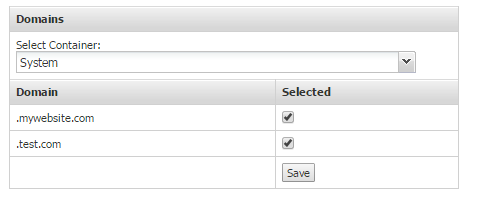
Each container uses one domain as the default staging URL for new websites. Go to "Admin.Container and Users" and select the required container from the tree. Click on "Container Settings" and scroll down to websites. Select the required domain from the dropdown list of domains and click "Save Container"

When creating a new website in that container the selected domain will be used as a subdomain for the staging URL. Note the staging URL is fixed and cannot be changed.
Note that the live URL can be set separately by clicking on "options" at the top left of the website editing screen and selecting "properties".
