Updating the value in the "Status" field for a contact in a Vuture (.csv) list will determine whether a mailing goes out to them or they are suppressed. You can update multiple contacts through the Contacts module. You can update the suppression status for contacts across the system globally, for a specific container only or on a list by list basis.
Your role must have "Global Unsubscribes In Contacts Module" enabled as well as Admin.System.Versions.CSVUpload.Version3.
WARNING: Bulk Subscribe or Unsubscribe has the potential to affect large numbers of contacts in one action. Please ensure that if you are subscribing individuals to a list or container, you have checked and double-checked before you do this.
Bulk (un)subscribe contacts globally or for a specific container
You can update the Status value for multiple contacts for a specific container or across the system globally. Follow these steps:
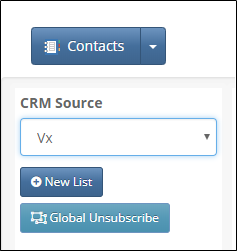
- In the Contacts module, click on "Global Unsubscribe"
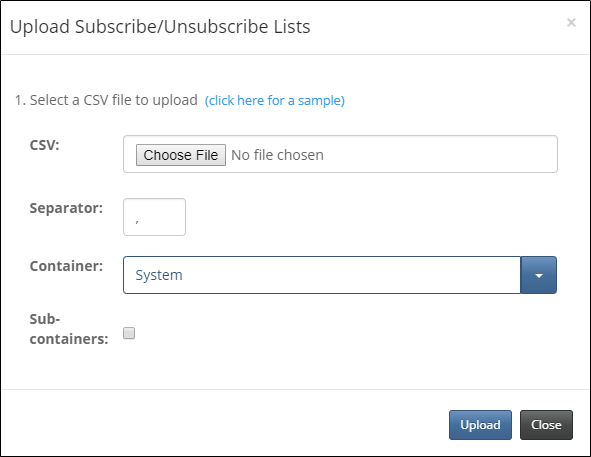
- Upload a .csv list with the updated values. The sheet must contain an Email Address and a Status field. Please note, the field "Status" must have one of five valid values: Subscribed, Unsubscribed, Unconfirmed, Suppressed or Undelivered.
- Select the container you would like to update. This will update the Status value for the contacts in the uploaded spreadsheet across all lists in the container. If you wish to update the contacts globally, select your root container (for example: System) and check the Sub-Containers box.
- Match the headers in your upload file with standard Vx headers
- When successful, the contacts in your spreadsheet will be updated in all lists within the selected container(s)
Bulk (un)subscribe contacts on a per list basis
You can update the Status value for multiple contacts for a specific list. Follow these steps:
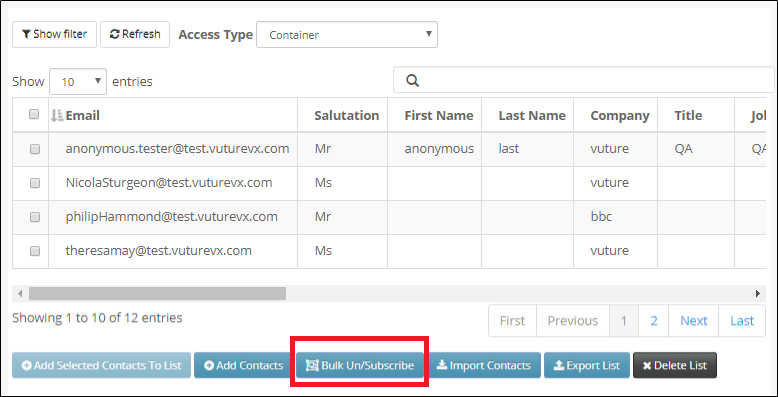
- In the Contacts module, select the list you want to update and click on "Bulk Unsubscribe"
- Upload the .csv list with the updated values. The sheet must contain an Email Address and a Status field. Please note, the field "Status" must have one of five valid values: Subscribed, Unsubscribed, Unconfirmed, Suppressed or Undelivered.
- Match the headers in your uploaded file with the standard Vx headers
- When successful, the contacts in your spreadsheet will be updated for this list only.
.