Overview
Update for October 2022 to clarify "Emails Since Last Engaged". We have fixed an issue where the count was not resetting for some types of engagement. The number of emails is now resetting based on all engagements.
Update for Summer 2020: There is an updated configuration available on client instances which will give more clarity to whether or not unengaged contacts are being suppressed from receiving emails via Vuture's Email Whitelist Engagement Tool. See the section below: "How do I get the Tool?"
Update for Spring 2020: It is confirmed that a contact who submits a form is engaged. Their whitelist date will automatically be increased by the length of time you have chosen to configure. For new FAQs on this topic please see the end of the FAQ listing at the foot of this article.
This article accompanies a webinar - see here for a link to the 4 webinar Deliverability series.
Contents
The Email Whitelist Engagement Tool works for clients with all CRMs and with no CRM. If it is set to "Monitor and Suppress" it will prevent contacts who have not engaged from receiving further emails. Once switched on, and if it is set to Monitor and Suppress, Vuture will automatically suppress any contact who has not engaged in the last 12 months (configurable setting) and remove them from your mailings. This is based on the historic data we run before enabling the tool.
The use of this tool is not compulsory - you can leave it switched to Off if you prefer, or you can set it to Monitor Only. If set to Monitor Only it will record the contacts who are not engaging with your emails but it will not suppress them. See more about these settings below.
The use of this tool is designed to reduce the risk of sending to email addresses that are not real but may be spam traps. If set to Monitor and Suppress it will remove contacts who are not engaging and improve your sending reputation.
Suppressed contacts are listed as a separate line item in Email Send Notifications, (the email you receive when you click Send) with a link to download the suppression list for review.
A manual whitelisting screen will allow your Account Manager to help you to override suppressions for an individual contact or for a whole domain (for example, if a contact has purchased a subscription and you wish to mail them, even if they are apparently not opening your emails).
How Does Vuture Judge Engagement?
The tool checks whether contacts have opened an email, clicked a link or submitted any form (including RSVPs) and whitelists them for a further 12 months so they can continue to receive mailings.
If they are a newly mailed contact or a new contact who has signed up using a blank form, they will also be whitelisted for 12 months.
12 months is a default configuration that can be varied if required. We plan, in a subsequent release, to vary this on a per-domain basis so that, for example, consumer domains such as Gmail and Hotmail can be given lower thresholds since they are much more likely to trigger spam trap alerts.
How Does the Tool Work?
Before enabling the tool, Vuture will run a script that generates a baseline of data against which engagement can be measured. The setup script and the ongoing process will update a central list of every email address that you email, or that engages with you. The list will record the following information:
- Email Address: Each unique email address is stored as a separate record. If you have a contact with more than one email address (e.g. work and home) then engagement is stored separately for each one.
- Domain: If you have whitelisted an entire domain (for example for one of your larger clients) it will appear in this column. Note: It is NOT recommended that you whitelist an entire consumer-type domain such as gmail.com or hotmail.com.
- First Mailed: This is the date that an email was first sent to this address. Note that, for large data sets, the initial data population may only look back for a certain time period.
- Last Engaged: The date on which the contact last opened an email, clicked a link or filled in a form.
- Whitelist Expiry: This date is set to 12 months from the first date they were emailed or first filled in a form. Each time they engage, they get a further 12 months.
- Email Count: The number of emails that have been sent since the last engagement. This number resets to 0 each time they engage.
- Created: This tells you the date this record was created in the whitelist (not the date the contact was created).
The whitelist looks like this:
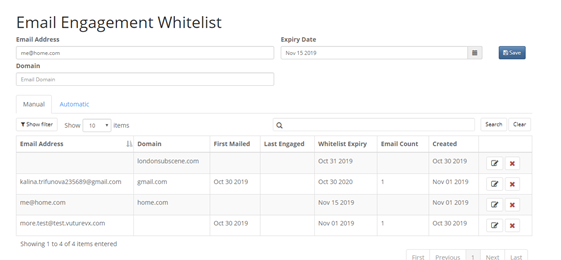
It is available to view (depending on your Role). Can be enabled via Admin > Roles > Emails > View Email Engagement Whitelist.
When you send an email, the automated tool (if enabled and set to Monitor and Suppress) will compare your mailing list against the table above. Any contact who has passed their whitelist expiry date will be suppressed. Suppressed contacts are added to another list which you can download and view. If you need to override any contacts, their Whitelist Expiry Date can be manually edited by your Account Manager or Support, then you could do a Send More on the email, so they are included.
How to edit the whitelist (currently for Vuture only) is here.
How Can I Download the Non-Engaged Suppression List?
Each email Send includes a line item called “Not Engaged” which shows the number of contacts who were suppressed from the mailing because they had passed their Whitelist Expiry Date. Or, if you have the feature set to Monitor Only if will show the number of contacts who are Not Engaged, but it will not suppress them from the mailing.
From the Email Send Notification email you receive after a Send, click on the Download link to load the list of emails in Excel format.
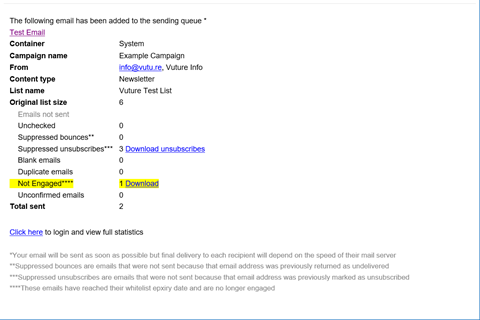
New contacts who are mailed for the first time, or who fill in a blank form, have their Whitelist Expiry Date automatically set to 12 months in the future, so they will be included in any mailings.
How Do I Get the Tool?
The Whitelist Engagement table can be created automatically for all Vuture clients and will collect data on new sends and blank forms.
To enable the suppression tool for mailings please speak to your Account Manager who can enable it for you by visiting this article and following the instructions.
It is important to run the pre-population tool on your historic mailings before enabling the tool. If you have many of years of data, we can limit the number of years that are pre-populated.
Note: The configuration available on client instances will give more clarity to whether or not unengaged contacts are being suppressed from receiving emails via Vuture's Email Whitelist Engagement Tool.
The default configuration for this (for new clients) is Off.
The "Check Whitelist On Send" drop-down box will be by default set to "Off". However, see the three options below.
There are three options available:
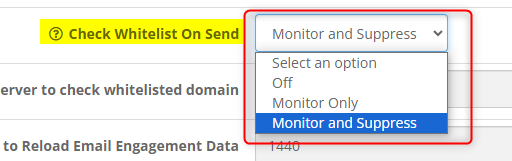
Off - Will send the email to all contacts who are not otherwise suppressed in some other way (for example, who have opted out previously). The Email Send Confirmation email will not contain any extra information:
Monitor Only - Will send the email to all contacts (who are not otherwise suppressed), but the Email Send Confirmation email will show a "Not Engaged" row for any not engaged contacts.
At the foot of this email page at **** it will also say "Warning only: They are not being suppressed." There will be a downloadable file listing these contacts.
Monitor and Suppress - Will send the email to engaged contacts only. The Email Send Confirmation email will show the "Not Engaged" row. Next to this row a download button will contain the suppressed contacts.
At the foot of the email on **** at the end of the sentence it will say "They are being suppressed."
Varying the Whitelist Expiry Time
Currently, the system defaults to 12 months of whitelisting for new contacts and for contacts who engage. If you'd like to decrease this time, your Account Manager can vary this using:
“Admin.System.Emails. Number of Months to add for never engaged white list expiration” to vary the months to whitelist new contacts.
and
“Admin.System.Emails. Number of Months added for white list expiration on email open” to vary the months for contacts each time they engage.
Please Note: We do not recommend increasing the whitelist expiry time to more than 12 months.
Managing the Email Whitelist
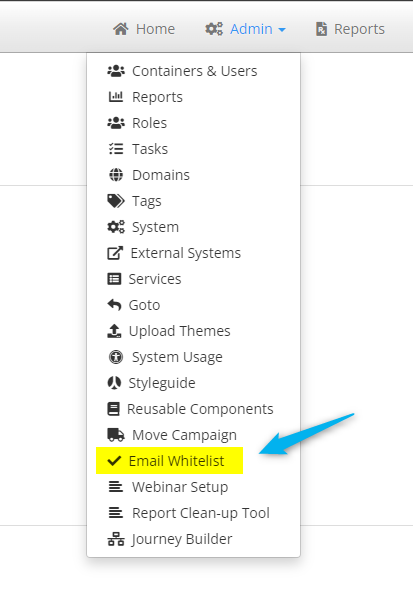
Your whitelist can be seen by clicking on “Admin.Email Whitelist” from the home screen. This is currently Read Only for users. It can only be edited by a Vuture Administrator.
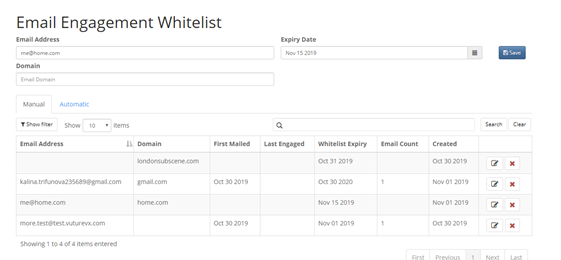
The Manual tab shows contacts and domains who have been manually whitelisted.
The Automatic tab shows contacts who have been whitelisted automatically by the system.
Are there any Prerequisites? Email Send Screen v2 for example?
No. You do not need to have Email Send Screen v2 enabled. However, the pre-population task must be run on your data before enabling the tool, so that there is historic data for the tool to use.
FAQs
Q. I am reviewing the number of “Emails Sent Since Last Engaged” for a contact. How is this number calculated by Vuture?
A. The number of Emails Sent is recalculated each time the contact is sent an email. Therefore if a contact, who is marked as not engaged, opens an email, and subsequently becomes engaged, the count of “Emails Sent Since Last Engaged” will only reset the next time they are sent an email.
Q. Is using the tool mandatory?
A. No. The tool is collecting engagement data. However, it is up to you to decide if, and when, you enable the whitelist engagement checking tool. Ultimately we would like all clients to have an authorised (whitelisted) list of core domains that they send to.
Q. Does the whitelisted period have to be 12 months?
A. No, this time is configurable (by Support or your CSM) separately for new contacts (those you are mailing for the first time or who fill in a blank form) and contacts who engage.
Please Note: We do not recommend increasing the whitelist expiry time to more than 12 months, only decreasing this whitelist expiry time.
Q. If someone updates an email in CRM is it updated in Vuture and can it then be sent to? Is it based on email or ID?
A. An updated/new email will be treated as "new" and will get 12 months whitelisting to start them off. The check is always on the email since this is the thing that hits a spam trap if it is a typo, etc.
Q. Who can add in an email to the whitelist? Will it be role based or Vuture only?
A. Adding to the whitelist is role-based. It defaults to Vuture Admin only but can be enabled for other roles.
Q. If we update consent for a contact in the CRM, will we then be able to send to them from Vuture?
A. A proper consent process will require a response from the contact (checking a box, submitting a form, clicking a link for example) and any of these will update the whitelist period for a further 12 months.
Q. If a contact uses a Vuture subscribe form is this engagement? Will it add to the 12 months?
A. Yes, if a contacts consents or subscribes (through Vuture) then yes they will get time added.
Q. Can we export the data from the table into a spreadsheet?
A. The data set is potentially very large so we are working out the best way for you to export it.
(Update for August 2020 - we are currently working on a way to write back the data directly into InterAction.)
Q. What are the Criteria for engagement? Do they include RSVPs? Also web tracking visits? Also alumni site registrations?
A. Yes they include RSVPs and Alumni site registration forms. No to web tracking – visiting a website does not indicate you want to receive emails (although if you click through to the website from an email then the click will count as engagement).
Q. What about Alumni? Would they count as engaged?
A. Alumni contacts who open/click on emails or fill in forms will count as engaged. We will be adding page views for secure Alumni sites shortly.
Q. When you suppress a contact, are you suppressing the contact id or the email address?
A. With this tool, we are offering a way to manage and suppress "bad" email addresses only. A contact may have more than one email address - Business and Home - and if one is good and one is bad we only want to suppress the bad one, not the entire contact.
Q. In Tufan's webinar, the tool looks as if all the dates are in UK format. Can this be changed for US clients?
A. Yes it will change automatically to US formatted dates if a US-based client logs in. The system looks at your user time format setting in "My Account->My Settings" that is available from the home screen.
Q. If we were to enter a group of email addresses to send a first time mailing will this violate any blacklisting?
A. If you are sending to a large number of brand new contacts you have never emailed before and are unsure of the data quality, please speak to us first. Bad addresses will still violate blacklists. We can advise on the best way to handle first time mailings.
Q. If an email domain has been validated, and the contact is a client, how can we override any excluded contacts even if they have not engaged in 12 months electronically?
A. You can override with a "manual whitelist" for the whole domain if you choose to do so. Tufan shows you how on the webinar.
Q. Can we export the Email Engagement Whitelist to Excel?
A. Not today, but yes eventually. It could potentially be huge so we are working on the best way to provide an export.
Q. Many of our contacts are on gmail. Why would you whitelist only corporate email domains and not gmail, etc.?
A. No email address at a valid business domain will be a spam trap. However there will be spam trap emails at valid consumer domains. That is why it is OK to whitelist valid business domains but not consumer ones. You can whitelist individual consumer emails but we recommend not doing this indefinitely as they can be converted to spam traps in future if the account is shut down.
Q. When does this tool become available?
A. It is available today. Ideally you need to get your history downloaded first. Talk to your Account Manager about switching it on.
Q. How does Vuture detect that a New Contact is being emailed on a list, because they will not have any past engagement?
A. Vuture knows if the email is a new one that it hasn't emailed before.
Q. Can we set our own standards for engagement? Instead of year can we do 2 years?
A. Yes, if you wish.
Q. Why do you have to do the historic work rather than just turning on the tool now and allowing it to pick up future whitelisted emails based on engagement?
A. We could do that, but the past engagement history would be missing to judge whether or not an address should be mailed.
Q. Is this tool available for ContactEase and other CRM's outside of InterAction?
A. Yes it is available for users of all CRMs we integrate with and no CRM.
Q. The manual check list tool was grabbing contacts we had added within the last week prior to running "check list." They were considered not engaged but were just added so had no history of engagement. Has this been fixed?
A. Yes. This automatic tool takes account of brand new (therefore unengaged so far) contacts.
Q. Will new Vuture contacts be automatically whitelisted? Presently they are identified as disengaged because there is not a one year look back.
A. Yes brand new contacts will be automatically whitelisted. How long for, is configurable by you.
Q. Can we turn on the notification piece but not the suppression?
A. Yes. There is an option to check engagement but mail anyway, by selecting the setting Monitor Only.
Q. There are now tools that IT teams are implementing that prevent the "Open" or "Click" from external emails going back to the sender. Is Vuture aware of these tools and how will that affect the "Engagement" score?
A. Open tracking pixels can be blocked (and also don’t load if images are not downloaded in the email) but it is not possible for clicks to not be tracked as all links go via a short URL. The short URL goes via a click handler that records the click and then forwards the recipient to the page. That cannot be blocked or the recipient would not be able to get to the page. We would encourage clients to have click calls to action in their emails to drive engagement.
Q. I'd like some clarification on the expected behaviour when whitelisting a domain. I recently whitelisted a domain but when I checked it did not apply to all emails with that domain. Is it meant to? Or would each email address in that domain still need to be whitelisted individually if they had not engaged?
A. When you add a domain whitelisting this overrides any individual email expiry. However, we don't change the value of any existing expiry recorded against the individual email addresses.
The individual email's engagement and expiry dates will continue to update as the contact engages so that if the domain whitelisting expires, or is removed, the system can fall back to the correct expiry date for each individual contact.
Q. If we run the whitelist tool at the standard 12 month expiry and client proceeds to use Vuture with it enabled for a few months and then later on decide to change the expiry to 18 months, are we able to look retrospectively at the data?
A. If the setting is changed then all activity from that point will take on the new setting. We would need to re-run the data population to update historic data which would require a few hours of no sending to update as the list need to be cleared and reset
Q. For new contacts added to the database, will their email count be blank or zero?
A. It will be 0
Q. If an existing contact completes and submits a blank form, will they get automatically whitelisted and for how long?
A. Yes, they will be added to the automatic tab of the Whitelist tool, and their expiry date will be added in line with the configuration you have chosen for your firm.
Q. If a completely new (not in the database, not already in the whitelist) contact submits a blank form, will they get added to the whitelist tool?
A. No, their form submission will be successful but they will not get automatically added to the whitelist tool. This is to prevent (possibly) fraudulent entries appearing in your whitelist.
Q. What about a known contact who has a new email address (for example they have changed company)? If they submit a prefilled form with an email address that is not found in the whitelist already, will they get their new email added to the whitelist?
A. Both blank and prefill form submissions will be successful, but if the email has not been previously whitelisted then it will not be added to the whitelist via a form submission - it will be ignored. This is for security reasons as we cannot verify the email's authenticity.
The whitelist tool is focused on email addresses, not on the contacts themselves. There could potentially be several emails in the database linked to one contact and each of them could have a different expiry date. So the bottom line is, no previous record in the database means no whitelisting.
Q. How then will any new contacts get added to the whitelist?
A. Some possible scenarios for how new contacts will get onto the whitelist:
- New contact added to a mailing list in the crm and mailed once, then new contact's email will appear on whitelist and automatically given 12 months (or whatever time configured)
- New contact typed into the manual tab of the whitelist, then new contact's email will be given 12 months.
- New contact or new email is not on crm, so new contact's email will not appear in whitelist. Will need to be typed manually into the whitelist using the Add button, or the new contact added to a mailing list on the crm and mailed once.
Q. In the Email Whitelist tool, why would the 'Email Count' column show as '0' when a contact has last engaged very recently?
A. The 'Email Count' column is the number of emails sent since the last engagement.
Q. In the Email Whitelist tool, if you delete a contact from the manually whitelisted tab, does this mean the suppression would reapply moving forward or would the contact still be whitelisted?
A. If you click delete, it will delete the Engagement profile for that email address and treat them as a new user. Therefore, the next time they are emailed it won't be suppressed and the engagement rules (i.e. 12 months) will start again from that date.