If you have a secure microsite, either as an Event site or an Alumni site, then you can create a page for your guest list. Within this page you are able to view your guests and filter them by different conditions such as location, sponsor, attendance status or organisation. Information in this site is synced with your CRM from your website setup in Vuture.
Attendance status totals
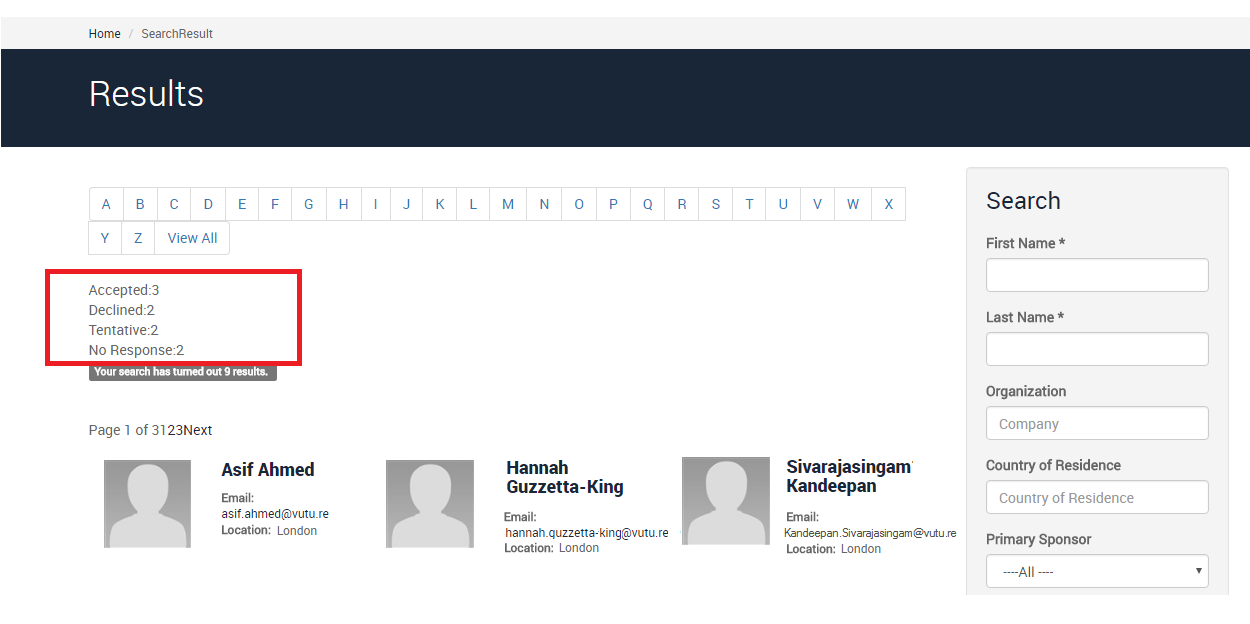
Within your event microsite's attendee page you can view the total number of participants for each attendance status at the top of the screen.
To have the totals enabled, please contact your Account Manager. The steps for achieving this are documented here.
Guest list filtered by specific sponsor
If you are a secure microsite user and would like to provide your sponsors with a personalised link to the attendees pages filtered by their specific contacts then you can use the following options:
Filter by primary sponsor
https://{siteUrl}/Search/SearchResult.aspx?IAForm_primary_sponsor_contact={sponsor_contactId}
Filter by additional sponsor
https://{siteUrl}/Search/SearchResult.aspx?IAForm_other_sponsors_contact={sponsor_contactId}
Filter by any sponsor
https://{siteUrl}/Search/SearchResult.aspx?IAForm_all_sponsors_contact={sponsor_contactId}
Where:
{siteURL} is the URL to the secure microsite
{sponsor_contactId} is the sponsor's InterAction contact Id.
Using the email module to email the link to sponsors
The email module has a personalisation field that returns a contact's InterAction ContactId. If you have the sponsors in a list you can automatically email them one of the links above using the personalisation field:
{IA:ContactId}
e.g. use the link to send sponsors the attendee list for which they are a primary or secondary sponsor
https://{siteUrl}/Search/SearchResult.aspx?IAForm_all_sponsors_contact={IA:ContactId}
