Keywords: Form Logic, lists, list ID, limiting form submissions, event capacity, show hide fields, wait list, troubleshooting
Overview
This article will provide you with the knowledge to find the list ID for a Vuture Standalone list. This ID can be used within the Count formula to show or hide fields based upon the number of registrants for an event.
To learn more about how to use Form Logic with your CRM or with Vuture Standalone (i.e. Vx Lists or Contacts Module), please review this article in full, then click here.
Contents
How to find the List ID for a Vuture Standalone list
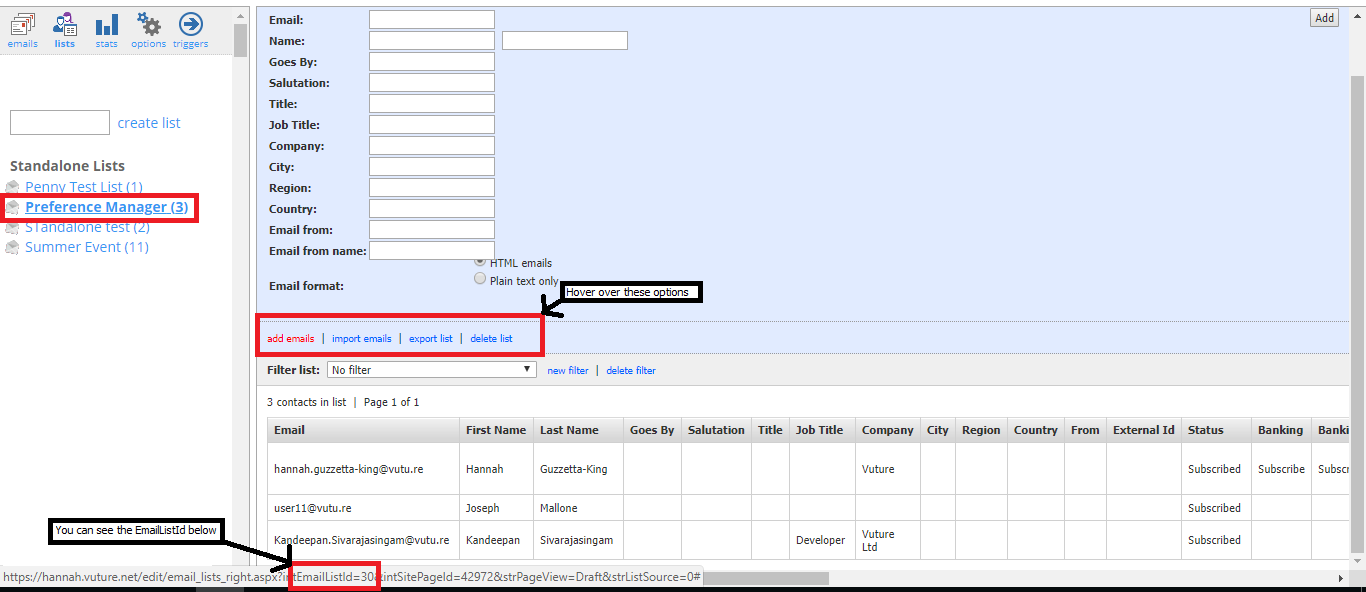
When using Form Logic with standalone lists, it is sometimes a requirement to know your list ID. Here is one way to find that list ID if you need it:
Click on the list name, hover over the options highlighted and you will see the EmailListId= number in the line at the bottom of your screen.