A quick way to manually update a contact record in both Vuture and InterAction, and cause a confirmation email to be sent.
Introduction
When recording responses to an invitation in InterAction, it sometimes happens that a client phones in with their response or passes their response to a lawyer instead of completing the RSVP form. This means that they will not receive a triggered confirmation or a notification template confirmation. If you go into InterAction and update their RSVP manually, they may still not receive an automatic confirmation (depending on how your triggers are set up) and your list on InterAction will be out of step with your list in the View Stats report on Vuture.
Prerequisites
You must be using InterAction.
You need to have the feature “Preview as Contact” enabled for in your instance (Admin.System.Emails)
You must already have the Confirmation published and ready to go out, and the RSVP form completed and linked to IA. This solution will work once your campaign has started, not before, if there are validity dates on your triggers.
The solution
When you receive a telephoned response from a client, go into Vuture. Navigate to your campaign and click on the RSVP pre-filled form to select it. In the icon list on the left of your screen, click on the test page icon.
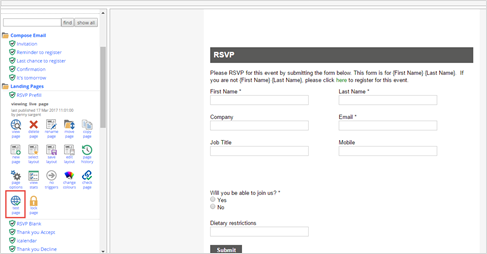
You will then be asked to specify the IA marketing list in use, and the contact name:
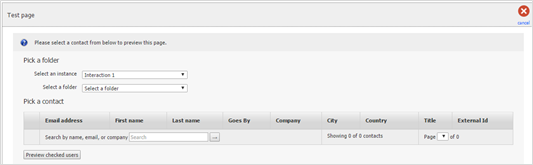
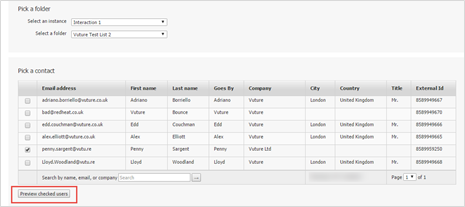
Select the list, and the contact, and click on Preview Checked Users:
The RSVP form will open, with the contact’s details pre-filled. You can now select Yes, or Accept, on their behalf and click Submit. The system will treat this as if the client submitted it themselves.
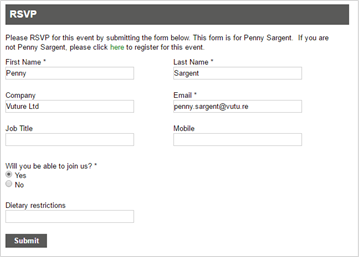
This will generate an automatic Confirmation email to them – if you have a Confirmation triggered to go out on Form Submit, or, if you have a Notification set up on this form.
It will also update InterAction as well as the View Stats report and keep the systems in synch for responses. Note that any form submissions will create an activity note on the contact record as well as populating any additional fields (such as RSVP or others).
Contact Support if you have any questions about this feature.
