Purpose of Litmus testing
Litmus testing is available to:
-
Check that any links you have created are not broken
-
Check your campaign for spam danger points or items which could increase the risk that your email is treated as spam
-
Show you how your responsive emails will appear on different email clients.
Vuture uses this service when it builds your original template set to ensure that your chosen layout will work effectively on all email clients in common use. It is not a Vuture product – Litmus is an independent service to which your firm can subscribe – but Vuture allows you to test your Vuture campaigns using Litmus and make the results visible directly inside Vuture.
Responsive Design - which devices support it?
Responsive design allows you to implement some impressive changes to an email’s appearance but it is not supported everywhere. See below a list of devices and email clients that support media queries (responsive design):
Amazon Kindle Fire | ✓ |
Amazon Kindle Fire HD | ✓ |
Android 2.1 Éclair | x |
Android 2.2+ | ✓ |
Apple iPhone | ✓ |
Apple iPad | ✓ |
Apple iPod Touch | ✓ |
BlackBerry OS 5 | x |
BlackBerry OS 6+ | ✓ |
BlackBerry Playbook | ✓ |
Microsoft Windows Mobile 6.1 | x |
Microsoft Windows Phone 7 | x |
Microsoft Windows Phone 7.5 | ✓ |
Microsoft Windows Phone 8 | x |
Microsoft Surface | x |
Palm Web OS 4.5 | ✓ |
Samsung Galaxy S3+ | x |
While your device may support responsive design the particular app that you view it on may not. Below are a list of some common apps that don’t support media queries even when viewed
on supportive devices.
Gmail app (all platforms) | x |
Yahoo! Mail app (all platforms) | x |
Mailbox app (iPhone) | x |
You may view an email on an iPhone for example which in general supports responsive design very well but if you view it on a third party app such as the Gmail app then it will not appear
responsive. Therefore saying “responsive emails work on iPhones” is not a correct statement. Support is not down to the device, it’s down to the app.
BlackBerry
BlackBerry is slowly becoming more and more supportive of responsive design and HTML emails in general. Support for HTML itself was only supported when OS5 was released as up until then
OS4 didn’t support any HTML at all (only plain text was displayed). While OS5 was a welcome and advanced move in the right direction it was only a step-up from the base and this continues to be so. Although HTML emails will display here many specific attributes
and elements of the code aren’t supported so the email won’t render as well as desired. When OS6 was released it supported media queries, and so supports responsive design, but as before several properties of HTML and CSS aren’t supported meaning the email
won’t look as well on a BlackBerry compared to other more supportive devices such as an iPhone.
Several clients and web articles about the industry have shown that responsive emails (and HTML emails in general) display better on personal email accounts than internal work ones when
viewed on a BB. This can usually be narrowed down to security settings and filters or because the email is sent from a secondary IP address that adds extra code into the sent email which can break the layout.
BlackBerry holds (as of March 2015) <1% of email client market share and between 2013 and 2014 the number of BB subscribers dropped by nearly half.
When should you use Litmus?
Use it at the end of creating your campaign, just before you send it out. Having finished editing first, and clicked on Publish and Publish
Now, your shield will be green, with a tick or check mark inside. Click on the check email icon.
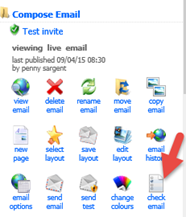
This will open a page which lists your page versions (every time you Publish, while you are creating your campaign, the system creates
a new version:
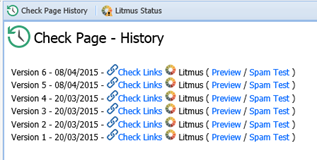
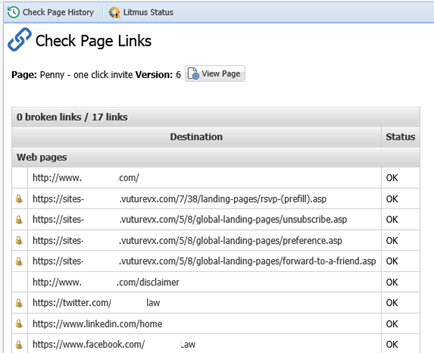
Check links will let you see all the links you have built on
the page – to the Accept or Decline thank you page for example, or to your website - and check that they are all correctly linked and working.
Click on Check Links to see the list. Any that are not working or broken will show up in red.
Warning: If you get the spinning wheel on the page making you wait,
and you have to wait more than 10-15 seconds, it will be a good idea to either refresh the page or back out, come back in and click on Check Links or Preview again.
The Litmus Preview will give you thumbnail images of the way your campaign will look on different email platforms.
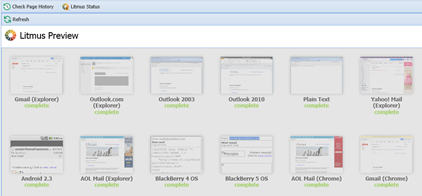
Clicking on one of the thumbnails will open the preview where you can see how the page will appear.
Warning: Use the NEXT command to see each one and look at the top of
the page to see whether images are switched ON or OFF. This switch is determined by the email client, not by Vuture.
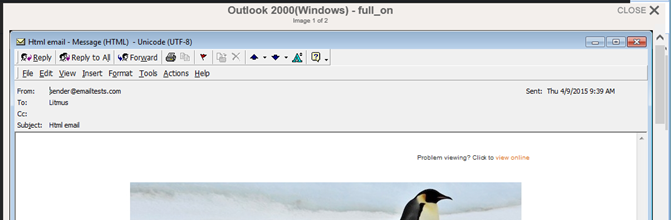
This version has images ON
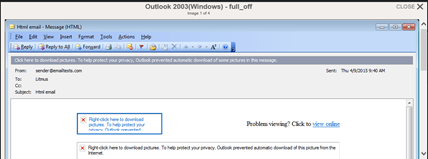
This version has images OFF
If you find a page rendered really badly that you would have expected to render well, contact the Vuture Help Desk for advice.
