* Please note, this is a premium feature. Please contact your Account Manager for more information.
Overview
This article helps to walk through the setup to integrate the Vuture Email Module with the ON24 webinar service. It will outline the requirements for you and your Account Manager.
Any Vuture form can be setup as a registration form for ON24's webinar platform.
Please note that the integration will only support the following fields:
FirstName
LastName
Company
EmailAddress
State
City
JobTitle
Country
PostCode
Contents
Requirements for Client
To begin setup, please provide your Account Manager with the following:
- ON24 Client ID
- ON24 Integration Service Event Key
- Ask ON24 to enable the feed (partner30) for testing purposes. Please let your Account Manager know once this has been enabled on ON24's side.
Requirements for Account Manager
Please review the configuration steps here.
InterAction Specific Requirements
If you'd like to write back attendee information to InterAction (i.e. 'Attended' Additional Field and Activity), please provide an InterAction Activity Type Id to use for contacts attending your event.
Please note: If you are utilizing Vuture's Event Check-in Module, it is likely that you'll already have an 'Attended' Activity Type setup. If that is the case, then there is no need to create a new activity. If your are unsure, please ask your Account Manager.
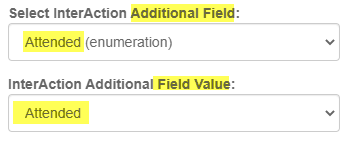
For the 'Attended' Additional Field, the field value must be 'Attended', rather than 'Yes'. Please see example below.
More information on this can be found here.
Tracking Attendance: It is only possible for Vuture to track (and write back activities for) attendees who register via a Vuture Form. Any users that register for the webinar directly through the webinar provider using a generic audience link, will not have an attendance activity written back to the crm. Their attendance will be recorded in the webinar provider's reports.
Once the ON24 Integration has been setup by your Account Manager, check out the "How To" instructions to get started on using Vuture with ON24.
