Keywords: list approval; before send; email list approved; sending statistics
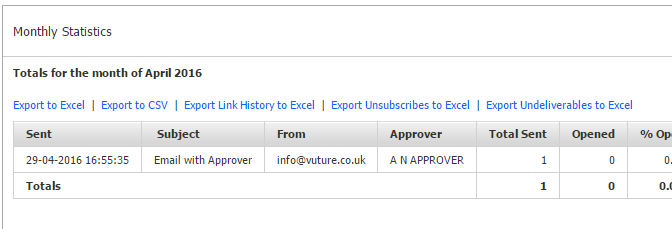
Email List Approval is optional functionality which prompts the sender of an email to enter the name of the person who approved the Email List that is being sent, to before sending the email. This information is recorded against the send and is displayed in the monthly sending stats.
Your Account Manager can switch this functionality on by enabling the system configuration "Admin.System.Emails.SendEmailListApproverRequired".
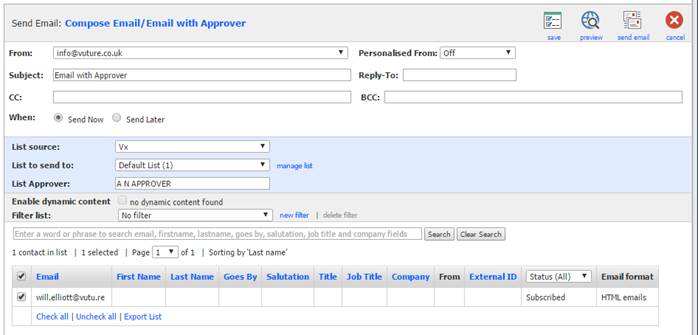
Once enabled an extra box is displayed on the email send screen called "List Approver". A value must be entered into this field before sending an email. The field has a maximum size of 50 characters. Typically you would enter the List Approver's full name here but the box is free text so any value can be entered here.
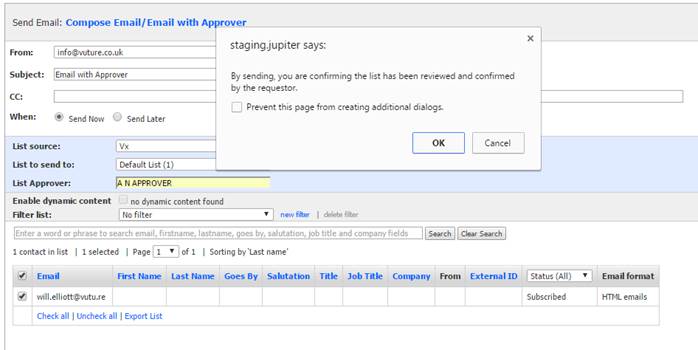
Once the user clicks "Send Email" a dialogue message appears which can be changed using the system configuration "Admin.System..Emails.SendEmailConfirmationMsg".
This defaults to "Are you sure you want to send this email?", but can be configured so for example the message might read: "By sending, you are confirming the list has been reviewed and confirmed by the requestor."
After pressing the "Send Email" and the "Ok/Confirm" button the email is sent as normal. The value of the "List Approver" field is displayed on the "Monthly Statistics" screen which can be accessed by clicking on the monthly folder for the email that was sent.