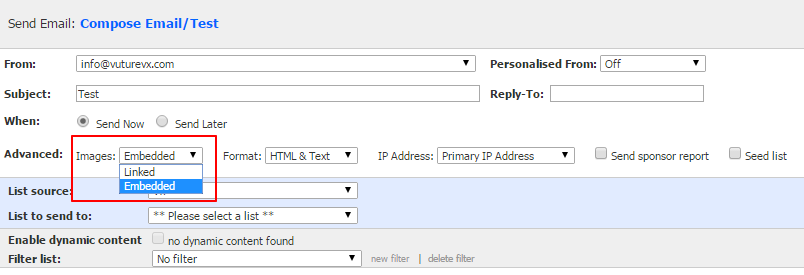
By default when an email is sent with images these are linked rather than embedded. This means that the images are not sent with the email. Instead there is a link to the image in the email HTML and the image is downloaded from the internet when the email is opened and the recipient has download images enabled.
Embedding images means that the images are sent with the email and do not have to be downloaded from the internet.
You can choose whether emails link or embed images. This can be set at a system level (which applies to all sends) or on an individual send basis.
The advantages and disadvantages of both methods are listed below.
Please contact your account manager or the support desk for more information, or if you wish to change your settings.
Linking Images
Linked images are not part of the email that is sent. The images are downloaded from the internet when the recipient opens the email and they have download images enabled in their email client.
Advantages
-
Email size is smaller (and therefore downloads faster)
-
Email is less likely to be marked as spam
Disadvantages
-
Images are downloaded when the email is opened but many email clients block image loading by default unless the recipient has changed this setting
-
If the recipient is not online the images will not be downloaded
-
Missing images can affect the way the email is presented in some email clients
Embedding Images
Advantages
-
Images are loaded when the email is opened even if the recipient has image blocking enabled
-
Images are displayed if the recipient is offline
Disadvantages
-
Images are included in the email making it a larger file which is slower to download
-
Some firewalls may strip attachments and therefore the images
-
Email opened statistics can be lower since these are generated from a linked tracking image (unless the recipient clicks on a link), and if the recipient sees that images are displayed in the email they are less likely to enable image loading which is required for the tracking image to load
Manage Image Link or Embed Settings
Default setting
The default setting is to link images in emails. To change the default to embed images, enable the system configuration setting "Admin.Settings.Emails.Embed Images" - contact Vuture Support or your Account Manager for assistance with this.
Allowing users to choose link or embed for each send
If you wish users to be able to choose between embedding and linking images for each send then enable the system configuration setting "Admin.Settings.Emails.Display Embed Images Option". Then for each role that you would like to have the option give them the feature "Admin.Roles.Emails.Embed Images Options" - contact Vuture Support or your Account Manager for assistance with this.
They will then get an additional option on the send screen: