Why?
Sometimes lawyers prefer that certain emails look as if they are coming from their email account rather than looking like a marketing email.
You can make this happen while still using Vuture’s functionality; being able to track engagement; manage unsubscribes and keep a record of these sends.
How do you this?
You can take a very plain template in Vuture, strip out most of the snippets and add text in the usual way, plus a “signature block” at the bottom for your personalised partner’s (sponsor’s) signature. Below is an example:
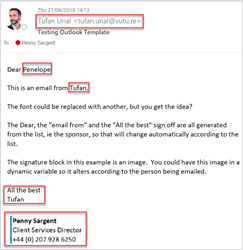
You can personalise the sections in red using your sponsored marketing list. In the above example Penny is sponsored by Tufan so it looks as if the email is coming from him. The signature block is an image. It could be one image for all, or you could put images in dynamic variables so each contact gets the standard signature block of their sponsor.
You’ll need to talk to your Account Manager about getting a plain, blank, template built for your use. Please note that you will still need to include all the legal disclaimers, even in these emails.
You will want to remove the image snippets from the top of the page – Outlook emails typically don’t have logo images – but leave in a text snippet or two for the body of the email, the sign off and an image snippet at the foot of the page for your signature block – if you choose to use an image at this point.
The Result?
The result is an email which behaves exactly like a Vuture email in your platform; it has all the typical Vuture functionality and reporting such as tracking open rates, but it looks like an Outlook email when it arrives in the contact’s inbox.
A Bonus
If you are having problems getting your standard Vuture emails through your clients’ firewalls it might be an idea occasionally to try this method as a change. Sometimes, heavily designed emails with coloured backgrounds, full of images can be treated as spam. If this is a problem a “lite” version of the email will have more chance of getting delivered.
