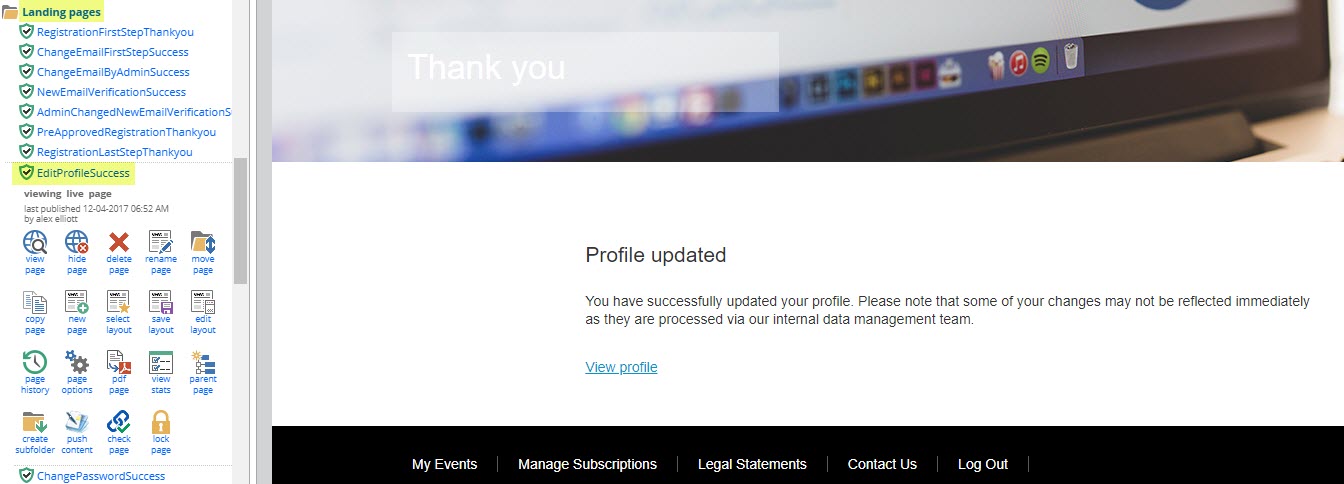
When an alumni updates their contact information in their Alumni Profile, this information will write back to InterAction. The alumni will then receive a thank you page, upon completing their updates.
However, if your organization has DCM rules in InterAction for the profile fields, your CRM Team will need to approve the ticket in InterAction, before the change is made available in the directory. This means those fields will not update immediately in the alumni client's profile. It is recommended that you amend the "Thank You" page to reflect your internal process to approve contact field changes. That way, the alumni is aware that their changes will not update immediately in their profile and will need to wait a certain period of time before those changes are reflected.
After you have approved the DCM ticket, the update will be made to the profile at the next Synchronization from InterAction. See the helpdesk page on Synchronization from IA if you need more information.
To edit this message, navigate into the back-end of your Alumni site. Then open the "Landing Pages" folder and click on the "EditProfileSuccess" landing page. This is the landing page the alumni will see, once they have made changes to their Alumni Profile. You can edit the message by clicking on the text to open the text editor. Don't forget to publish > publish now, to save out your changes.